¶ Monitoring and alerts
Every 5 minutes, each node measures the space used and free of each started volume and of each brick, the bricks online, the entries waiting for self-heal, the files in split-brain and the clients connected. The Usage tab shows the last measurement and the charts over 24 hours, 7 days or 31 days (period selector in the header). The measurements are kept 31 days.
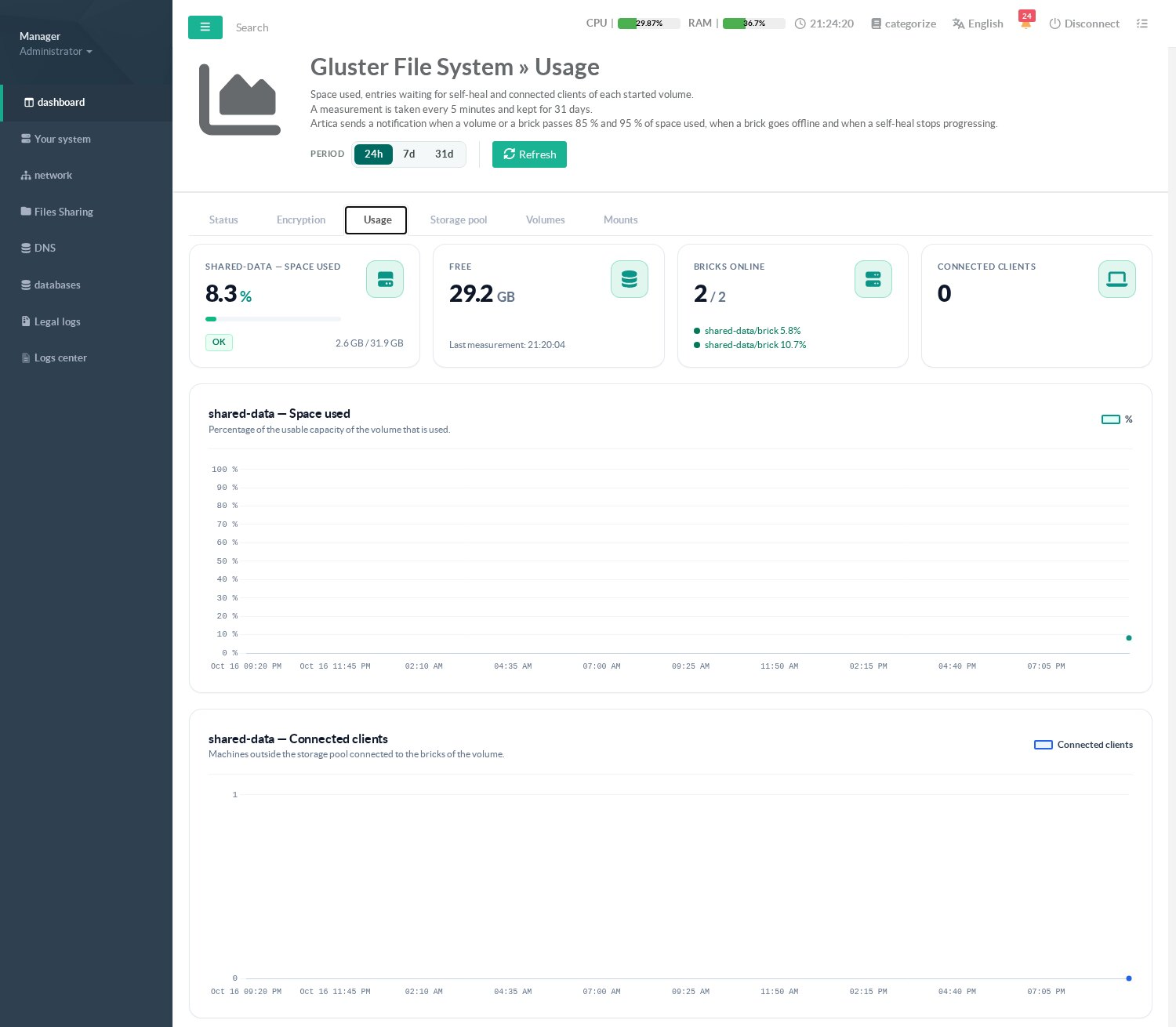
Artica sends a notification (system events, e-mail according to the notification settings, SIEM) when:
| Event | Severity | Cleared when |
|---|---|---|
| A volume or a brick passes 85 % of space used | Warning | back under 80 % |
| A volume or a brick passes 95 % of space used | Critical | back under 90 % |
| A brick is offline on two measurements in a row | Critical | the brick is back |
| The self-heal backlog does not decrease for one hour | Warning | no entry left |
| A file is in split-brain | Critical (also at night) | the split-brain is resolved |
On a pool, only one node sends the notifications of a volume, so that an event is not received once per node.
¶ Troubleshooting
| Symptom | What to check |
|---|---|
| Linking a node fails | GlusterFS enabled on that node, TCP 24007 reachable, and if its Artica firewall is on, the address of this node in its client networks. |
| A brick stays offline | Is the disk mounted (/media/...)? Every minute, Artica restarts a local brick of a started volume that is offline on two checks in a row, but never a brick whose disk is unmounted or which would land on the system disk. A notification is sent after two measurements. |
| A mount shows an error | The Last error column of the Mounts tab; the volume must be started and its volfile server reachable. The mount is retried automatically. |
| The self-heal does not progress | All bricks of the set online? The Self-heal tab shows the entries per brick; start a heal. |
| Split-brain notification | The Self-heal tab shows the bricks concerned; gluster volume heal <volume> info split-brain lists the files. Resolve each file with gluster volume heal <volume> split-brain latest-mtime <file> (or bigger-file / source-brick), then start a heal. |
Useful commands on a node: gluster pool list, gluster volume info, gluster volume status, gluster volume heal <volume> info. The logs are in /var/log/glusterfs/.
¶ Other pages of this guide
- Installation and activation
Requirements, installation, activation, firewall and client networks, backup, stopping and disabling GlusterFS on an Artica appliance. - Storage pool
Link Artica appliances into a GlusterFS storage pool, check their connection state and detach a node. - Volumes
Create a GlusterFS volume with the wizard, list volumes, change volume options and rebalance a volume after adding bricks. - Disks and bricks
Prepare XFS disks, add, remove and replace the bricks of a GlusterFS volume, and follow the self-heal. - Mounting volumes
Mount a GlusterFS volume on an Artica appliance with persistent mounts, backup volfile servers and mount options. - Encryption (TLS)
Encrypt GlusterFS management and data traffic with a pool certificate authority managed by Artica, and issue certificates for external clients. - Monitoring, alerts and troubleshooting
Usage charts, space, brick and self-heal alerts of GlusterFS volumes, and troubleshooting.