A web target turns an RDS Proxy session into one web application.
The user starts the usual Remote Desktop client, connects to the gateway and picks the application.
The page opens inside the Remote Desktop window, without address bar, tabs or menus.
¶ The problem it solves
Administration consoles, ERP screens and intranet tools are often web applications.
Opening them from the workstation means a direct network path from the workstation to the application.
It also means the browser of the workstation keeps the session cookies and the saved passwords.
With a web target, the browser runs on the bastion.
The workstation only receives images over RDP and sends the keyboard and the mouse.
The application only sees the bastion.
No Windows server is needed to host the browser.
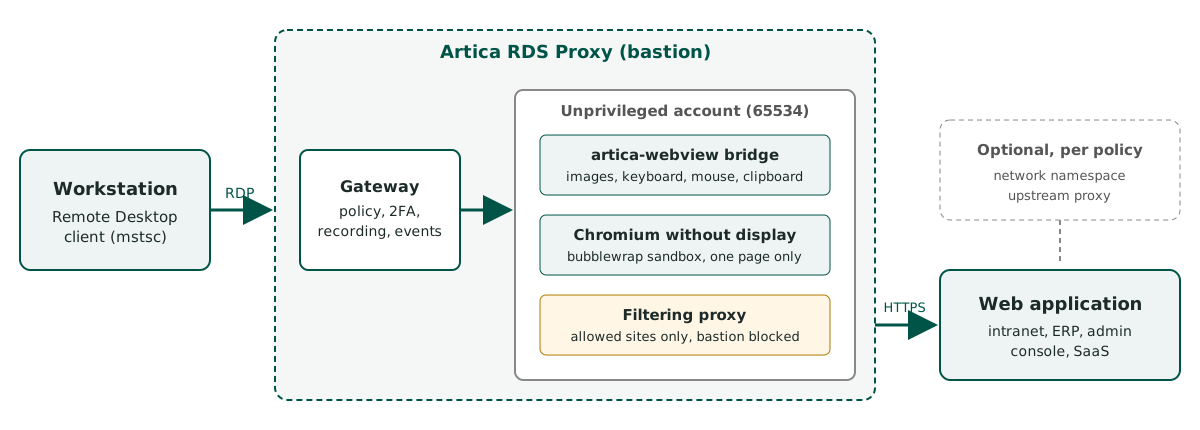
The browser runs on the bastion, in a sandbox, behind a filtering proxy.
¶ How it works
- The user opens a Remote Desktop connection to the Artica appliance.
- The gateway checks the account, the source network, the schedule and, when the policy asks for it, the second factor.
- The user picks a web target in the list of applications.
- The bastion starts a headless Chromium for this session only, in a bubblewrap sandbox, under an unprivileged account.
- The page of the application is drawn in the Remote Desktop window.
Only the parts of the screen that change are sent, and a scroll is sent as a scroll. - When the session ends, the browser and everything it wrote are destroyed.
A web target is a target like the others.
It goes through the same policies, the same second factor, the same video recording and the same access events.
¶ Benefits
- No path from the workstation to the application.
The application can stay in a network that only the bastion reaches. - Nothing to install.
The workstation needs only the Remote Desktop client.
No Windows server, no browser plug-in, no agent on the application. - Only the allowed sites.
The page can load content only from the sites listed on the target.
Every other navigation shows a blocked page. - The bastion protects itself.
The browser cannot reach the bastion, its local addresses or its loopback, even through a redirection. - Credentials stay in the vault.
The bastion can sign in to the application with an account the user never sees. - Controlled copy and paste.
Each direction is a right of the policy, and every copy and paste is counted in the events. - Full trace.
Visited pages, blocked pages, closed pop-ups, sign-ins, copies and pastes go to the access events and to the SIEM.
The session is recorded on video like an RDP session. - Per-policy network.
A policy can confine its browsers to a network namespace, or send their traffic to an upstream proxy.
A PAC file can choose the exit address by address. - The target is always named.
A band at the top of the session shows the target and the host of the page.
¶ What the user can and cannot do
| Action | Behavior |
|---|---|
| Browse inside the application | Allowed, with the keyboard and the mouse, accents and dead keys included. |
| Open a link to another site | A site outside the allowed list shows Page blocked by the access policy. |
| Open a new window or a new tab | The window is closed at once and the event web_popup is written. |
| Download a file | Refused. |
| Upload a file | Refused. The file chooser never opens. |
| Copy and paste text | Allowed only when the policy grants it, one right per direction. Details. |
| Not available. |
¶ Requirements
| Component | Version | Brings |
|---|---|---|
| RDS Proxy engine (ReDemPtion) | 12.3.22 or later | Web targets, network namespace and upstream proxy (capabilities web1, webnet1) |
| 12.3.23 or later | Automatic sign-in (webauth1) |
|
| 12.3.24 or later | Copy and paste (webclip1) |
|
| 12.3.25 or later | PAC files and hiding the target name band (webpac1) |
|
| RDS Proxy authenticator (authhook) | 1.7.0 / 1.8.0 / 1.8.1 / 1.9.5 | Same four steps |
| Browser bridge (artica-webview) | 0.3.3 or later | PAC files and the target name band |
| chromium-headless-shell and bubblewrap | Debian packages | Installed by Artica |
Artica installs chromium-headless-shell and bubblewrap with apt when the RDS Proxy is installed.
If one of them is missing, it tries again every 6 hours.
The installation needs 600 MB free on /usr.
The WebView tab shows each component, its version and what is missing.
¶ Limits
- One application per target.
A user who needs two applications gets two targets. - The browser has no display, camera or microphone of its own.
WebGL and 3D are disabled. - Downloads, uploads and printing are refused.
- Copy and paste is text only.
The right-click menu of the page cannot paste: use Ctrl+V or Shift+Insert. - The session limit of the RDS Proxy license applies to web sessions too.
¶ Documentation pages
| Page | Content |
|---|---|
| Create a web target | Application address, allowed sites, policy, what the user sees |
| Copy and paste | The two rights of the policy, how the user copies and pastes |
| Automatic sign-in | Sign in to the application with an account of the vault |
| Network confinement and upstream proxies | Network namespace and upstream proxy per policy |
| PAC files | Route each address of a web session through a declared proxy or directly, test a PAC file |
| Target name banner | The band that names the target at the top of each web session |
| Trusted certificates | Self-signed and internal certificates of the applications |
| The WebView tab | Components, versions and browser parameters |
| Events and troubleshooting | Events written by web sessions, refusals and their causes |