Every web session goes through a filtering proxy that runs for this session only.
It lets through the allowed sites of the target and blocks the bastion itself.
A policy can add two network settings for its web targets: a network namespace, and a route.
The route is a direct exit, one upstream proxy or a PAC file.
¶ What the filtering proxy always refuses
- The loopback, unspecified, link-local, multicast and broadcast addresses.
- Every address of the bastion, even when a public name resolves to it.
- Every host that is not in the allowed sites of the target.
The proxy resolves the name, checks the address, then connects to that address.
A DNS answer that changes between the check and the connection cannot reach a refused address.
¶ Network namespace
A policy can start the browsers of its web sessions inside an Artica network namespace.
The browser then sees only the network card of that namespace and uses its DNS servers.
Use it to reach applications of a DMZ or of a customer network that the bastion itself must not route to.
Create the namespace first with the network namespaces feature of Artica, in the Network menu.
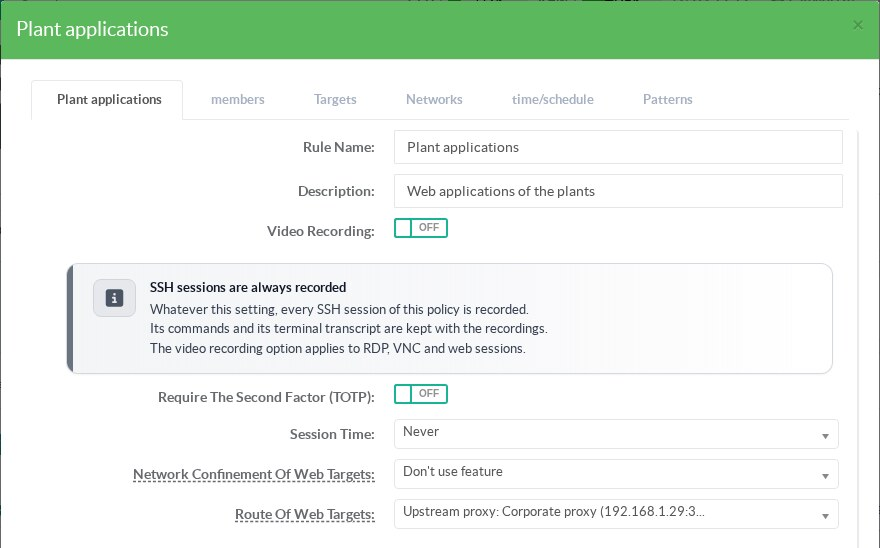
Then choose it in the policy, field Network Confinement Of Web Targets.
If the namespace does not exist when the user connects, the session is refused with the reason
web_netns_unavailable.
The browser never falls back to the network of the bastion.
¶ Upstream proxy
A policy can send the web traffic of its sessions to an upstream proxy.
The filtering proxy of the session applies the allowed sites first, then goes through the upstream proxy.
An HTTPS site is reached with HTTP CONNECT.
A plain HTTP site is reached with a request in absolute form (GET http://host/path), because many proxies refuse CONNECT outside the SSL ports.
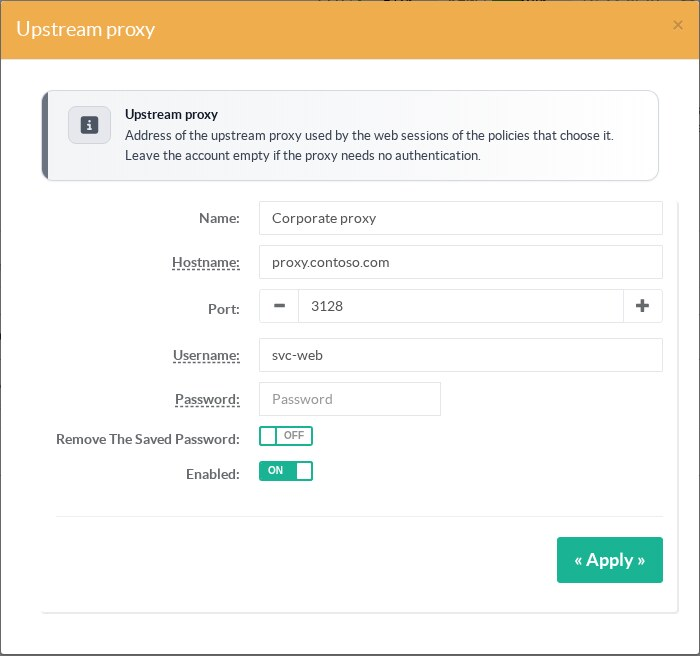
When an account is set, it authenticates with Basic.
¶ Create the upstream proxy
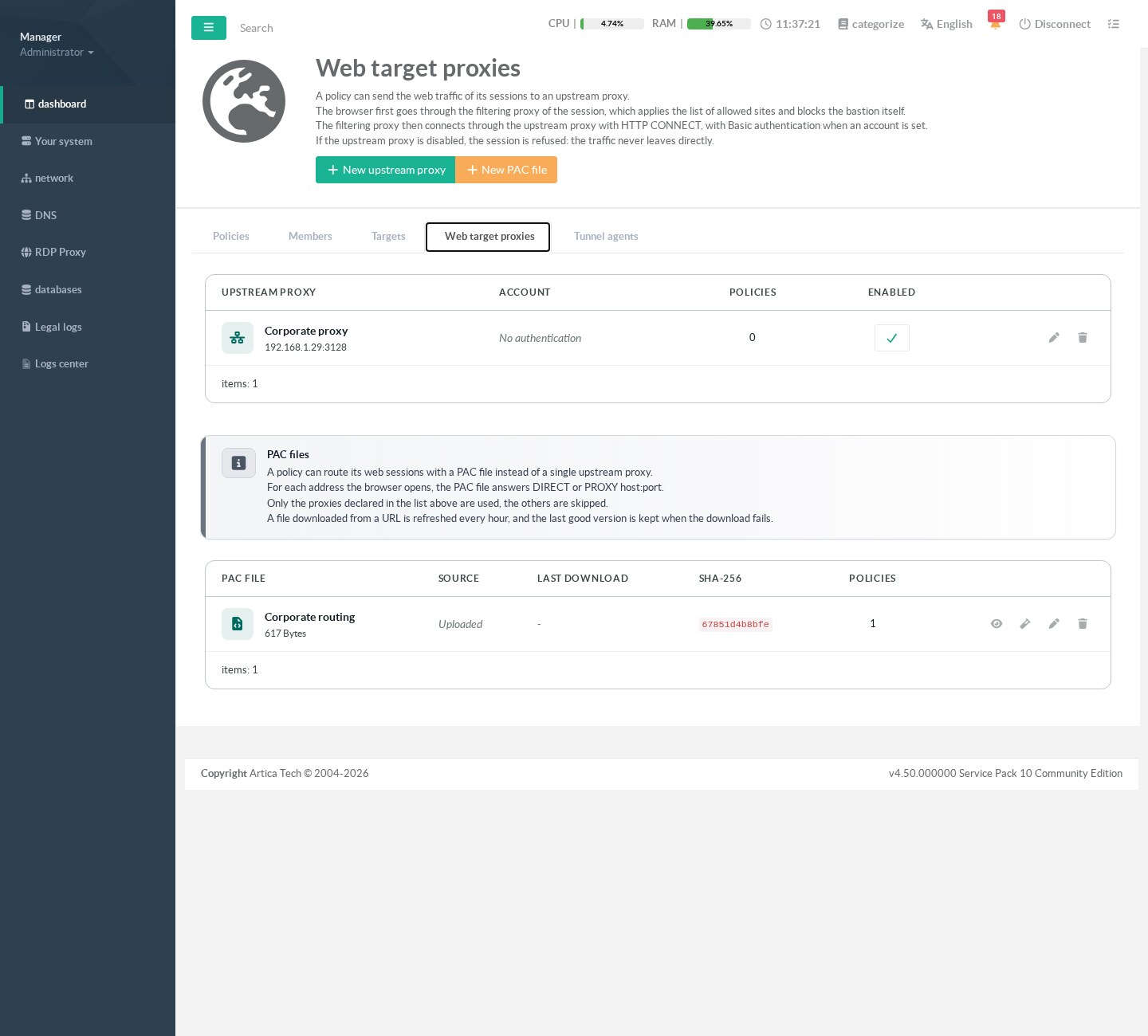
Open RDP Proxy > Web target proxies and click New upstream proxy.
Then choose the proxy in the policy, field Route Of Web Targets.
The same list offers None (direct connection), the upstream proxies and the PAC files.
A policy uses one route only.
If the upstream proxy is disabled, or its password cannot be decrypted, the session is refused with the reason
web_proxy_unavailable.
The traffic never leaves directly.
¶ Delete or disable an upstream proxy
- A proxy chosen as the route of a policy cannot be deleted.
The bastion answersproxy_in_use.
Choose another route in that policy first. - A proxy cited by the PAC file of a policy cannot be deleted either.
The bastion answersproxy_in_pac.
It looks forhost:portof the proxy in the text of each PAC file used by a policy, comments included.
Remove the proxy from that PAC file first, or detach the PAC file from its policies. - The Policies column counts only the policies that chose the proxy as their route.
A proxy used only through a PAC file shows 0. - A disabled proxy stays in the list.
A policy that chose it refuses its sessions.
A PAC file that names it skips it.
¶ Route with a PAC file
When one application needs several exits, choose a PAC file instead of a proxy.
The PAC file picks a direct exit or one of the declared proxies for each address.
See PAC files for web targets.
¶ Requirements
The namespace and the upstream proxy need the RDS Proxy engine 12.3.22 and the authenticator 1.7.0.
A PAC file needs the RDS Proxy engine 12.3.25, artica-webview 0.3.3 and the authenticator 1.9.5.
The WebView tab lists the policies that use a namespace or an upstream proxy.
¶ REST API
| Method and path | Role |
|---|---|
GET /rdpproxy/webproxies | List the upstream proxies. The password is never returned, only password_set. |
POST /rdpproxy/webproxies | Create a proxy with name, host, port, username, password and enabled.Without enabled, the proxy is enabled. |
GET /rdpproxy/webproxies/{id} | Read one proxy. |
PUT /rdpproxy/webproxies/{id} | Update a proxy. Without enabled in the body, the state stays as it is.A script that changes only the host does not turn a disabled proxy back on. Without password, or with an empty one, the saved password is kept.password_clear=1 removes it. |
DELETE /rdpproxy/webproxies/{id} | Delete a proxy. Refused with proxy_in_use while a policy chose it as its route.Refused with proxy_in_pac while the PAC file of a policy cites its host:port. |
PUT /rdpproxy/policies/{id} | web_netns (namespace id, 0 = none), web_proxy (proxy id, 0 = direct), web_pac (PAC file id, 0 = none) and web_pac_fail_direct.A field left out is unchanged. A policy cannot keep both a proxy and a PAC file. Set the other one to 0 in the same request, or the bastion answers proxy_and_pac_exclusive. |
The PAC routes are listed in PAC files for web targets.