A policy can route the web traffic of its sessions with a PAC file.
The PAC file picks the exit of each address the page opens: a direct connection or one of your upstream proxies.
Use it when one application needs several exits.
A typical case: an internal application loads scripts from a public CDN, or sends the user to an external identity provider during the sign-in.
The application itself must be reached directly.
The external sites must go through the corporate proxy.
A single upstream proxy per policy cannot give both exits, and a PAC file can.
¶ How the bastion applies the PAC file
The browser of the session never reads the PAC file.
The filtering proxy of the session evaluates it, so the PAC file cannot bypass the allowed sites or the protection of the bastion.
- The page asks for an address.
- The filtering proxy checks the allowed sites of the target.
An address outside the list is blocked, whatever the PAC file says. - The filtering proxy calls
FindProxyForURL(url, host).
For an HTTPS address, the URL holds only the scheme and the host, without path or query, like in Chromium. - It tries the answers in their order:
DIRECT, orPROXY host:port.
An answer such asPROXY a:8080; PROXY b:3128; DIRECTgives three attempts. - A
DIRECTanswer still goes through the refusals of the filtering proxy.
The addresses of the bastion and its local addresses stay out of reach.
¶ Only declared proxies are used
A PROXY host:port answer is followed only when host:port matches an enabled proxy of the Web target proxies list.
That entry also gives the account sent to the proxy.
Any other proxy is skipped and the next answer is tried.
The bridge logs the skipped proxy once per session.
No credential is ever sent to a proxy you did not declare.
SOCKS, SOCKS4, SOCKS5 and HTTPS host:port answers are skipped the same way.
¶ When the PAC file fails
The PAC file fails when it raises an error, runs too long or returns no usable answer.
An answer that names only undeclared or disabled proxies counts as no usable answer.
- By default, the request is refused.
The traffic never leaves directly because of an error. - With the policy option Direct Exit If The PAC File Fails, the request leaves directly instead.
¶ Limits of the evaluation
| Limit | Value |
|---|---|
| Size of the PAC file | 256 KiB, UTF-8 text |
Time for one call of FindProxyForURL | 100 ms. A loop is stopped and counts as an error. |
| Length of the answer | 1 KiB |
| Cache of the answers | 60 seconds per URL and host |
| Memory | The PAC file runs in a separate process with a memory limit. A script that allocates without end kills only that process. |
The standard PAC functions are available: isPlainHostName, dnsDomainIs, localHostOrDomainIs, isResolvable, isInNet, dnsResolve, myIpAddress, dnsDomainLevels, shExpMatch, weekdayRange, dateRange, timeRange.dnsResolve and isResolvable use the DNS of the session, so the network namespace of the policy when it has one.
¶ Requirements
| Component | Version | How to check |
|---|---|---|
| RDS Proxy engine (ReDemPtion) | 12.3.25 or later | Capability webpac1 |
| Browser bridge (artica-webview) | 0.3.3 or later | artica-webview -print-config shows "pac_witness":"webpac1" |
| RDS Proxy authenticator (authhook) | 1.9.5 or later | WebView tab |
When one of them is older, the policy window shows a warning as soon as you choose a PAC file.
The sessions of that policy are then refused with the reason web_engine_outdated.
They never leave directly.
¶ 1. Declare the upstream proxies
Declare first every proxy the PAC file can name, in RDP Proxy > Web target proxies.
The host and the port must be the ones written in the PAC file.
See Upstream proxy.
¶ 2. Add the PAC file
The PAC files section is below the upstream proxies, in the same tab.
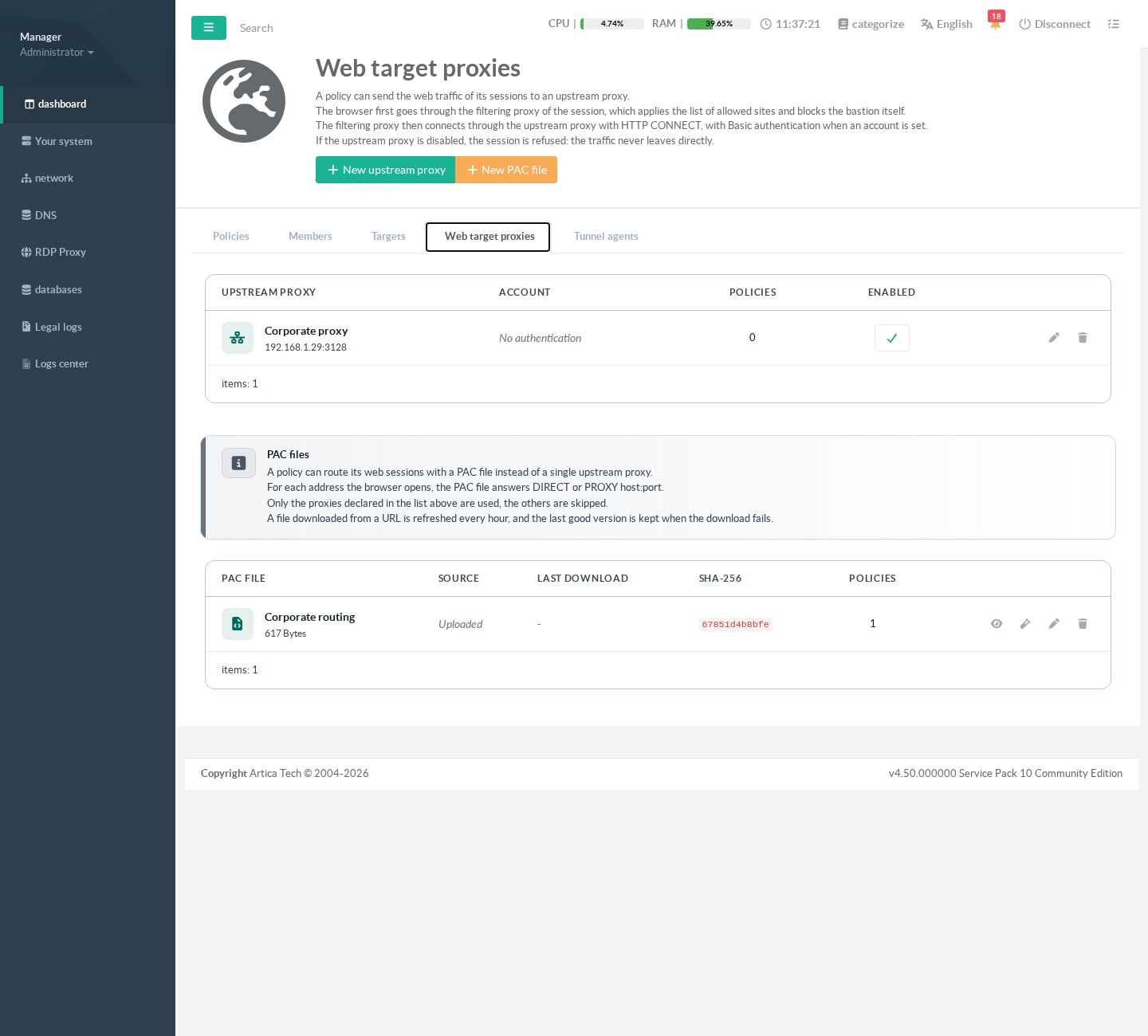
It names the Corporate proxy.
Click New PAC file.
Give a name, then choose the source.
¶ Upload a file
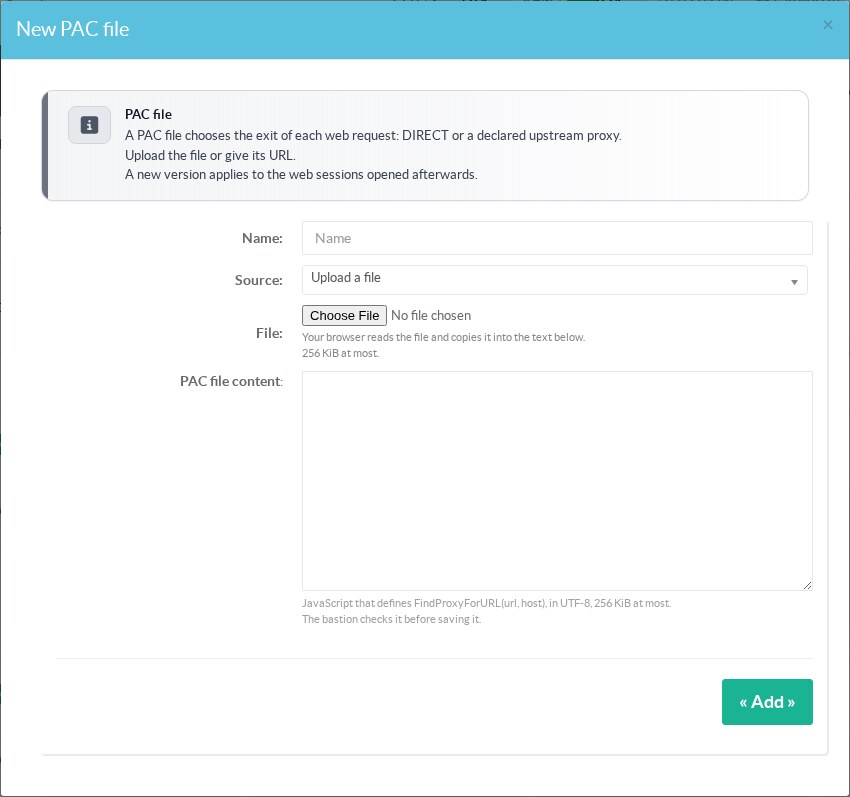
The browser reads the file and copies it into the text area.
The file must define FindProxyForURL(url, host), in UTF-8, 256 KiB at most.
The bastion runs it once before saving it.
A file with a syntax error, or without FindProxyForURL, is refused.
¶ Download from a URL
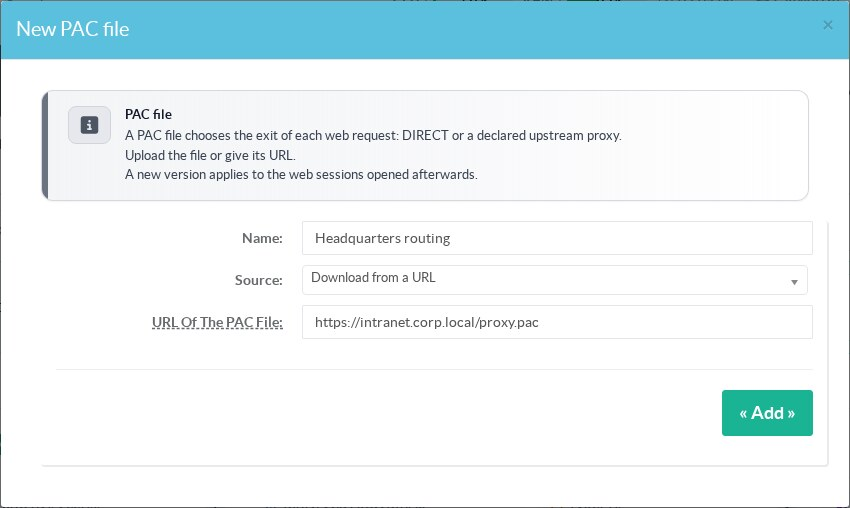
- The URL starts with
http://orhttps://. - A URL with a user name or a password (
user:password@) is refused.
Publish the file without authentication. - The download goes through the outgoing proxy of the appliance when one is set.
It stops after 5 seconds or 256 KiB. - The certificate of the server is verified.
With an internal certificate authority, add it to the trust store of the appliance first. - At most 5 redirections are followed.
A redirection from HTTPS to HTTP is refused. - If the URL cannot be reached when you save, nothing is saved.
- If a later download fails, the bastion keeps the last good version.
The list shows Last error under the source.
A new version applies to the web sessions opened afterwards.
Open sessions keep the version they started with.
¶ 3. Test the PAC file
Click the test button of the PAC file, type a URL and click Launch test.
The bastion runs FindProxyForURL and opens no connection.
Leave the host empty to use the host of the URL.
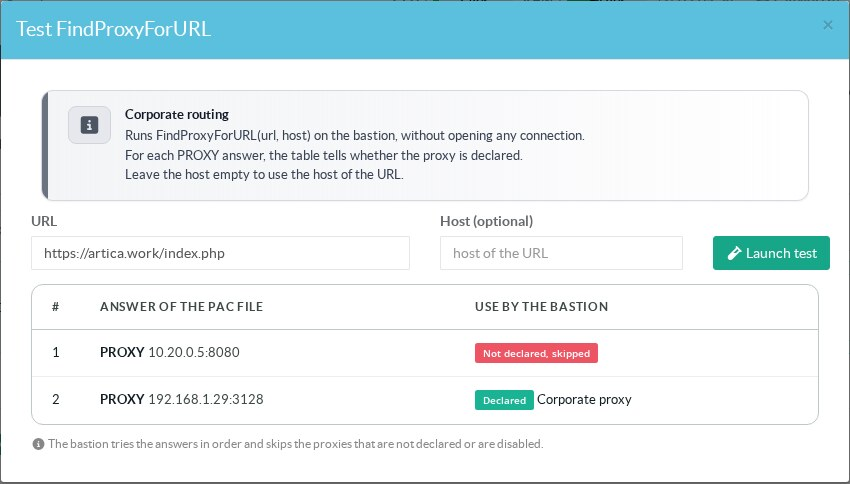
The session will use Corporate proxy.
| Use by the bastion | Meaning |
|---|---|
| Direct exit | The request leaves from the bastion, or from the namespace of the policy. |
| Declared | The proxy is in the list and enabled. Its name follows. |
| Declared but disabled, skipped | Enable the proxy, or remove it from the PAC file. |
| Not declared, skipped | Add the proxy to the list with the same host and port, or remove it from the PAC file. |
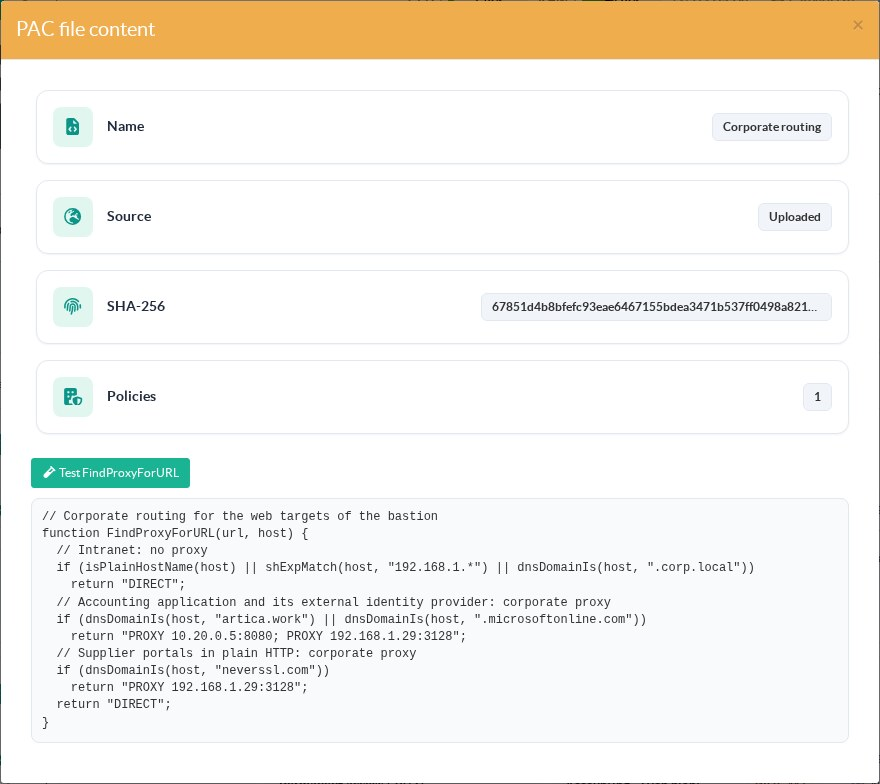
The eye button shows the content of the file, its SHA-256 and the number of policies that use it.
¶ 4. Choose the PAC file in the policy
Open the policy.
In Route Of Web Targets, choose the PAC file.
This list holds three kinds of choice: None (direct connection), an upstream proxy or a PAC file.
A policy uses one of them, never a proxy and a PAC file together.
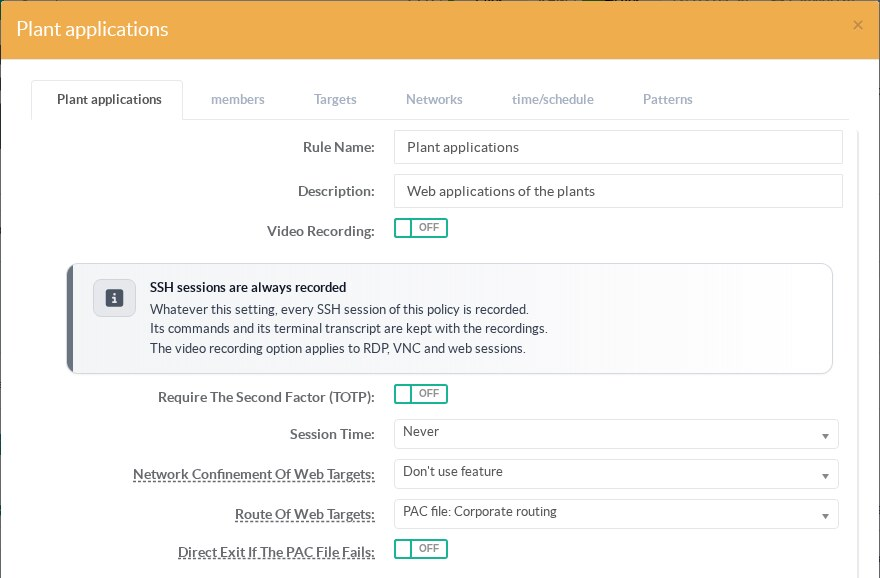
Direct Exit If The PAC File Fails appears only when a PAC file is chosen.
Leave it off unless a direct exit is acceptable for this policy.
A PAC file whose last download failed stays in the list with the mark failing.
The policy keeps using its last good version.
¶ Example
function FindProxyForURL(url, host) {
  // Intranet: no proxy
  if (isPlainHostName(host) || shExpMatch(host, "192.168.1.*") || dnsDomainIs(host, ".corp.local"))
    return "DIRECT";
  // Accounting application and its external identity provider: corporate proxy
  if (dnsDomainIs(host, "artica.work") || dnsDomainIs(host, ".microsoftonline.com"))
    return "PROXY 10.20.0.5:8080; PROXY 192.168.1.29:3128";
  // Supplier portals in plain HTTP: corporate proxy
  if (dnsDomainIs(host, "neverssl.com"))
    return "PROXY 192.168.1.29:3128";
  return "DIRECT";
}Every host used here must also be in the allowed sites of the target.
The PAC file only chooses the exit of a site the target already allows.
¶ Check the targets
The Status column of the Targets tab evaluates the PAC file of the policy for each web target.
It then tries the chosen exit like a session would.
See Read the status column.
¶ Delete a PAC file
A PAC file used by a policy cannot be deleted.
The bastion answers pac_in_use.
Choose another route in these policies first.
While a policy uses this PAC file, the upstream proxies it cites cannot be deleted.
The bastion answers proxy_in_pac.
¶ Refused sessions
| Reason | Cause | What to do |
|---|---|---|
web_engine_outdated | The engine or the bridge does not have the webpac1 capability. | Update the RDS Proxy engine to 12.3.25 and artica-webview to 0.3.3. |
web_pac_unavailable | The PAC file of the policy is missing, empty or larger than 256 KiB. Or the policy has both a proxy and a PAC file. | Open the policy and choose the route again. Check the PAC file in the list. |
A request refused by the PAC file does not close the session.
Only that request fails.
See also Events and troubleshooting.
¶ REST API
| Method and path | Role |
|---|---|
GET /rdpproxy/web-pac | List the PAC files, without their content. |
POST /rdpproxy/web-pac | Create a PAC file with name and content, content_base64 or source_url.With id, replace it. |
GET /rdpproxy/web-pac/{id} | Read one PAC file with its content. |
DELETE /rdpproxy/web-pac/{id} | Delete a PAC file. Refused with pac_in_use while a policy uses it. |
POST /rdpproxy/web-pac/{id}/test | Evaluate the PAC file on url (and host) without any connection. |
PUT /rdpproxy/policies/{id} | web_pac (PAC file id, 0 = none) and web_pac_fail_direct (0 or 1). |
Creating, replacing and deleting a PAC file are written to the security audit trail.