Firewall rules only apply to the network interfaces that are linked to the firewall.
This page, Your Firewall › Parameters, is where you link interfaces, choose what happens to traffic that no rule matches, and set the global logging options.
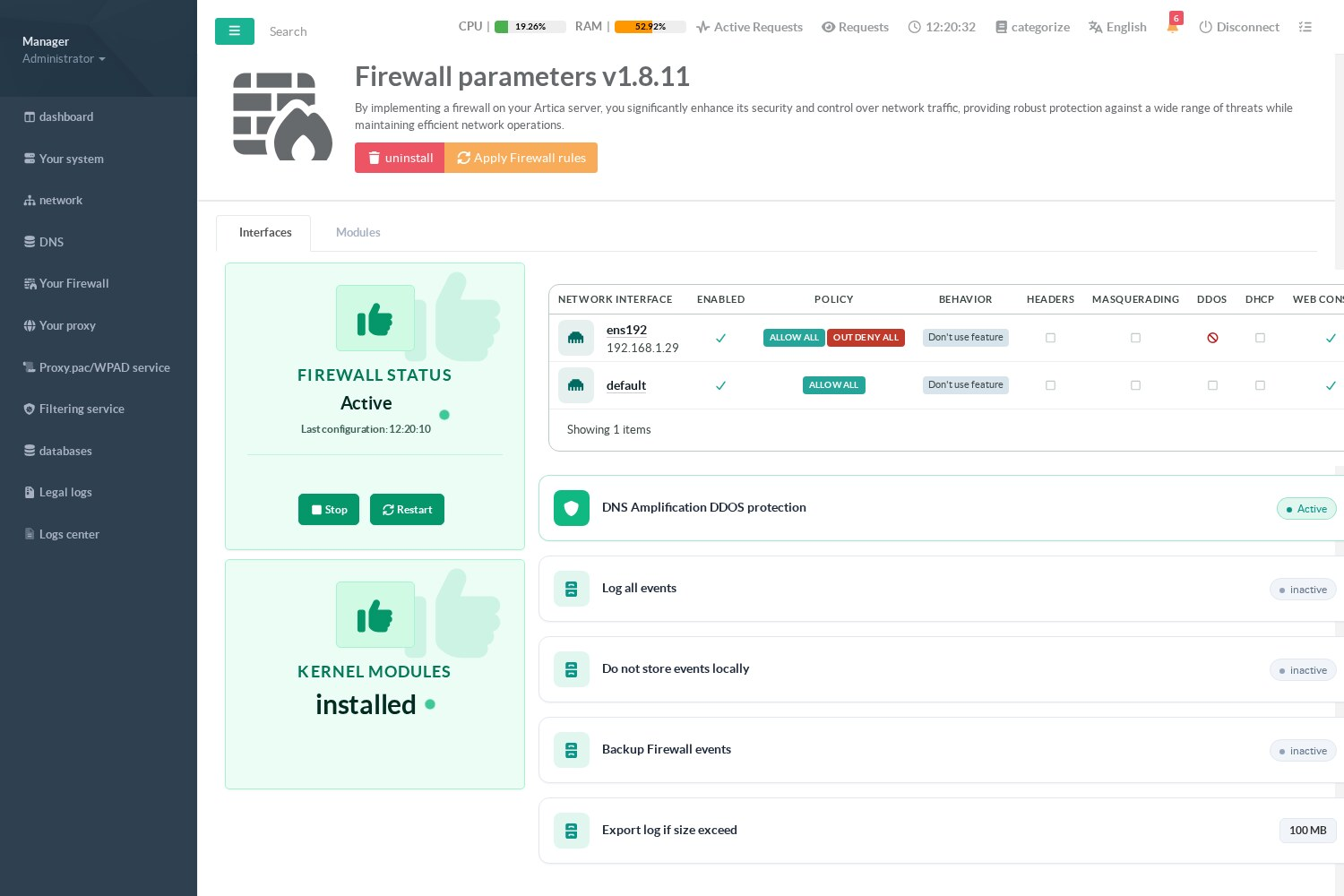
¶ Status and buttons
- Firewall status shows whether the firewall is active and when the rules were last applied.
- Apply Firewall rules rebuilds the firewall immediately. You rarely need it: every change is applied automatically a few seconds after you save it (see How the firewall applies your rules).
- Stop removes all the firewall rules; Restart rebuilds them.
- uninstall disables the feature (your rules stay in the database).
¶ Link an interface to the firewall
The table lists the network interfaces of the appliance, plus a default line.
- An interface whose Enabled column is checked has its own firewall chain: its rules are active.
- An interface that is not linked follows the default line. On a new installation that line allows everything.
Click the name of an interface to open its settings:
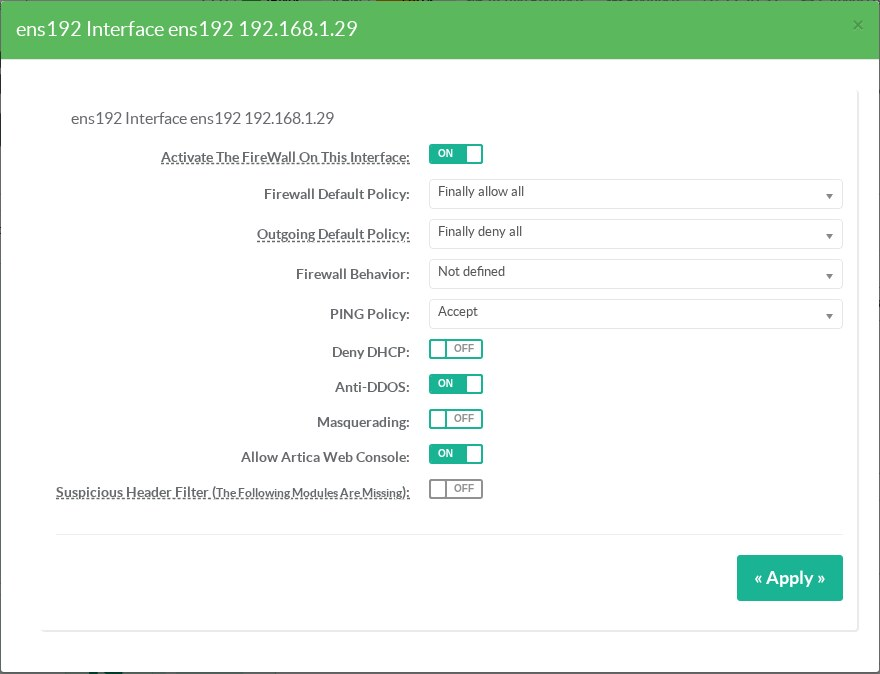
| Setting | Effect |
|---|---|
| Activate the firewall on this interface | Links the interface to the firewall. Until it is checked, the rules written for this interface are shown in the rules table with the label This network interface is excluded from the firewall and are not applied. |
| Firewall default policy | What happens to incoming traffic that no rule matched: Finally allow all accepts it (a black-list approach: you write rules for what must be blocked); Finally deny all rejects it (a white-list approach: you write rules for what must be allowed). Rejected packets are logged with the prefix ARTICA:REJECT:. |
| Outgoing default policy | What happens to new connections leaving the interface that no outgoing rule accepted: Finally allow all (default) lets them out: outgoing rules can only block or log; Finally deny all rejects them: only what your outgoing rules accept can leave. Replies to connections already established are never affected, so your Web console and SSH sessions keep working. The interfaces table shows OUT DENY ALL next to the incoming policy. |
| Firewall behavior | Not defined: no extra rule. Act as LAN: traffic from the trusted networks is accepted on this interface before your rules. Act as WAN: adds the Internet-facing protections — packets in an invalid state are dropped, port scans and SYN floods are rate-limited and dropped, and the interface kernel settings are hardened. |
| PING policy | Accept, Accept from trusted networks only or Deny ICMP echo requests. |
| Deny DHCP | Drops DHCP traffic in both directions on this interface (and when it is forwarded). Use it on an interface connected to a network where Artica must not answer or relay DHCP. |
| Anti-DDOS | Drops malformed and impossible packets and limits the new connections of each source on this interface. See DDoS protection. |
| Masquerading | Hides every network routed through this interface behind its address. For finer control (per source network, exclusions), use masquerade rules instead. |
| Allow Artica Web Console | Always accepts the Web console port on this interface, whatever the policy. Keep it checked on the interface you administer the appliance from when the policy is Finally deny all. |
| Suspicious header filter | Drops IPv4 packets carrying source-routing or timestamp options. Requires the firewall extension modules; the label says so when they are missing. |
Click Apply: the interface is rebuilt a few seconds later.
Before switching an interface to "Finally deny all", create the rules that keep your access open (Web console, SSH) or check Allow Artica Web Console. The appliance itself (loopback) and the Artica service ports used between Artica servers are always allowed.
Before switching the outgoing policy to "Finally deny all", create outgoing rules (Outgoing Rule checked, action Accept) for everything the appliance needs: DNS (dns), time (ntp), Artica updates and license checks (http, https), mail notifications (smtp), and the services that this interface publishes or relays. Check the Top tab of the events: the most rejected ports show what is still missing.
¶ In which order are the rules of an interface evaluated?
For incoming traffic on a linked interface, Artica evaluates, in this order:
- the protection modules common to all interfaces (anti-flood, trusted networks, CrowdSec, black lists, DecisionIP… see the order of protection rules);
- the proxy anti-flood and SMTP black lists of the interface;
- replies to connections already established (accepted);
- the Web console and DHCP exceptions of the interface;
- the behavior rules (LAN or WAN);
- your rules, in their order;
- the default policy.
¶ Global options
| Option | Effect |
|---|---|
| DNS Amplification DDOS protection | Rate-limits, per /24 source network, the DNS queries coming from networks that are not trusted (ANY queries, root queries, global rate). See DDoS protection. |
| Log all events | Logs every packet accepted or rejected by a rule or a policy, not only the rules that have Log All Events enabled. Useful while you build your rules; leave it off in production, it is verbose. |
| Do not store events locally | Firewall events are only forwarded (syslog, SIEM) and not written to the local log. |
| Backup Firewall events / Export log if size exceed | Archive the firewall log when it reaches the given size. |
¶ Unauthorized transit traffic
When Artica routes traffic between two of its interfaces (gateway mode), the option Unauthorized transit traffic decides what happens to traffic that no interface connector allows:
- Accept: the traffic crosses the appliance without filtering. This is the historical behavior, kept on appliances that were already configured.
- Reject: the traffic is rejected and logged (it appears as Transit in the events). This is the value of a new installation.
Even in Reject mode, replies to established connections, services published by a destination NAT and WireGuard tunnels are always allowed. To allow another flow, create a connector between the two interfaces with its rules.
The interface connectors page shows a banner recalling the current mode. Switching to Reject is a firewall change: it must be confirmed within the delay, otherwise the appliance goes back to Accept by itself — a forgotten flow cannot cut your network for good.
¶ Automatic blocking
The section Automatic blocking bans for a while the sources whose packets to the appliance are rejected too often. It is disabled by default. See Automatic blocking.
¶ IPv6
The interface policies apply to IPv6 as well when IPv6 filtering is enabled. See IPv6 filtering.
¶ Modules
The Modules tab lists the kernel modules of the appliance, with their state (loaded, installed but not loaded, missing), their aliases and their dependencies. It tells you, for example, whether the modules needed by GeoIP filtering (xt_geoip), deep packet inspection (xt_ndpi) or bandwidth limits (xt_ratelimit) are available for your kernel.
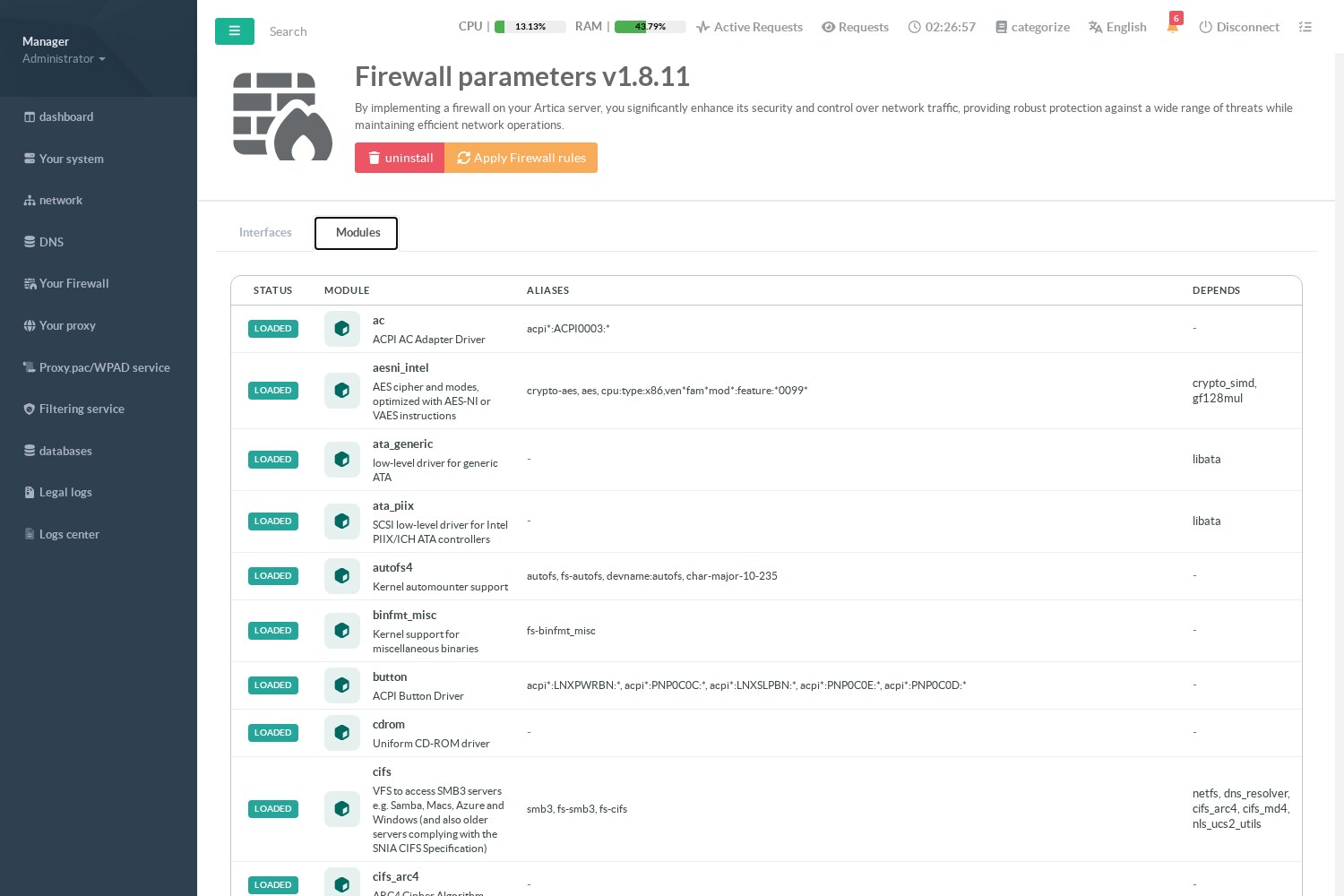
The list is refreshed by the Artica service at most every 10 minutes.