A connector links two network interfaces of Artica to route traffic from one network to the other, with its own default policy, optional masquerading and dedicated firewall rules. It turns Artica into a router between those two networks.
Typically, the source interface is your local network and the destination interface is your Internet connection.
¶ Create a connector
Go to Your Firewall › Interfaces connectors and click New Connector:
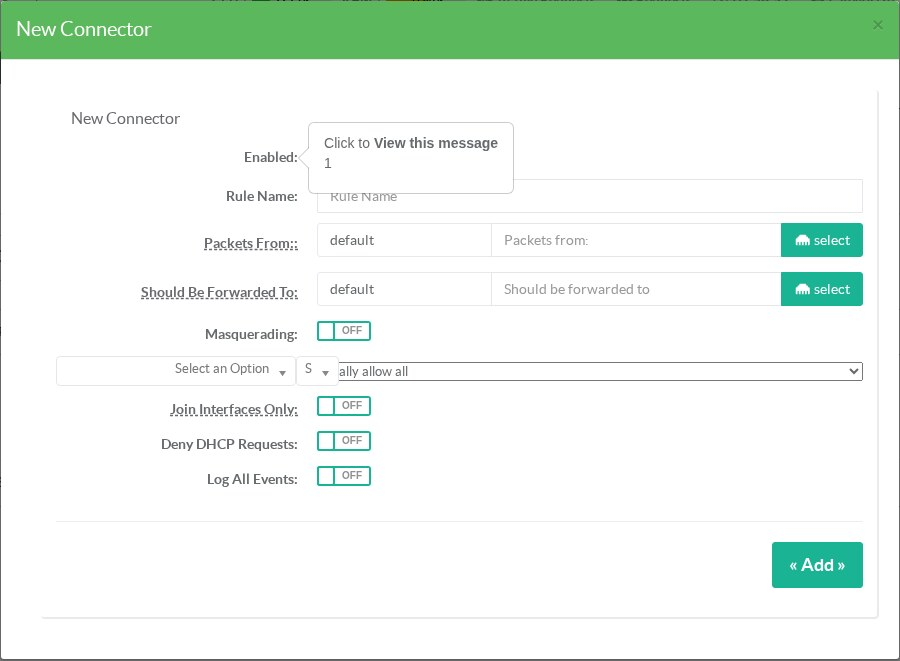
| Field | Meaning |
|---|---|
| Packets From | The interface receiving the packets (the local network). |
| Should Be Forwarded To | The interface the packets leave through (the Internet or another network). |
| Masquerading | Translates the source address of the forwarded packets into the address of the destination interface, and translates the replies back. Needed when the next router does not know the route back to your local network. |
| Policy | What happens to forwarded traffic that no rule of the connector matches. Finally allow all: write rules for what must be blocked. Finally deny all: write rules for what must be allowed. |
| Join Interfaces Only | Only links the two interfaces: no default rule is created and no rule can be added to the connector. |
| Deny DHCP Requests | Blocks DHCP traffic across the connector, so that devices of one network do not get an address from a DHCP server of the other. |
| Log All Events | Logs the packets crossing the connector in the firewall events. |
Once the connector is created, its rules and its packet counters appear in the rules table, and the masquerading it imposes is shown on the Masquerade page.
¶ Restrict the source networks
A connector can be limited to some source networks: only their traffic is forwarded. Open the connector and add the networks in its sources tab.
¶ Troubleshooting
- Nothing crosses the connector: check that IP forwarding is enabled on the appliance and that the policy or a rule allows the traffic.
- Replies never come back: enable Masquerading, or add on the next router a route to your local network through Artica.