Network address translation (NAT) changes the destination or the source address of packets crossing Artica.
The best-known use is port forwarding: a connection reaching the public address of Artica on port 443 is sent to a web server of your internal network.
¶ How a NAT works in Artica
A NAT is built in two steps:
- The NAT entry (Your Firewall › N.A.T) says where the traffic goes: its type, the interface, the target address and port.
- One or more firewall rules say which traffic uses it: in the rules table, the NAT entry appears in the Network Interface list (for example
DNAT:3); the service of the rule gives the incoming port, its objects restrict the sources.
This separation lets one NAT entry serve several rules (several ports, several source networks) and lets you see each rule's packet counters.
¶ NAT types
| Type | Effect | Typical use |
|---|---|---|
| Destination NAT | New connections arriving on the interface and matching the rules are sent to the target address (and port). | Publish an internal server: HTTPS, RDP, mail. |
| Source NAT | New connections leaving through the interface get the target address as source address (and port, if given). Rules with the action Accept apply the translation; rules with another action define exceptions. Without any rule, all new traffic leaving the interface is translated. |
Make a network leave the Internet with a specific public address. |
| Redirect to the node | Matching connections are redirected to a port of Artica itself. | Send a port to a local service listening on another port. |
| Route packets to a node | Matching packets are routed through the target address instead of the default gateway (traffic from the target itself is not rerouted). Nothing happens until a rule uses the entry. | Send some flows through a second router or a security appliance. |
¶ Create a port forwarding
¶ 1. The NAT entry
Go to Your Firewall › N.A.T and click New Rule:
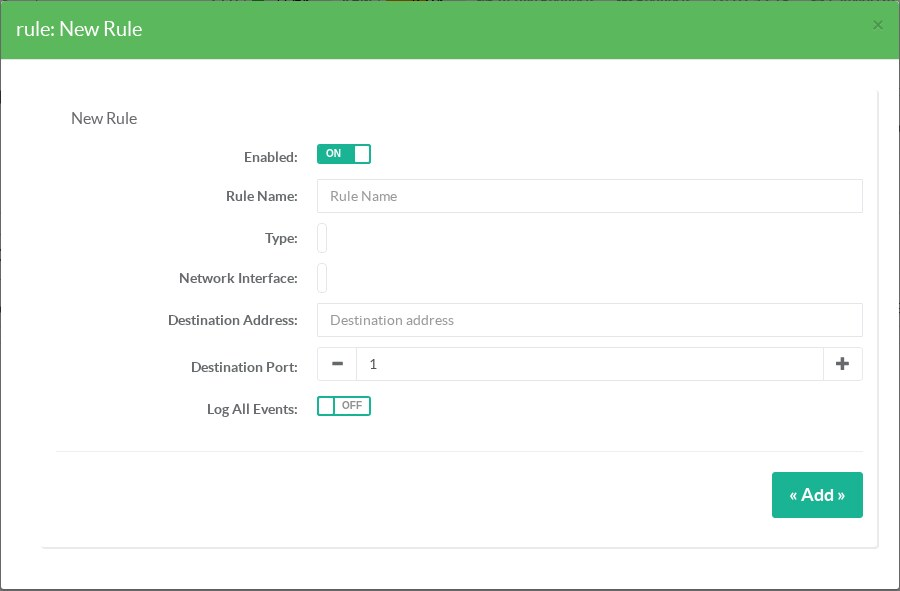
- Rule Name: for example Web server.
- Type: Destination NAT.
- Network Interface: the interface receiving the connections (usually the Internet side).
- Destination Address: the internal server. You can type a host name: it is resolved when you save, and the name is kept for display.
- Destination Port: the port of the internal server. Leave it empty to keep the incoming port.
- Log All Events: log the translated connections.
¶ 2. The rule that uses it
Go to Your Firewall › Firewall Rules, click New Rule:
- Network Interface: select the NAT entry (
DNAT:<id>, shown with its name). - Service: the incoming port, for example https.
- Action: Accept.
- Optionally, restrict the sources in the Inbound object tab.
A few seconds later the port forwarding is active; the rule shows its packet counters in the rules table.
The forwarded traffic must also be allowed to cross Artica: if the interface towards the server has the policy Finally deny all, add a rule allowing it, or use an interface connector.
¶ 3. Reach the published server from the internal network (NAT reflection)
Without anything more, a workstation of your local network that calls the public address of a published service (for example https://www.example.com resolved to the address of the appliance) is not translated and never reaches the server. Destination NAT entries carry the option Reachable from the internal network, checked by default:
- A connection coming from any other interface and addressed to the public address is translated like a connection from the Internet.
- When the server and the workstation are on the same network, Artica also rewrites the source of these connections only, so that the server answers through the appliance. A client coming from the Internet keeps its own address.
- Public address (when the interface has a private address): when the appliance sits behind a router and its Internet interface carries a private address, enter the real public address here; the reflection then targets it instead of the addresses of the interface.
Uncheck the option if internal clients must reach the server by its internal address only. A NAT entry without interface and without public address cannot be reflected: the list says so. Connections opened by the appliance itself to the public address are not reflected.
¶ Leave the Internet with a given address (Source NAT)
- Create a NAT entry of type Source NAT on the Internet interface, with the public address to use as Destination Address.
- Without any rule, every new connection leaving this interface uses that address.
- To translate only some networks, create rules on the
SNAT:<id>interface with the action Accept and the networks as inbound objects.
To hide a whole network behind the address of the interface itself, prefer masquerading.
¶ Troubleshooting
- The rule shows an orange label: the NAT entry was deleted or disabled, or its interface is not linked to the firewall.
- The counters stay at 0: check the incoming port (service of the rule) and that the traffic really arrives on the interface of the NAT entry.
- The server receives the connection but the client times out: the server's replies must come back through Artica — its default gateway must be Artica, or add a Source NAT/masquerading towards it.