Artica keeps every applied version of the firewall configuration. A change must be confirmed within a few minutes: without confirmation, the previous configuration is restored automatically, so a wrong rule can no longer lock you out of the appliance.
¶ Why it matters
A firewall is usually managed from a remote browser. One wrong rule — an outgoing policy set to Finally deny all, a Drop rule on the administration interface, ping limited to trusted networks on the only interface you can reach — and the console no longer answers. Without this feature, the only way back was a console on the hypervisor or a visit to the server room.
- Automatic rollback: if nobody confirms a change in time, the appliance restores the last confirmed configuration on its own. Nothing needs to reach it from the network.
- History: every version records who changed what and when.
- Differences: compare a version with the previous one, line by line.
- Restore: go back to any previous version in one click.
¶ Confirm a change
As soon as a change is applied — a rule, a NAT, a masquerade entry, an interface option, a global option, enabling or disabling the firewall — a banner appears at the top of the firewall pages with a countdown:
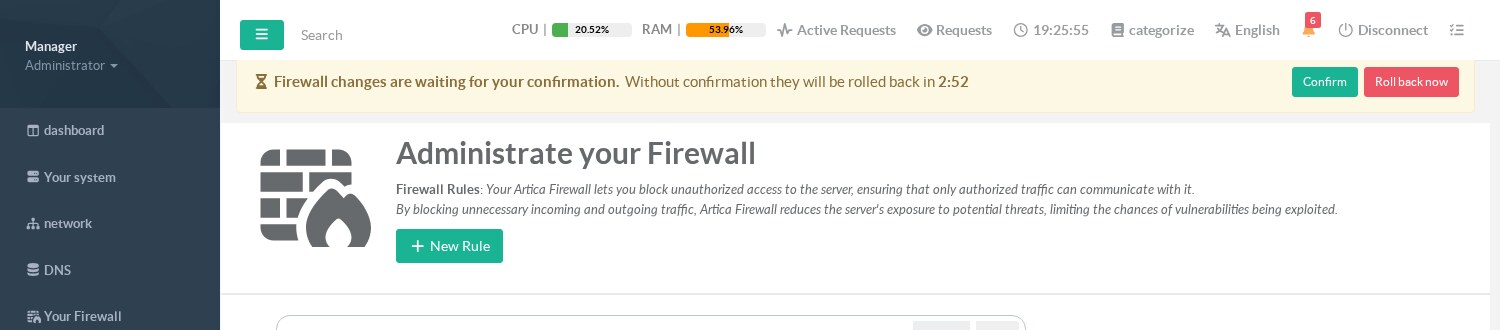
- Confirm: the change is kept. Click it once you have checked that the console still answers and that the traffic you care about still passes.
- Roll back now: the previous configuration is restored immediately.
- Do nothing: when the countdown ends, the previous configuration is restored and the administrators receive the notification Firewall: changes rolled back.
Several changes made one after the other share the same countdown: each new change restarts it, and a rollback restores the configuration as it was before the first of them.
The countdown survives a restart of the Artica service and a reboot of the appliance: if the delay is over when the service starts again, the rollback happens within the first minute.
¶ Configuration history
Go to Your Firewall › Configuration history:
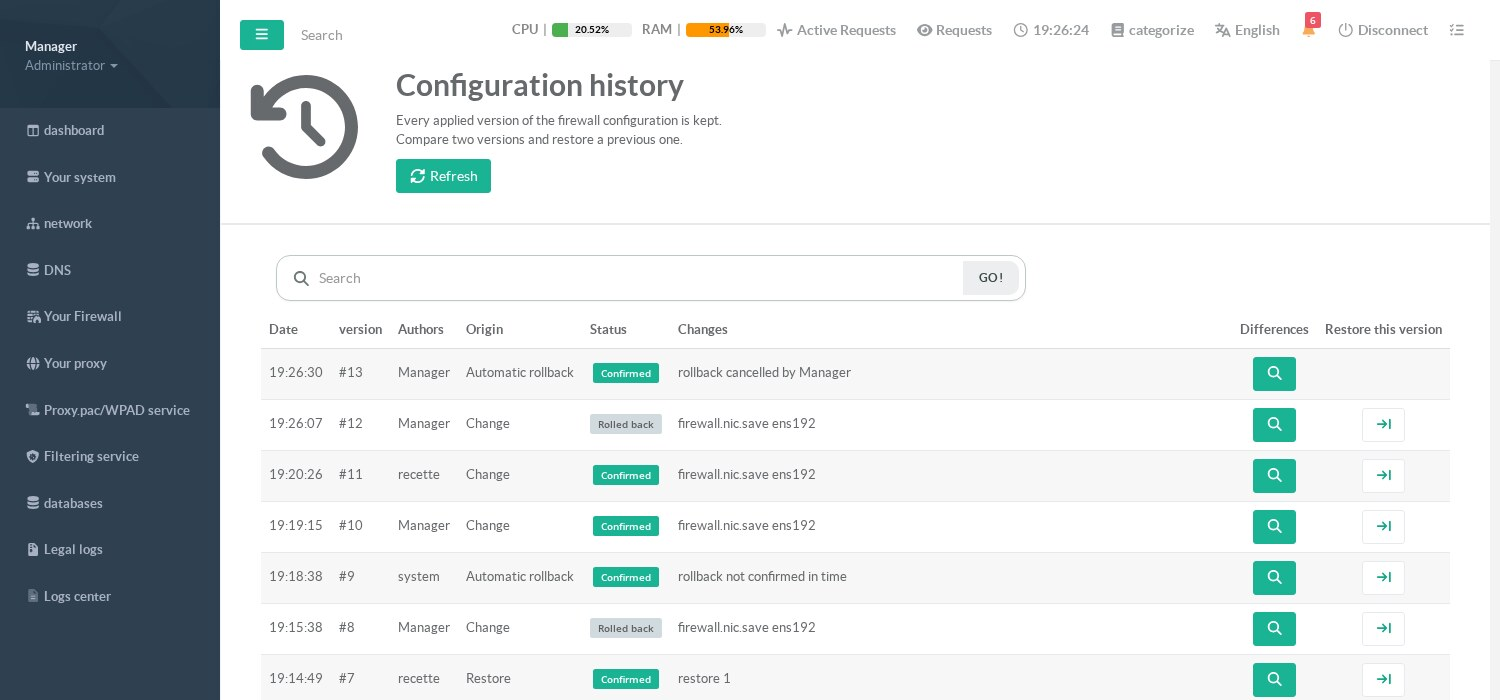
| Column | Meaning |
|---|---|
| Authors | The console accounts (or API callers) that made the changes of this version; system for an automatic rollback. |
| Origin | Change (made from the console or the API), Restore (a previous version restored), Automatic rollback, Change made outside the console (detected every 5 minutes), Initial version (the state when the feature started), Draft (a draft applied, or set aside by a firewall start), Temporary rules expired (rules disabled at their expiry). |
| Status | Confirmed, Awaiting confirmation, Rolled back or Suspended (a draft set aside when the firewall started: it can be reopened, and is never restored by a rollback). |
| Changes | What was changed (rule, NAT, interface…). |
The page header also has the buttons Open a draft (or Preview when a draft is open, Reopen the suspended draft after a suspension) — see Draft and preview — and Export / Import — see Export and import a configuration.
¶ Compare with the previous version
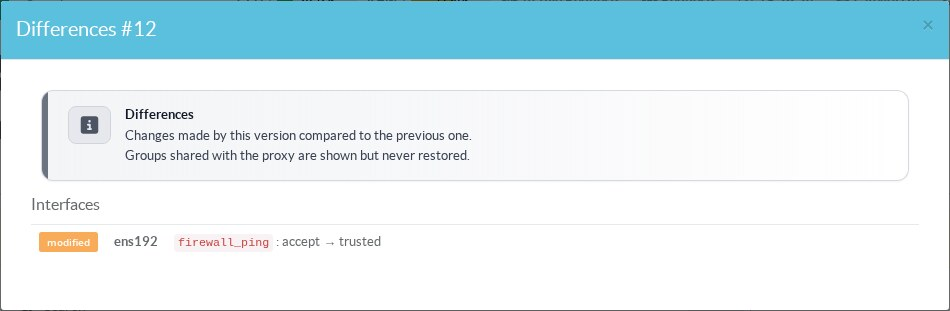
Click the magnifier of a version to see what it changed compared to the previous one:
¶ Restore a previous version
Click the arrow of the version you want to go back to, then confirm. The restore is itself a change: it is applied immediately and must be confirmed like any other one, so restoring the wrong version cannot lock you out either.
¶ What a version contains
- The firewall rules, with their services, schedules, application filters (nDPI), logging and options.
- NAT, masquerading, interface connectors, link balancer, bandwidth limits, published addresses, CognixSys rules and the firewall services.
- The firewall options of each interface (link to the firewall, incoming and outgoing policies, behavior, ping, DHCP, Anti-DDoS…). The addresses and routes of the interfaces are not part of it.
- The objects used by the rules. The content of an object (its addresses, networks, countries) is restored only when the object is used by firewall rules only.
- The global options: firewall enabled, logging options, DNS amplification protection, link balancer.
An object also used by proxy rules (or by another service) is shown in the differences but never restored: restoring it would undo changes made on the proxy side. Objects filled automatically — for example by the DNS AutoBlock feature — are not restored either, so a rollback never removes the addresses blocked since.
The history keeps the last 100 versions, and every version of the last 90 days.
¶ Settings
Go to Your Firewall › Parameters: the section Confirm firewall changes follows the global options. Click it to change it:
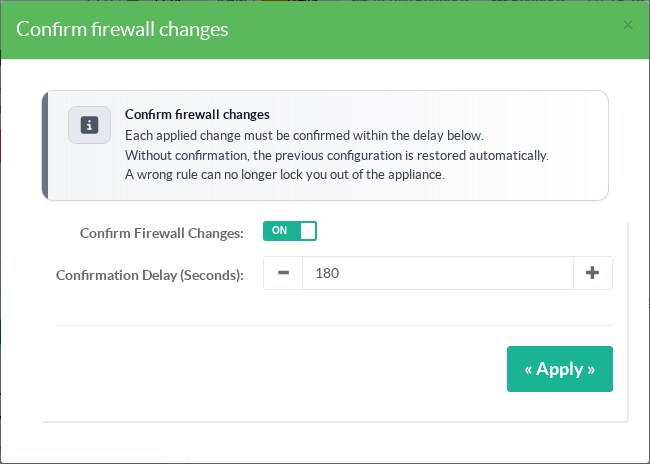
- Confirm firewall changes: enabled by default. When it is off, changes are applied and kept at once; the history is still recorded. Turning it off while a change is waiting confirms that change.
- Confirmation delay: from 60 to 1800 seconds, 180 by default.
¶ REST API
| Method and path | Purpose |
|---|---|
GET /firewall/config/versions |
List of the versions (limit, offset) and pending: the versions waiting for confirmation, the version a rollback would restore and the seconds left. |
GET /firewall/config/versions/{id} |
A version and a summary of its content. |
GET /firewall/config/versions/{id}/diff?against={id} |
Differences; without against, compared to the previous version. |
POST /firewall/config/versions/{id}/restore |
Restore a version (it then waits for confirmation). |
POST /firewall/config/versions/confirm |
Confirm the pending changes (404 when nothing is waiting). |
POST /firewall/config/versions/cancel |
Roll back the pending changes now. |
GET / PUT /firewall/config/versions/settings |
{"confirm": true, "delay": 180} |
A script that changes the firewall through the API should call POST /firewall/config/versions/confirm once it has checked that the appliance is still reachable; otherwise its change is rolled back when the delay ends. See Firewall REST API.
While a draft is open, changes made through the API go into the draft and create no version to confirm; restoring a version is refused (HTTP 409).
¶ Troubleshooting
- My change disappeared after a few minutes: it was not confirmed. The history shows it as Rolled back, followed by an Automatic rollback version. Apply it again and click Confirm.
- A version “Change made outside the console” appeared: the configuration was changed by something that does not go through the console or the API (an object edited from the proxy pages, a script writing the databases). Such versions are never rolled back.
- The rollback failed: the administrators receive Firewall: automatic rollback failed with the reason. Restore a version from the history.