The RDS Proxy can open SSH sessions to Linux servers and Artica appliances.
The user starts the usual Remote Desktop client, connects to the gateway and picks an SSH target.
A terminal opens inside the Remote Desktop window.
This documentation has three parts:
- Concepts (this page):
How it works and what it brings. - Create an SSH target and its policy:
The administrator side, step by step. - Connect and transfer files:
The user side, with the Remote Desktop client.
¶ The problem it solves
Many administrators work from locked-down Windows workstations.
Only the Remote Desktop client (mstsc) is allowed on them.
PuTTY, OpenSSH and WinSCP are blocked or not installed.
Yet these administrators still need a command line on the Artica appliances and on the Linux servers of the company.
With SSH targets, the RDS Proxy becomes the only way in.
The workstation speaks RDP to the gateway.
The gateway speaks SSH to the servers.
Nothing is installed on the workstation or on the servers.
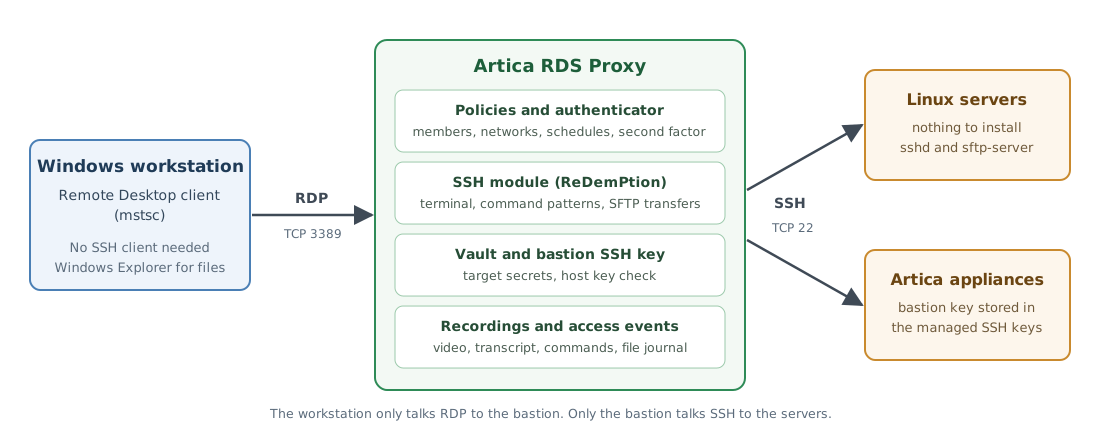
The gateway opens the SSH connection.
¶ How it works
The gateway engine (ReDemPtion) has a native SSH module.
The module draws the terminal in the Remote Desktop window, sends the keystrokes to the server over SSH and reads the screen like a terminal emulator.
- The user opens a Remote Desktop connection to the Artica appliance.
- The gateway checks the account, the source network, the schedule and, when the policy asks for it, the second factor.
- The user picks an SSH target in the list of servers.
- The gateway connects to the server on port 22.
It checks the host key of the server, then logs in with the account defined on the target. - The terminal opens in full screen, with a status bar at the bottom.
An SSH target is a target like the others.
It goes through the same policies, the same second factor, the same session list and the same access events.
¶ Authentication to the server
Each target chooses how the gateway logs in to the server:
| Mode | What happens |
|---|---|
| Typed at connection | The user types the Linux account and password in the terminal. The password is never shown and never written in the traces. |
| Secret kept in the vault, password | The gateway logs in with a password stored in its vault. The user never sees it. |
| Secret kept in the vault, private key | The gateway logs in with a private SSH key stored in its vault. |
| Secret kept in the vault, bastion key | The gateway logs in with its own SSH key pair. The public key is installed on the server from the console. |
Vault secrets are encrypted on the appliance (AES-256-GCM).
The console and the REST API can replace a secret, never display it.
The bastion key is one SSH key pair that belongs to the gateway (ed25519 by default, RSA 4096 on request).
The console installs its public key on a target account in one click.
The password used for this installation serves one connection and is never stored.
On an Artica appliance, the key goes into the SSH keys the appliance manages, so it survives its own configuration updates.
¶ Host key verification
The gateway records the host key of each server at the first connection.
When the key changes later, the connection is refused, a notification is raised and an access event is written.
If the change is expected (server reinstalled, new key), the administrator clicks Forget the key on the target.
The next connection records the new key.
¶ What the user gets
- A color terminal (xterm-256color) in UTF-8 that follows the size of the Remote Desktop window.
- The keyboard layout of the Remote Desktop client.
- Text copy and paste in both directions.
- File transfers in both directions.
Files copied in Windows Explorer are pasted in the terminal and land in the home directory.
TheCtrl+Alt+Ffile explorer sends server files to the Windows clipboard.
The policy decides what is allowed with its clipboard rights.
See Connect and transfer files.
¶ What the gateway records
Every SSH session is recorded, whatever the video setting of the policy.
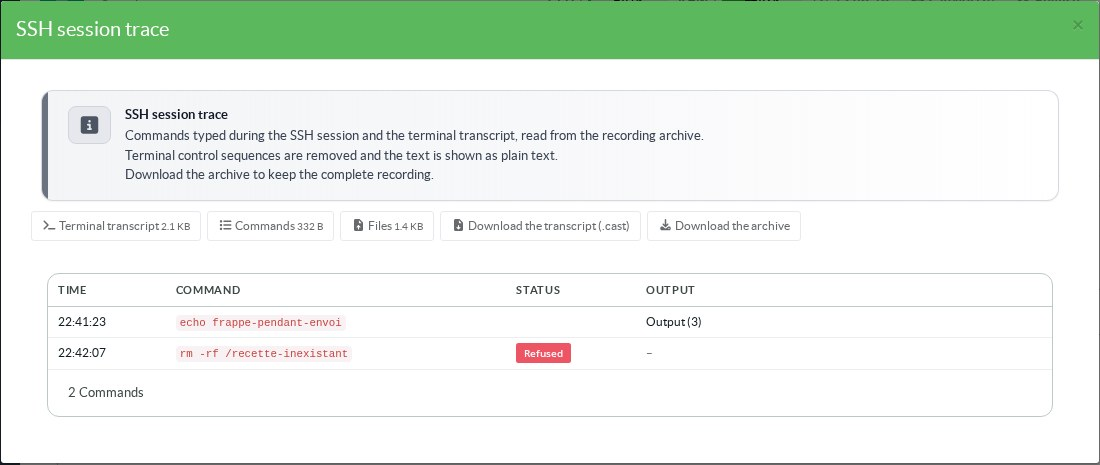
Next to the video, the gateway keeps three text traces:
- The terminal transcript (asciicast format), with timestamps.
- The list of commands, with the start of their output and whether they were refused.
- The journal of transferred files, with direction, path, size, SHA-256 and status.
Input typed while the server hides the echo (password prompts, sudo) is masked.
It never reaches the transcript or the command list.
The traces follow the retention of the video recordings.
The console shows them in the SSH session trace window of each recording, under RDS Proxy » Videos.
¶ Command patterns
The detection patterns of the policies also apply to SSH commands.
A pattern has a scope: Window titles (RDP sessions) or SSH commands.
Three actions exist for SSH commands:
| Action | Effect |
|---|---|
| Notify | The command runs. A notification and an access event are written. |
| Refuse the command | The command never reaches the server. The gateway clears the line and shows a yellow message with the policy and the pattern. The session goes on. |
| Disconnect | The command never reaches the server, then the session is closed. |
The gateway holds the Enter key until it has read the command line on the screen.
Tab completion, history and line editing are already resolved at that moment.
Each line of a multi-line paste is checked on its own.
¶ Benefits
- No SSH client on the workstations.
The Remote Desktop client is enough. - No agent on the servers.
A standardsshdwith its SFTP subsystem is enough. - One entry point for RDP, VNC and SSH, with one set of policies.
- Server passwords and keys stay in the gateway vault.
Users never see them. - A text trace of every command, readable and searchable, in addition to the video.
- File transfers are allowed by policy, checked by SHA-256 and written in the access events.
- Dangerous commands can be refused before they run.
- A server whose host key changes is never reached silently.
¶ Requirements
| Function | RDP Proxy | RDP Proxy authenticator |
|---|---|---|
| SSH targets, command patterns, traces | 12.3.18 or later | 1.6.0 or later |
| File transfers | 12.3.19 or later | 1.6.1 or later |
The versions are shown on the RDS Proxy status page.
See How to upgrade the RDS Proxy service.
When the version is too old, the target form explains why SSH is not available.
¶ Limits
- The entry stays Remote Desktop.
The gateway does not listen for SSH clients. - Port forwarding, SSH agent forwarding and X11 are not supported.
- The commands and the transcripts are not sent to the Artica SIEM yet.
They stay in the recordings.
The connection and disconnection events of SSH sessions are sent as for other targets. - A pattern matches text.
A determined user can hide a command from it (quotes, variables, scripts, full-screen editors).
Patterns stop mistakes and ordinary gestures.
The transcript remains the record of what happened. - In a full-screen program (
vi,less,top), Enter is not a command.
Only the command that opened the program is listed. - The messages the gateway writes in the terminal are in French in this version.
- The RDS Proxy in a cluster is not supported.