The packet tester tells you what the active firewall does with a given packet — accepted, rejected or dropped — and which rule decides. It reads the rules actually applied in the kernel: nothing is sent and nothing is changed.
¶ Why use it
- “Why is this flow blocked?” — get the deciding rule in one click instead of reading the whole rule list.
- Before opening a service — check that a new rule really comes before the rule that would block it.
- Everything is taken into account: your firewall rules, but also what other features set up — trusted networks, CrowdSec, the proxy anti-flood, Anti-DDoS, NAT.
¶ Test a packet
Go to Your Firewall › Firewall rules and click Test a packet:
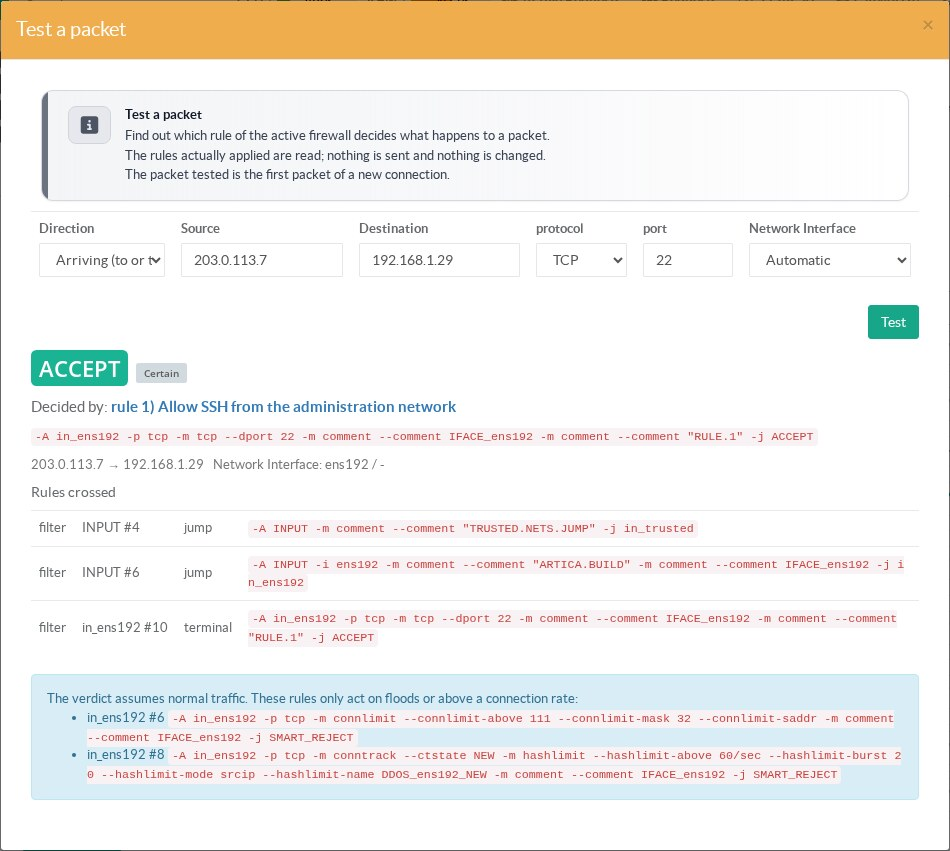
| Field | Meaning |
|---|---|
| Direction | Arriving: a packet that reaches the appliance, or that is routed through it. Sent by the appliance: a connection opened by the appliance itself (DNS, updates…). |
| Source / Destination | IPv4 addresses. For a packet sent by the appliance, leave the source empty: the address of the outgoing interface is used. |
| Protocol / Port | TCP or UDP with the destination port, or ICMP (ping). |
| Network interface | Automatic: the interface the routing table uses to reach the source. Choose it explicitly to test traffic arriving on another interface. |
¶ Read the result
- The verdict: ACCEPT, REJECT (the sender is told) or DROP (the packet is silently discarded).
- Decided by: the firewall rule (click it to open it, its description is shown under its name), a protection such as Trusted networks, a source banned automatically, the Unauthorized transit traffic policy, or the default policy of the interface.
- Destination translated to: when a NAT rule redirects the packet, the tester follows it to its new destination.
- Rules crossed: the path through the firewall chains, up to the decision.
¶ Certain or uncertain
The tested packet is the first packet of a new connection. A few conditions cannot be decided for a single packet; the result then shows Uncertain and lists the rules concerned:
- conditions on the user running a program, on the packet content, on the time of day, on the country (GeoIP) or on the application (DPI);
- a packet handed to a filtering daemon (NFQueue) or intercepted by the transparent proxy;
- a mark set on the packet (link balancer): the route can depend on it.
Rules that only act on floods — the Anti-DDoS connection limits, the connection limits of a rule, the counting of the automatic blocking — are listed separately: the verdict assumes normal traffic.
¶ Temporary rules
A firewall rule can expire: in the rule form, choose Expires — 1 hour to 30 days. When the delay has passed, the rule is disabled automatically (never deleted) and the administrators are notified. See Firewall rules.
¶ REST API
POST /firewall/test-packet
{"direction":"in","src":"203.0.113.7","dst":"192.168.1.29","proto":"tcp","dport":22,"in_iface":""}The answer gives verdict, certain, decided_by (table, chain, line, rule, rule_id, rule_name), translated, path, uncertain and rate_dependent. See Firewall REST API.
¶ IPv6 packets
Enter IPv6 addresses to test an IPv6 packet; source and destination must be of the same version. When IPv6 filtering is off, the tester says that all IPv6 traffic is accepted, except by the CrowdSec and SSH black lists.
¶ Limits
- Packets of an already established connection are not tested: replies are always accepted by the connection tracking.