A tunnel agent is a small program installed on a server that the bastion cannot reach.
It opens an outbound encrypted connection to the Artica appliance and keeps it open.
RDP and VNC sessions to that server then travel inside this connection.
The remote site opens no inbound port.
¶ The problem it solves
Without an agent, the RDS Proxy opens a TCP connection to each target, on port 3389 for RDP or 5900 for VNC.
The target must therefore be reachable from the appliance.
That means an inbound port on the target, a route to its network and no NAT in the way.
This is often impossible or unwanted.
A plant network, an OT zone, a customer site behind a firewall you do not manage or a DMZ with strict rules will not accept an inbound flow from the bastion.
With a tunnel agent the direction is reversed.
The agent opens an outbound connection to the appliance.
When a user opens a session, the RDS Proxy sends it through that connection instead of opening its own.
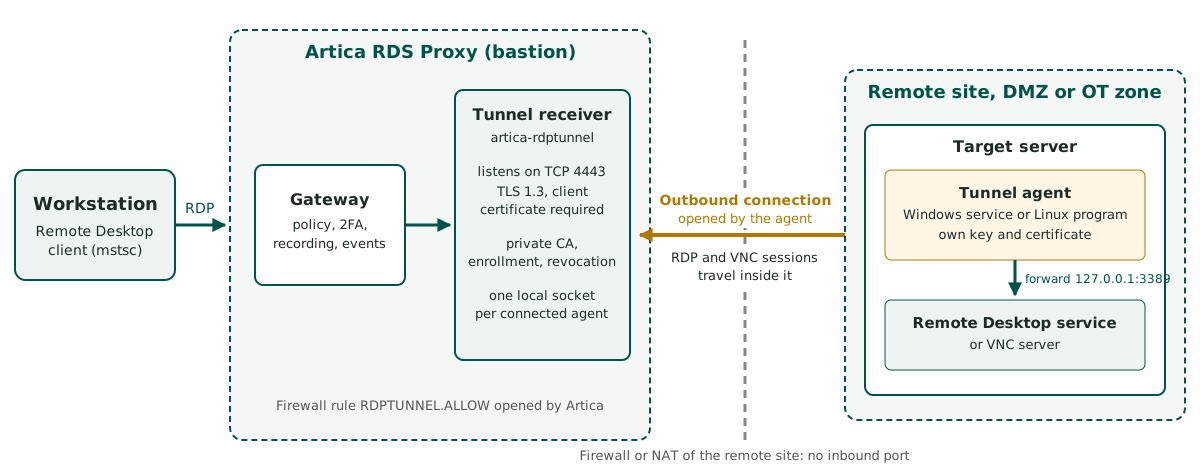
The bastion reaches the target through it, without any inbound port on the remote site.
¶ How it works
- The administrator creates an agent in the console and receives a single-use enrollment code.
- On the target server, the enrollment command creates the private key of the agent.
The key never leaves the server.
The appliance signs a certificate for it with a private certification authority dedicated to tunnel agents. - The agent connects to the appliance on TCP port 4443 by default, with TLS 1.3.
Both sides present a certificate.
The appliance checks the agent identity, the agent checks the appliance. - In the console, the administrator enters the agent identifier in the Tunnel agent field of an RDP or VNC target.
- When a user opens a session to that target, the RDS Proxy sends it through the agent.
The agent connects to its local address,127.0.0.1:3389by default, and relays the traffic. - If the agent is not connected, the session is refused.
It never falls back to a direct connection.
A target behind an agent remains a normal target.
It goes through the same policies, the same second factor, the same video recording and the same access events.
¶ Benefits
- The remote site opens no inbound port.
Its firewall only needs to allow one outbound connection to the appliance. - The agent works through NAT.
It can reach the appliance through a translated address with the-serveroption. - The bastion cannot redirect the agent.
The address the agent forwards to is set in its local configuration only.
Nothing in the protocol lets the appliance choose another destination. - Each agent has its own key, generated on the server, and its own certificate.
A revoked certificate or a certificate from another authority is refused during the TLS handshake. - An enrollment code works once and is valid from 1 to 168 hours.
No private key is ever copied from one machine to another. - One console tab lists the agents with their live state.
It also handles revocation, the firewall rule and the agent downloads. - The Windows agent runs as a service under a limited virtual account.
Its MSI package can be deployed silently or by GPO. - Agent connections, disconnections, refusals, enrollments and revocations go to the SIEM of the bastion.
¶ Requirements
| Component | Version | Notes |
|---|---|---|
| RDS Proxy authenticator (authhook) | 1.9.0 or later | Sends sessions through the agent. The Tunnel agents tab and the Tunnel agent field only appear with this version. |
| Tunnel receiver (artica-rdptunnel-server) | 0.3.0 | Delivered with the RDS Proxy package. Runs as the systemd unit artica-rdptunnel.service. |
| Windows agent | 0.3.0 | Windows service and MSI package. 64-bit Windows only. |
| Linux agent | 0.2.0 or later | Program for amd64 and arm64. No package yet: you start it yourself. |
| Network | TCP 4443 by default | From the target server to the appliance, outbound. Artica opens the port in its own firewall automatically. |
¶ What can go through an agent
| Target type | Through an agent |
|---|---|
| RDP | Yes |
| VNC | Yes |
| SSH | No. The console and the API refuse the field for SSH targets. |
| Web (WebView) | No. Web targets are reached from the bastion itself. |
| Active Directory group | No. An agent publishes one server only. |
¶ Limits
- One agent forwards to one address.
To publish two servers behind one site, install one agent on each, or point one agent at another machine of its network on purpose. - At most 32 simultaneous sessions per agent.
Further connections are closed at once. - A broken connection is detected in less than 60 seconds.
Until then the agent is still shown as connected. - Network Level Authentication with NTLM works through the agent.
Kerberos is not guaranteed. - The agent certificate is valid 825 days.
It is not renewed automatically: enroll the agent again before it expires.
The console flags certificates that expire in less than 30 days. - RDP inside the tunnel runs over TCP inside TCP.
On a link that loses packets, sessions can feel slower than a direct connection. - The MSI package is not signed yet.
Windows can show an unknown publisher on a manual install.
Silent installs and GPO deployments are not affected.
¶ Documentation pages
| Page | Content |
|---|---|
| Install and enroll an agent | MSI package, enrollment command, Windows service, Linux, executable without installer |
| Manage agents in the console | Agent list and states, new agent, revocation, settings, downloads, attaching a target |
| Troubleshooting | Agent offline, enrollment refused, Windows events, logs, SIEM events |