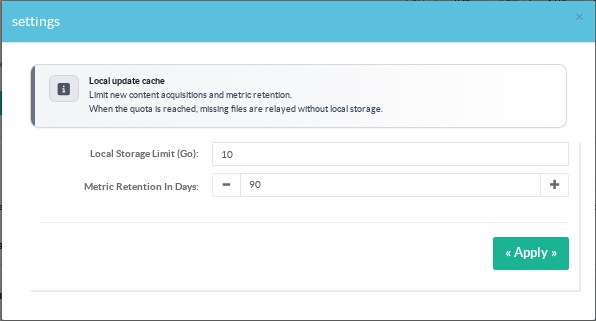
In Status, click Modify in Local update cache.
¶ Set the storage allowance
Enter the allowance in Local Storage Limit (Go).
Decimal values are accepted with a dot or comma.
This form uses binary gigabytes: 1 Go = 1,073,741,824 bytes.
The dashboard labels the same unit GiB.
For example, 10 sets a 10 GiB allowance.
A value of 1.5 sets 1.5 GiB.
The stored API value remains a number of bytes.
The accepted allowance is greater than zero and no more than 1 PiB.
¶ What happens at the limit
| Situation | Behaviour |
|---|---|
| The requested approved file is already cached | Serve the local file. |
| A missing file fits within quota and available space | Fetch, verify and cache the file. |
| A missing file cannot fit | Relay the request from its registered source without a new cached copy. |
| The limit is reduced below current occupation | Keep existing files. Use relay mode for missing files until there is room again. |
Artica does not evict old files automatically.
Lowering the allowance does not delete files.
Removing a content object from the manifest also leaves its cached file on disk.
¶ What counts as occupied storage
The storage directory is /home/artica/windows-update.
Occupation includes existing files, temporary transfers, quarantine files and download reservations.
The quota controls new content acquisitions.
It is not a filesystem hard limit on metadata or metrics database growth.
Leave free space for databases and operating system activity.
Monitor the underlying filesystem as well as the Windows Update cache widget.
¶ Metric retention
Set Metric Retention In Days from 1 to 3650 days.
The default is 90 days.
Retention removes old minute samples.
Lifetime counters remain available after old samples expire and across service restarts.