In Status, click Modify in Catalog scheduling.
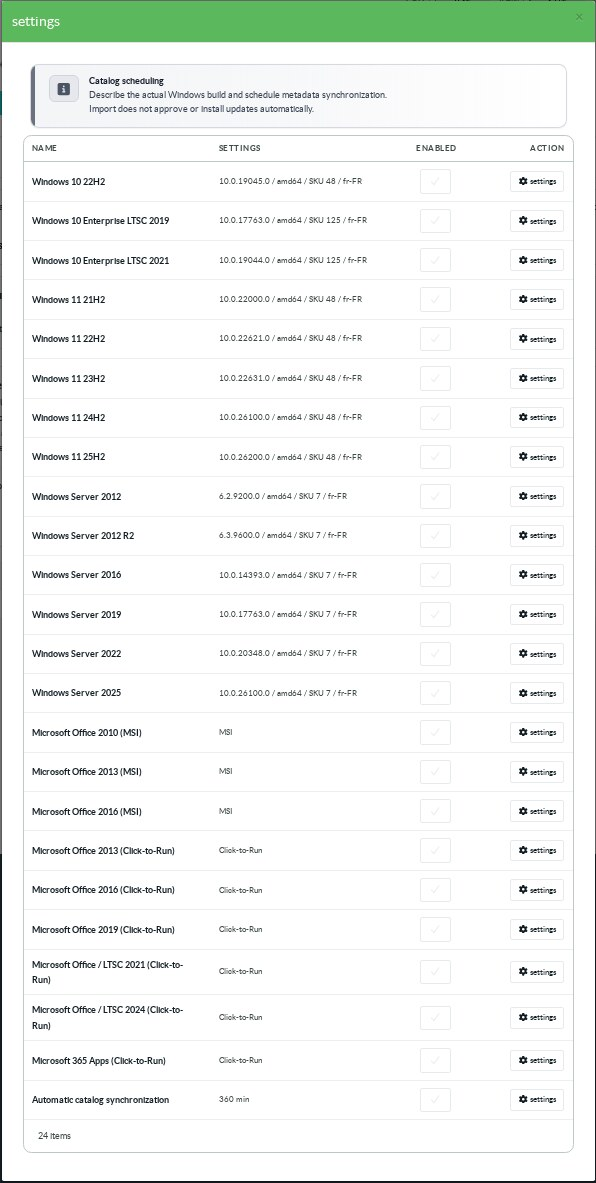
Each product has its own activation control and Settings button.
Several Windows profiles and Office products can be selected together.
¶ Windows profiles
The Windows choices include Windows 10 22H2 and Enterprise LTSC 2019 and 2021.
Windows 11 choices cover 21H2 through 25H2.
Server choices are Windows Server 2012, 2012 R2, 2016, 2019, 2022 and 2025.
These entries are query presets.
They do not extend Microsoft support or provide Extended Security Updates rights.
A preset build ending in .0 is a starting value, not the latest patch level.
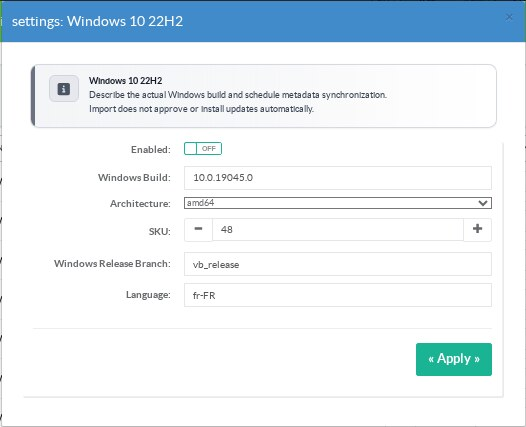
| Field | Value to use |
|---|---|
| Windows Build | The full build observed on the target, including its revision. |
| Architecture | amd64, x86 or arm64. |
| SKU | The numeric Windows edition SKU reported by the operating system. |
| Windows Release Branch | The release branch reported by that build. |
| Language | A locale such as en-US or fr-FR. |
Open Windows PowerShell on the pilot computer to collect its build facts:
$os = Get-CimInstance Win32_OperatingSystem
$version = Get-ItemProperty 'HKLM:\SOFTWARE\Microsoft\Windows NT\CurrentVersion'
[pscustomobject]@{
    Build = "$($os.Version).$($version.UBR)"
    SKU = $os.OperatingSystemSKU
    Branch = $version.BuildBranch
    Architecture = $os.OSArchitecture
    Locale = (Get-WinSystemLocale).Name
}Map the reported architecture to the form values.
Confirm the facts before applying the profile.
The module accepts up to 32 Windows profiles.
Catalogue entries and approvals remain separate for each profile.
¶ Office product families
The MSI choices are Office 2010, 2013 and 2016.
The Click-to-Run choices are Office 2013, 2016, 2019, LTSC 2021, LTSC 2024 and Microsoft 365 Apps.
Office selection allows approved content objects for that product to be delivered.
It does not discover Office updates, create an Office catalogue or configure an Office client.
Deselecting a product suspends delivery of its objects without deleting files or approval records.
¶ Automatic synchronization
- Select at least one Windows profile.
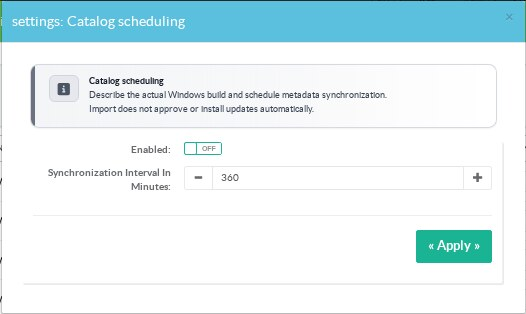
- Open Settings on the Automatic catalog synchronization row.
- Enable the schedule and enter an interval in minutes.
- Apply the settings and check the last successful synchronization in Status.
The interval is from 5 to 43200 minutes.
The default is 360 minutes.
The Windows Update service must be enabled.
Manual synchronization is available without enabling the automatic schedule.
Profiles are synchronized one after another.
A failed profile does not stop the following profiles.
The overall last success changes only when all selected profiles succeed.
Importing metadata does not approve updates.
¶ Native client pilot
Use exactly one Windows profile for a native client pilot.
Native session routing across several profiles is not qualified.
Multiple selected profiles remain useful for separate catalogue review and approval records.