Back to Active Directory | NTLM (domain join) | LDAP connections
Silent authentication identifies the Windows user who browses through Artica Proxy without any login popup and without joining the appliance to the Windows domain.
The proxy reads the account name that the workstation sends in the NTLM handshake and resolves its Active Directory groups through the LDAP connections already declared in the console.Important:
This is identification, not authentication.
The password is never verified.
Use it for logs, reports and web filtering by group, never as a security barrier.
¶ Functional advantages
- No popup
For users of domain workstations: browsers on Windows send the logged-on account to the proxy automatically. - No domain join,
no computer account, no keytab, no Kerberos SPN, no NTLM:
nothing to repair when the machine password expires or when the domain controller changes. - Works with the proxy addressed by IP or by any host name (Kerberos needs the proxy FQDN and a valid SPN).
- Reuses the existing group rules:
Rules based on Active Directory groups (web filtering, ACLs, bandwidth, logs) apply to the identified account, through the same group helper as the other Active Directory methods. - Several domains:
Each LDAP connection of the console can provide groups; the domain sent by the workstation selects the connection. - Usernames in every log:
Access.log, Logs center, statistics and the SIEM receive the account name instead of an IP address. - Anonymous NTLM workstations are still named with a default account (
guestby default) instead of being refused. - Fail-safe:
when the helper is missing, the proxy still starts (without identification) and the administrator is notified;
Proxy is never left in a FATAL loop.
¶ Concepts
¶ Identification versus authentication
With NTLM, the workstation proves that it knows the password by answering a challenge.
A real NTLM authentication (domain join) forwards that answer to a domain controller, which accepts or refuses it.
Silent authentication skips that check: the helper only reads the account, domain and workstation fields of the last NTLM message (Type 3) and accepts the request.
Anyone able to configure an HTTP client can therefore claim any user name.
The console says it on every screen: “The password is not verified”.
¶ User name seen by the rules
Like the classic NTLM mode (winbind “use default domain”), the domain of a declared LDAP connection is removed from the identity: ARTICATECH\jdoe reaches the proxy as jdoe. User lists written for NTLM or Kerberos (plain names) therefore match, and reports, quotas and statistics see the same names as with the other methods.
A domain that is not declared keeps its prefix: a local account arrives as PC-JOHN\john and never matches the plain name john of a list.
For each connection, the NetBIOS form (first DC= of the suffix, e.g. ARTICATECH) and the DNS form (articatech.int) are removed. Requires helper 1.2.0 or later; with an older helper the identity keeps DOMAIN\user.
¶ Which LDAP connection provides the groups
- The identity carries a domain:
ARTICATECH\jdoe.
The connection whose LDAP suffix starts with that name (DC=articatech,DC=int) is queried.
The comparison uses the first DC component of the suffix, so it works when the NetBIOS domain name equals the first label of the DNS domain. - No connection matches (a NetBIOS name different from the DNS domain, the computer name of a local account such as
PC-JOHN\john) or no domain at all (default account):
all connections are queried in their declared order, and the first one that knows the account wins.
¶ Default account
Some clients complete the NTLM handshake anonymously (empty user name).
Instead of refusing them, the helper names them with the default account (guest unless you change it).
That account appears in logs and reports and is looked up in Active Directory like any other name — see the warning in Limitations.
¶ How it works
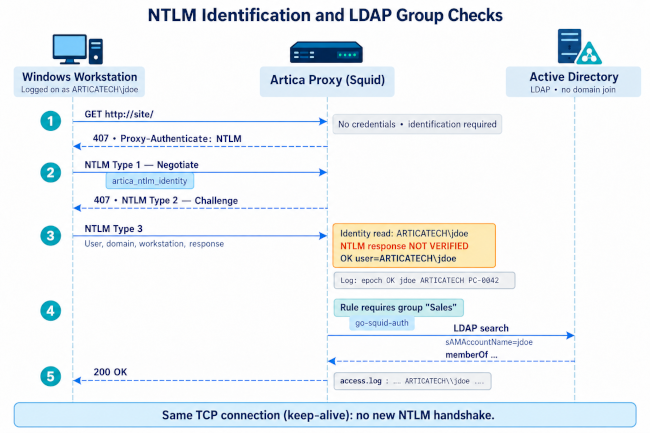
Steps 1 to 3 are the standard NTLM exchange, done once per TCP connection.
Group answers are cached by Proxy service (ads_group TTL, 3600 seconds by default) and by the group helper, so LDAP is not queried for every request.
¶ Requirements
- Artica Proxy with a valid Enterprise (Corporate) license.
- The Active Directory feature and at least one LDAP connection in Active Directory » Connections (LDAP connections).
It is only used to read groups: a read-only service account is enough. - No other proxy authentication method enabled (Kerberos, NTLM domain join, LDAP, Radius…, see Limitations), and the appliance is not a HaCluster node.
- Workstations configured to use the proxy explicitly (GPO, PAC file or WPAD), not through transparent interception.
¶ Install
- Open Active Directory » Status. As long as no method is configured, the page lists the available methods. The last card is Silent authentication.
- Click Installation. The proxy configuration is rebuilt and reloaded (about 40 to 50 seconds), then the console opens the Silent authentication page.
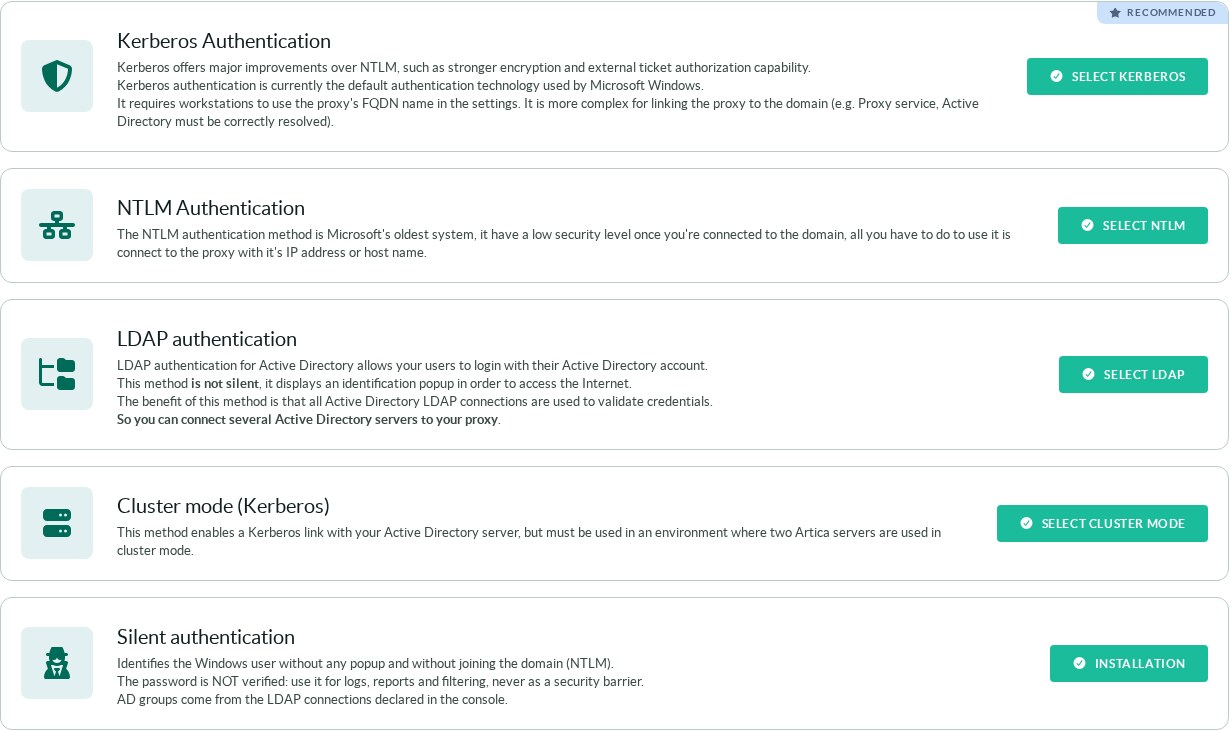
When the button is greyed out, the card prints the reason in red:
No Enterprise license, no LDAP connection (with a link to add one), or another authentication method already enabled (its setting name is shown in parentheses).
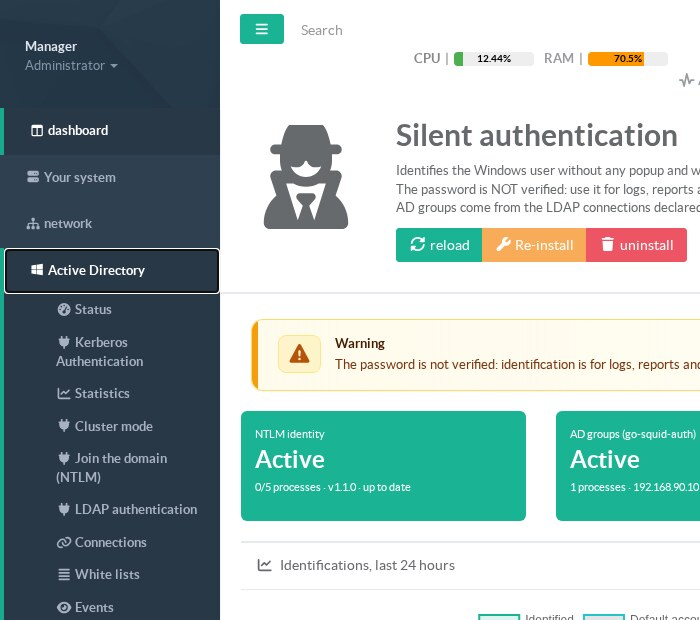
Once installed, Active Directory » Status opens the Silent authentication page directly, and the left menu gets the entry Active Directory » Proxy authentication.
¶ The Silent authentication page
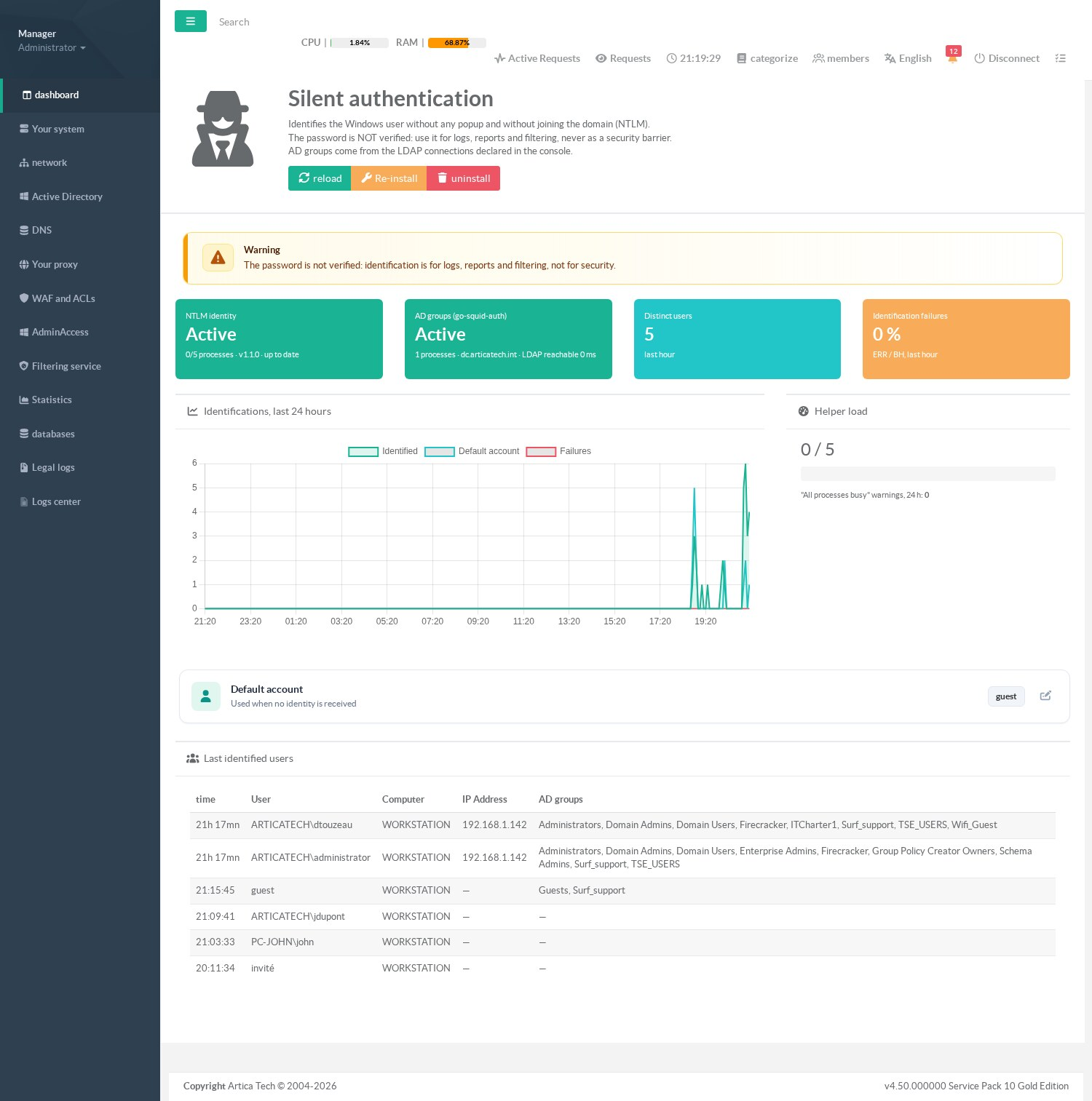
| Element | Meaning |
|---|---|
| reload / Re-install / uninstall | reload refreshes the page. Re-install copies the shipped helper again even if it looks up to date, then rebuilds the proxy configuration. uninstall disables the feature and rebuilds the configuration (the helper binary stays on disk). |
| NTLM identity | Active when Squid runs the identity helper. Busy/total processes as reported by the proxy service, helper version, and up to date when the installed helper is the one shipped with Artica. |
| AD groups (go-squid-auth) | Group helper installed, number of running processes, first LDAP connection and whether its LDAP port answers (with the connection time). |
| Distinct users | Different account names identified in the last hour (the default account counts as one name). |
| Identification failures | Share of helper answers ERR/BH in the last hour (malformed NTLM messages, helper errors). “—” when nothing was identified in the last hour. |
| Identifications, last 24 hours | Identified accounts, default-account answers and failures, per 5 minutes. |
| Helper load | Busy / total identity helper processes, and how many “All processes are busy” warnings proxy service wrote in the last 24 hours (counted since the last restart of the Artica daemon). |
| Default account | Name given to anonymous NTLM workstations; click the line to change it. |
| Last identified users | Last 50 accounts (most recent first): time, account and domain as sent by the workstation, computer name sent in the NTLM message, IP address, and the Active Directory groups of the account as the group rules see it. The IP address is filled when the user had requests in progress at the last 5-minute activity snapshot. |
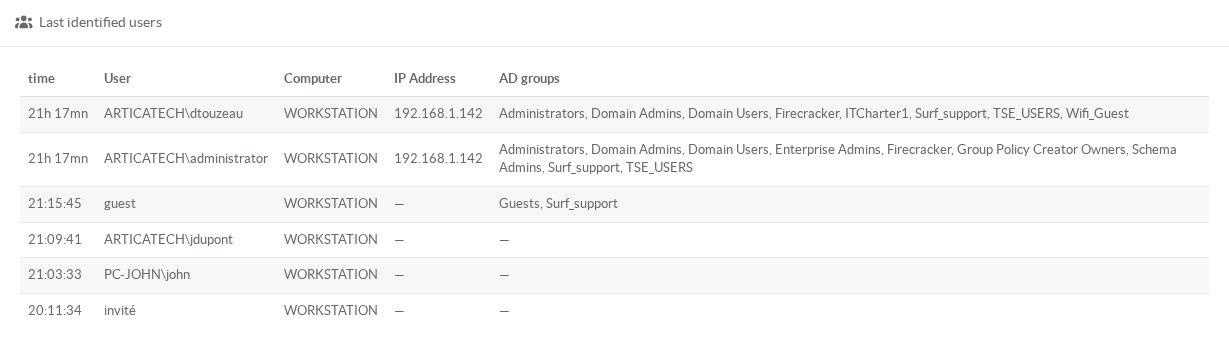
guest (anonymous NTLM, groups of the built-in AD account “Guest”), ARTICATECH\jdupont (unknown in the directory: no group) and PC-JOHN\john (local account of a workstation).¶ Default account
Click the Default account line to change the name.
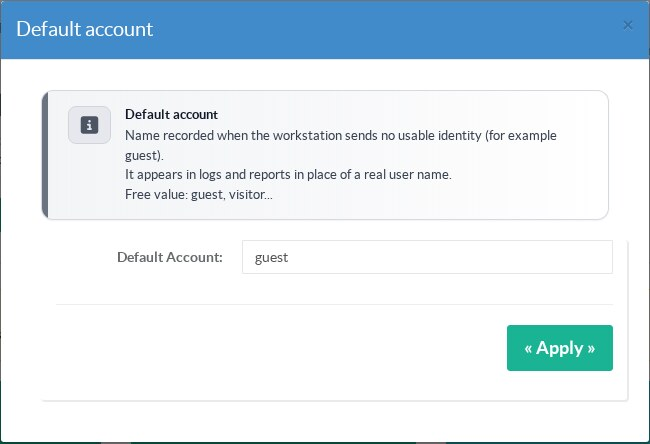
| Setting | Key | Default | Rules |
|---|---|---|---|
| Silent authentication enabled | EnableSilentNTLMAuth |
0 |
Set by Install (1) and uninstall (0). Do not set it by hand: Install also checks the requirements and rebuilds the proxy. |
| Default account | SilentNTLMAuthDefaultUser |
guest |
1 to 64 bytes (UTF-8: an accented letter counts 2); letters (accents allowed), digits, spaces inside the name, . _ - @; no leading or trailing space. Anything else is refused (HTTP 400) and nothing is written. |
The identity helper pool follows the NTLM helper settings of the proxy (20 children, 5 at startup, 1 idle by default), divided by the number of SMP workers with a floor of 2 children per worker; the queue holds at least 200 requests.
¶ Use cases
- Reports and logs by user name in a domain where joining the proxy is not allowed (strict change management, outsourced AD, no delegated account).
- Web filtering by Active Directory group for comfort rules (categories allowed to Marketing, streaming for a group of trainees) where the cost of a spoofed name is low.
- Proxy reached by IP address, or with many names/aliases, where Kerberos SPNs cannot be maintained.
- Several forests or domains without trust between them: one LDAP connection per domain, the domain sent by the workstation selects it.
- Quick replacement of a broken NTLM/Kerberos join while the domain side is repaired, to keep users named in the logs.
- Lab, school, branch office: user-level visibility without any domain-side operation.
¶ Limitations
¶ When the identity IS sent correctly
- The client uses the proxy explicitly (manual settings, GPO, PAC, WPAD) on a port where authentication applies, and supports NTLM proxy authentication with the session credentials.
This is the case of Chromium-based browsers (Edge, Chrome) and of Windows applications that use the system proxy stack;
Firefox for Windows also sends the session credentials to a proxy by default (network.automatic-ntlm-auth.allow-proxies=true; thetrusted-urispreference concerns web servers, not proxies).
Deploy the proxy settings with GPO for Chrome/Edge or GPO for Firefox. - HTTP and HTTPS: the identity is obtained before the
CONNECTtunnel is opened, so HTTPS sites are identified too, with or without SSL inspection. - Domain accounts are sent as
DOMAIN\userby the workstation and reach the rules asuserwhen the domain is that of a declared LDAP connection; the groups are then looked up in the connections, the first one that knows the account wins. - Prerequisites on the workstation: the computer is joined to the domain and the Windows session is opened with a domain account.
Windows only sends the session credentials automatically to a proxy it trusts: put the proxy address in the Local intranet zone (GPO “Site to Zone Assignment List”) — a proxy addressed by its IP address is in the Internet zone by default.
¶ When the identity is NOT sent, or is not what you expect
- Clients that do not speak NTLM (curl without
--proxy-ntlm, many mobile apps, IoT, update agents, most Linux and macOS tools) receive407 Proxy Authentication Required.
The proxy only offers NTLM: a Basic login box cannot succeed.
Exclude such clients or destinations in Active Directory » White lists (see below): they are then served without identification. - Transparent (intercepted) ports:
A browser that does not know it uses a proxy never answers a proxy authentication.
The identification rule is only applied to the explicit proxy ports; intercepted traffic, and ports set with “no authentication”, pass unidentified and rules on users or groups cannot match them. - Session opened with a Microsoft account or on a computer outside the domain (verified on a real Windows 11 workstation, session
MicrosoftAccount\user@outlook.com):
Windows has no NTLM identity to give to the proxy. Edge and Brave behave the same way: they either send an anonymous NTLM answer (→ the default account) or abandon the handshake and show a login box.
Adding the proxy to the Local intranet zone or storing credentials for the proxy in the Windows Credential Manager (cmdkey) does not change this.
Solutions for such workstations: type a name in the login box (any password is accepted, the name is kept until the browser is closed), whitelist them (see below), or use the Artica authentication agent instead of silent authentication. - Anonymous NTLM:
The workstation completes the handshake without a user name → the default account is used. - Local or non-domain accounts are sent as
COMPUTER\user(e.g.PC-JOHN\john) and keep that prefix in the rules.
No LDAP connection matches the computer name, so all connections are searched forjohn.
If a domain account with the same name exists, the local user receives its groups (verified on the lab:PC-JOHN\administratoris a member of “Domain Admins” for the group rules). - Default account and real accounts:
The default account is looked up in Active Directory like any name.
Withguest, anonymous workstations receive the groups of the built-in AD account “Guest” (on the lab: Guests and a custom group).
Choose a name that does not exist in the directory, or one whose groups are what you want for anonymous clients. - “Network security: Restrict NTLM: Outgoing NTLM traffic to remote servers” = Deny all (GPO):
Windows refuses to send NTLM; users get a login prompt they cannot satisfy.
Add the proxy to the exception list of that policy, or use Kerberos.
Microsoft has announced the progressive deprecation of NTLM in Windows: check this policy on new Windows builds. - Other proxy authentication methods are exclusive.
Installation is refused (and an installed silent authentication stops being applied, with a notification) when another method is active: Kerberos or NTLM with domain join, LDAP authentication (local, external or through Active Directory), RADIUS, the legacy Basic “fake” authentication, the HaCluster client mode, the Artica authentication agent, the external AD agent, or the ident service.
Two authentication schemes are never written together. - Enterprise license and at least one LDAP connection are required.
If the license expires or the last connection is deleted, the feature is dropped from the proxy configuration at the next rebuild and the administrator is notified. - Helper missing or not executable: the authentication is removed from the proxy (no
auth_param, no identification) so that Squid still starts. Users are no longer identified, rules on users and on AD groups no longer apply — group deny rules no longer block anyone. A notification is sent (at most once an hour) and the page shows the feature inactive. The helper is reinstalled automatically when the update that ships it is present; a periodic check (every 5 minutes) restores the configuration. - Group changes are not immediate: Squid caches group answers (1 hour by default).
Security warning. Any user or program able to send NTLM to the proxy can claim any account name, including an administrator's.
Never base a security decision on this identity: access to sensitive sites, bypass of filtering for privileged groups, quotas that protect money, audit evidence.
Use Kerberos or NTLM with domain join when the identity must be proven.
¶ Excluding clients from identification
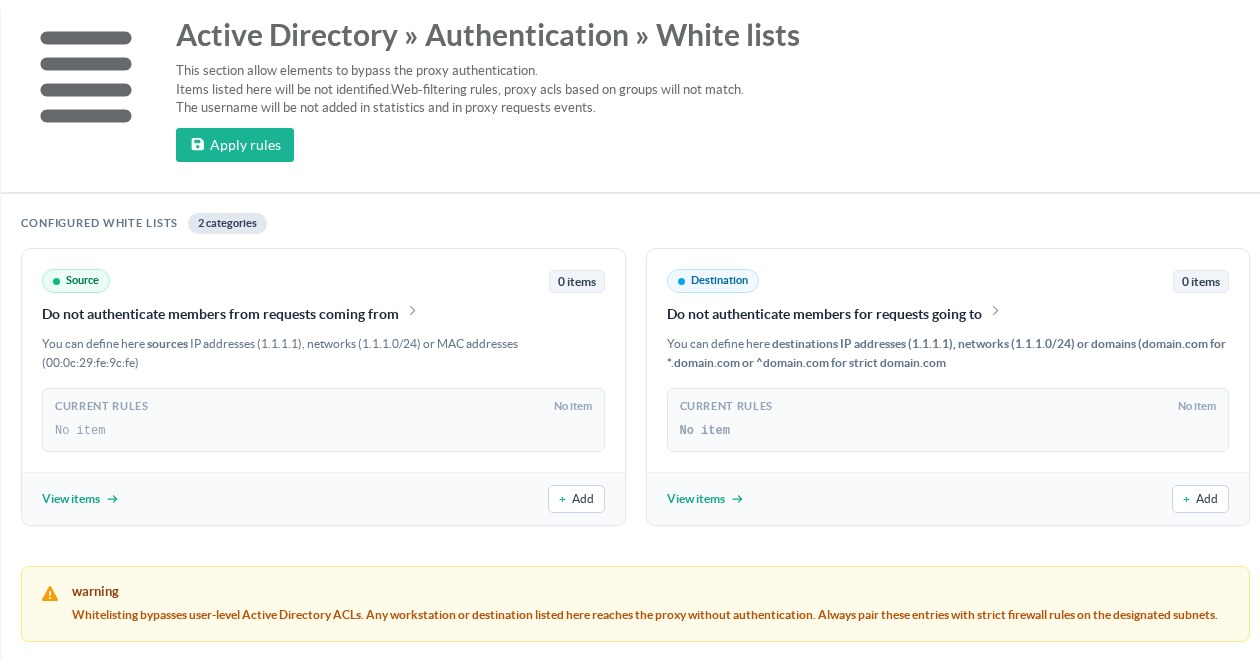
Active Directory » White lists lists the sources (IP addresses, networks, MAC addresses) and destinations (IP addresses, networks, domains) that are served without identification.
Use it for servers, printers, phones and update services that cannot speak NTLM.
Click Apply rules after a change.
¶ REST API
Routes of the Artica daemon (Unix socket /usr/share/artica-postfix/bin/run/articarest.sock, or the REST API port with an API key). Answers use the envelope {"success":bool,"error":"…","data":…} with real HTTP codes. Write operations run in the background and answer {"started":true}, unless ?wait=1 is added (then the answer comes after the rebuild, which can take about a minute). One operation at a time: a concurrent call answers 409 "busy".
| Method and route | Effect |
|---|---|
GET /proxy/auth/silent/state |
enabled, active, refusal ("", license, no_ldap_connection, other_auth:<Key>), default_user, helper{installed, shipped, md5_installed, md5_shipped, version, processes, busy, total}, groups{helper, processes, ldap_reachable, ldap_latency_ms, connection}. |
GET /proxy/auth/silent/metrics |
distinct_users_1h, failures_1h_pct (null when nothing in the last hour), series_24h (288 buckets of 5 minutes: t, ok, default, err), last_users (up to 50: time, user, domain, workstation, ip, groups), busy_warnings_24h. HTTP 500 when the journal cannot be read. |
POST /proxy/auth/silent/install |
Sets EnableSilentNTLMAuth=1, installs the helper, rebuilds and reloads the proxy. 409 with data.refusal when a requirement is missing. |
POST /proxy/auth/silent/reinstall |
Copies the shipped helper again (MD5 ignored) and rebuilds. 409 like install. |
POST /proxy/auth/silent/uninstall |
Sets EnableSilentNTLMAuth=0 and rebuilds; the binary stays. |
POST /proxy/auth/silent/settings |
Body {"default_user":"guest"}. 400 when the name breaks the rules; otherwise writes it, regenerates authenticate.conf, checks it with squid -k parse and reloads. |
A failed rebuild answers 500 with data.squid_accepted=false and the first FATAL line of squid -k parse; the running proxy keeps its previous configuration.
SOCK=/usr/share/artica-postfix/bin/run/articarest.sock
curl -s --unix-socket $SOCK http://localhost/proxy/auth/silent/state
curl -s --unix-socket $SOCK http://localhost/proxy/auth/silent/metrics
curl -s --unix-socket $SOCK -X POST -d '{"default_user":"visitor"}' \
"http://localhost/proxy/auth/silent/settings?wait=1"¶ Troubleshooting
| Symptom | Check |
|---|---|
| Login popup on a domain workstation | The browser or application does not send NTLM to the proxy: GPO Restrict NTLM, Firefox network.automatic-ntlm-auth.allow-proxies set to false, a non-Windows client. Test from the workstation: the access.log must show the user name after the first TCP_DENIED/407. |
One TCP_DENIED/407 per new connection, then the request with the user name |
Normal: this is the NTLM handshake. Keep-alive avoids repeating it on the same connection. |
Users logged as guest |
The workstation completes NTLM anonymously (account not logged on to the domain, service, kiosk). The journal shows DEFAULT lines. |
| A user has no group in “Last identified users” | The account is unknown in every LDAP connection (local account, wrong name), or the LDAP connection is unreachable (tile AD groups). Test the connection in Active Directory » Connections. |
| Group rule does not apply after adding the user to a group | Group answers are cached (1 hour by default). Wait, or reload the proxy. |
| NTLM identity tile inactive, notification “the silent identification helper is missing, proxy authentication was removed” | The helper is absent or not executable: ls -l /lib/squid3/artica_ntlm_identity /usr/share/artica-postfix/bin/artica_ntlm_identity_deb*. Click Re-install, or install the Artica update that ships it. |
| Notification “the silent identification is no longer applied (other_auth:…)” | Another authentication method, the license or the LDAP connections changed. Disable the other method or restore the requirement, then click Re-install. |
| “All processes busy” warnings | Too many new connections for the identity helpers: raise the NTLM helper children of the proxy. |
| Install answers “busy” | Another silent authentication operation (or the 5-minute check) is running: retry a minute later. |