Use
artica-wuclient.exeon a pilot computer.
The native installation cycle is not qualified.
Prepare the endpoint on Configure Windows clients before the first run.
¶ Benefits
- One command, or one window, writes the three client policy values described on the client configuration page.
- The address is checked before anything is written.
A dead endpoint does not replace a working update source. - A deployment script can sort computers by the exit code.
Each code asks for a different action. - When the appliance refuses the computer's network, the code is distinct from an unreachable address.
Allowed client networks start as loopback only, so this is the usual result of a first run. - A Group Policy that sets these values, or that deletes them, is reported.
The next policy refresh would undo the change. - The registry state from before the first successful check is kept, and the program can put it back.
statusreads the computer without administrator rights.- Windows Home is supported.
The program reads policy files directly and does not callgpresultor WMI.
¶ What the program writes
The address you pass is the URL root of the module.
For direct TCP, an example is https://updates.example.net:18531.
For a reverse proxy, an example is https://updates.example.net.
Three values are written under HKLM:
| Value | Type | Key |
|---|---|---|
WUServer |
REG_SZ |
SOFTWARE\Policies\Microsoft\Windows\WindowsUpdate |
WUStatusServer |
REG_SZ |
SOFTWARE\Policies\Microsoft\Windows\WindowsUpdate |
UseWUServer |
REG_DWORD = 1 |
SOFTWARE\Policies\Microsoft\Windows\WindowsUpdate\AU |
AUOptions is left untouched.
How the computer installs updates stays as you set it.
The command-line option --lab is the only way to also write NoAutoUpdate = 1.
The window has no laboratory option.
After a successful write, the program restarts the Windows Update service.
If that restart fails, the values are already in the registry and the service is still using the previous configuration.
Restart the computer.
¶ Run it from a command
The command line never opens an elevation prompt.apply and restore return code 2 when the registry write is denied.
artica-wuclient.exe status
artica-wuclient.exe apply --url https://updates.example.net
artica-wuclient.exe restore--url is required for apply, including when you pass --force.--force skips the reachability check and still rejects a malformed address.--help prints usage and returns 0.
The program follows the Windows display language.
French and English are available.
Any other display language produces English.
A French entry that appears only later in the Windows language list does not change the text.
¶ Run it from the window
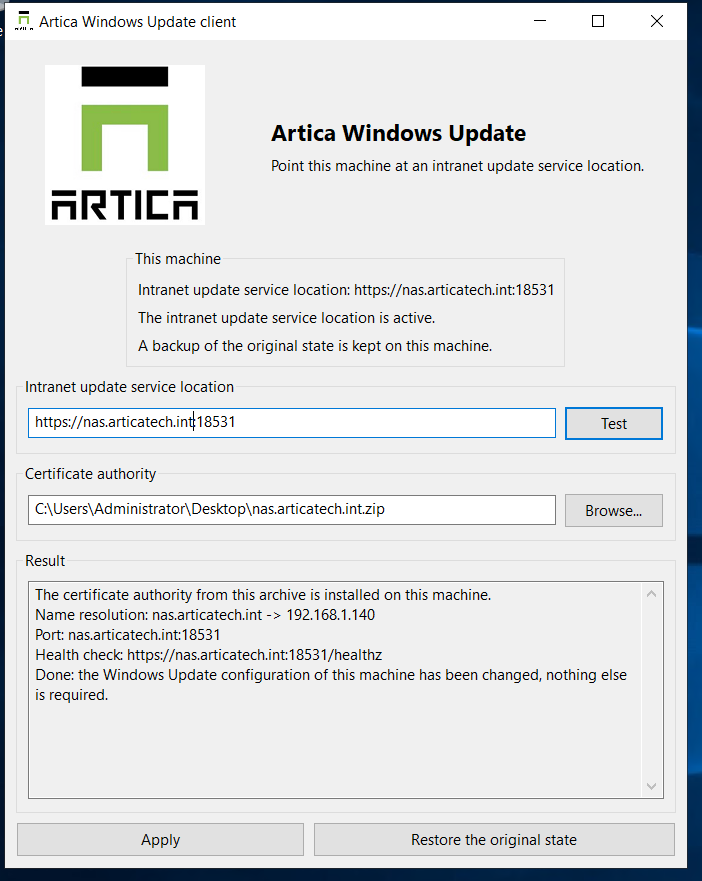
Start artica-wuclient.exe with no arguments.
If the process is not elevated, Windows shows one elevation prompt and the program starts again.
The executable is not signed, so the prompt names an unknown publisher.
If you refuse the prompt, the program exits with code 2 and the window does not open.
Test checks the address and writes nothing.
Apply checks the address again, then writes the three values.
Restore the original state stays disabled until a backup file exists.
Closing the window during Apply does not cut the registry write.
¶ Exit codes
One code is returned.
When more than one result is true, the most urgent code is the one returned.
From most urgent to least: 1, 2, 3, 4, 8, 5, 6, 7, 0.
What the code omits is printed on standard output.
Argument errors go to the error output.
A policy file that cannot be read does not change the code.
The text then says: Could not tell whether a Group Policy governs these values.
| Code | What happened | What to do |
|---|---|---|
| 0 | apply changed the computer, or restore put it back.The sentences differ. |
Nothing else. |
| 1 | The operation failed. | Read the standard output. |
| 2 | Writing the machine policy requires administrator rights. | Run the program again as an administrator. |
| 3 | The appliance refused this computer's network. Nothing was written. |
Add the subnet to the allowed client networks. |
| 4 | The appliance did not answer. Nothing was written. |
Check the address and the routing. |
| 5 | The configuration is written. The Windows Update service did not restart. |
Restart the computer. |
| 6 | A Group Policy governs these values. The next refresh will undo this configuration, whether this run wrote it or the computer already had it. |
Correct the policy. |
| 7 | The computer already had the requested configuration. | Nothing was rewritten. |
| 8 | This program has never configured this computer. | There is nothing to restore. |
¶ Backup
The file is %ProgramData%\Artica\WindowsUpdate\policy-before.json.
It is written on the first apply that gets past the address check, including when the computer is already compliant.
It is never replaced.
A later apply to a different address does not update it.restore returns the state from before that first apply, and the file stays on disk.
If the file is unreadable, the next apply stops and the registry is left unchanged.
The program does not delete that file.
Deleting it yourself discards the only saved copy of the original state.
¶ Group Policy
The program reads Registry.pol files.
It reports a policy that writes WUServer, WUStatusServer or UseWUServer, and a policy that deletes them.
A policy that only sets NoAutoUpdate does not return code 6 for an ordinary apply.status still reports all four values.
On Windows Home, the absence of these files means no policy governs the values.
That absence is not an error.
The program does not change Group Policy.
Correct the policy in the Group Policy editor when code 6 is returned.
¶ Limitations
- The program does not search for updates, download them, or install them.
- It does not show whether the computer is fully patched.
- It does not change Office client settings.
- It does not write a Group Policy, and it does not write
AUOptions. - It does not write a log file on the computer.
- It does not remain installed as a service or as an agent.
- An address in
httpis accepted.
The output warns that the traffic is not encrypted.
The recommended endpoint uses HTTPS. - An address that contains
/Contentor/ClientWebService, or that uses port9000, is refused.
Those point at the content store, the Windows client web service, or the appliance console. - The window cannot force a write and cannot enable laboratory mode.