The server does not finish booting.
The console loops on these lines, then drops to a maintenance shell:
(none) login: root (automatic login)
Error opening terminal: linux.
INIT: Id "1" respawning too fast: disabled for 5 minutes
INIT: Switching to runlevel: 6
INIT: No inittab.d directory found
INIT: cannot execute "/etc/init.d/rc"
Give root password for maintenance
(or press Control-D to continue):
root@(none):~#
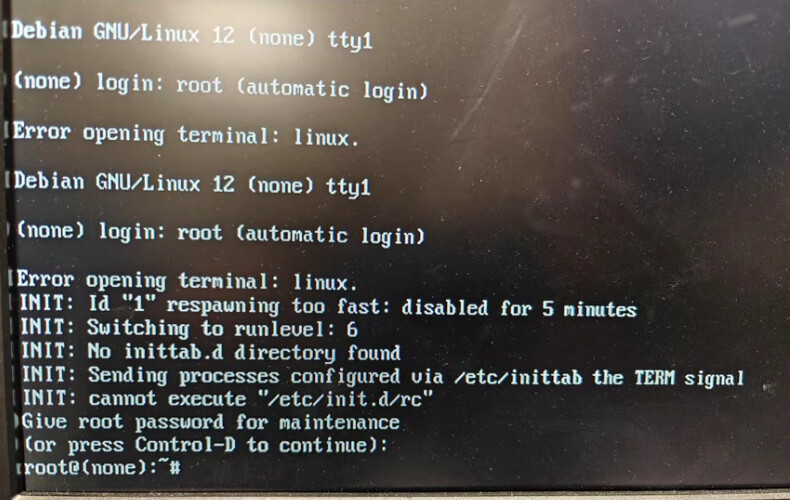
¶ What the messages mean
| Message | Meaning |
|---|---|
INIT: ... |
The kernel started the sysvinit init program (package sysvinit-core).An Artica server on Debian 12 boots with systemd. |
cannot execute "/etc/init.d/rc"No inittab.d directory found |
The boot scripts of sysvinit (packages sysv-rc and initscripts) are not installed.No service starts, not even the network. |
(none) as the host name |
The host name was never set. This is a side effect of the missing boot scripts. |
Error opening terminal: linux. |
The description of the linux terminal (package ncurses-base) is missing.The Artica console menu starts on tty1 with an automatic login. It cannot open the screen, so it exits and restarts in a loop until respawning too fast. |
¶ Cause
A package operation replaced systemd-sysv with sysvinit-core, or removed base packages.
The server then boots with an init system that has nothing to start.
The repair puts systemd back.
Before you repair, look at the end of the APT history.
It shows which command removed systemd or these packages:
tail -50 /var/log/apt/history.log
If the change came from an Artica update or a Service Pack, send this file to the Artica support team.
¶ Step 1: make the system usable
Run these commands in the maintenance shell root@(none):
mount -o remount,rw /
export TERM=vt100The first command makes the root file system writable.
The second one gives the shell a terminal type that works without ncurses-base.
¶ Step 2: check what is missing
ls -l /sbin/init
cat /proc/cmdline
dpkg -l | grep -E "systemd|sysvinit|sysv-rc|initscripts|ncurses-base"
ls /lib/systemd/systemd
- If
/lib/systemd/systemdexists, follow step 3a. - If it does not exist, follow step 3b.
¶ Step 3a: systemd is still installed
Restart the server with reboot -f.
In the GRUB menu, press e.
Add init=/lib/systemd/systemd at the end of the line that starts with linux.
Press Ctrl-X to boot.
The server now boots normally, with its network.
This GRUB change only applies to this boot.
Log in as root and run:
apt-get update
apt-get install systemd-sysv ncurses-base
dpkg --configure -a
rebootInstalling systemd-sysv removes sysvinit-core.
It points /sbin/init back to systemd.
¶ Step 3b: systemd is no longer installed
The network does not start, so you must configure it by hand.
Replace the interface name and the addresses with your own:
ip link set eth0 up
ip addr add 192.168.1.10/24 dev eth0
ip route add default via 192.168.1.1
echo "nameserver 1.1.1.1" > /etc/resolv.confIf the network failed, use this process
Then install the packages:
apt-get update
apt-get install systemd systemd-sysv ncurses-base
dpkg --configure -a
reboot -fWithout network access, check if the packages are still in the APT cache:
ls /var/cache/apt/archives/ | grep -E "systemd|ncurses-base"If they are, install them with dpkg -i and the full path of each .deb file.
¶ Step 4: check the result
After the restart, run:
ps -p 1 -o comm=
hostnameThe first command must print systemd.
The second one must print the server name instead of (none).
The Artica console menu opens again on tty1.