The CVE Vulnerability Scanner answers one question about the appliance itself:
which of the packages installed on this machine are affected by a publicly known vulnerability, and which of them already have a fix?
It runs Trivy against the appliance root filesystem, entirely offline, and keeps a dated history of every scan.
web console > Your system > Security > CVE.
¶ Concept
Artica does not maintain its own vulnerability data. The feature is built on two independent pieces:
- The engine — the
trivybinary, distributed as the Artica package CVE Security Scanner (trivy).
It reads the package database of the running system (dpkg) and matches every installed version against known advisories.
- The vulnerability database
A single trivy.db file (about 1.3 GB) mirroring the upstream Trivy database.
The appliance downloads it from the Artica mirror and verifies its MD5 checksum before putting it in place.
Three properties of that command are deliberate and are not configurable:
- The scan is fast because it is a database lookup, not an inspection:
A full Debian 13 appliance (258 affected packages, 4 286 findings) completes in a few seconds and uses no measurable CPU afterwards.
¶ What it gives you
- An inventory of the appliance's own exposure.
Perimeter tools tell you what your users browse; this one tells you what an attacker would find on the proxy itself.
That is a different question, and until now the only way to answer it was to run an external scanner against the box. - A priority order that survives contact with reality.
A Debian system permanently reports several thousand findings.
What matters is the intersection of severity and a fix exists: the console gives both as first-class filters, and the report leads with the CRITICAL entries. - Proof for an audit.
Every scan is kept with its date, its counts and the exact database version used, and can be exported as a self-contained HTML page or as raw JSON.
A CVE scan the day before the auditor arrives is worth much less than a dated series showing the number going down. - An early warning.
When a scan finds vulnerabilities at or above your threshold, the administrator is alerted with the report in the message body — no dashboard to watch. - No agent, no exposure.
Nothing listens, nothing is published, and the scan does not need Internet access.
The only outbound traffic is the database download.
¶ Use cases
- Deciding whether an upgrade window is needed.
"1 949 fixable out of 4 286" is an argument for scheduling apt upgrade; "2 337 with no fix available" tells you an upgrade will not close everything, and which packages to compensate for by other means. - Answering a security questionnaire.
Most compliance frameworks (BSI IT-Grundschutz, ISO 27001, PCI-DSS) ask for a documented vulnerability-management process on every server, appliances included.
The scan history is that document. - Reacting to a published CVE.
A critical vulnerability is announced in OpenSSH or glibc — search the CVE number in the Vulnerabilities tab and get an immediate yes/no for this appliance, with the installed version and the fixed version. - Checking a fleet after a mass upgrade.
Run a scan on each appliance after the maintenance window and compare the counts with the previous report.
A box whose numbers did not move did not actually take the upgrade. - Validating a hardened image.
Before rolling out a template or a new appliance, scan it once.
The report states exactly what is shipped with it. - Watching an end-of-life system.
On an OS approaching end of support, the share of findings marked not fixed grows steadily.
That curve is the argument for a migration, in figures.
¶ Requirements
| Engine | The CVE Security Scanner (trivy) package. Install it from Your system > Versions. |
| Disk space | About 2 GB free on the partition holding /var/lib ~1.3 GB for the database, ~170 MB for the engine, plus room for the reports. The daemon refuses to start a download that would not fit and says so A vulnerability database is not worth filling a production filesystem for. |
| Network | Outbound HTTP to the Artica mirror (clamav.artica.center) for the database only. The scan itself needs nothing. |
| Clock | A correct system time. The scheduler compares timestamps to decide when the next scan and the next database check are due. |
¶ Enable the scanner
Open Your system > Security > CVE.
The feature is disabled by default — arming it commits the appliance to a 1.3 GB download and a full scan, which is a decision, not a default.
Click Enable on the status widget, or set Enable CVE Scanner in the settings dialog.
¶ Download the vulnerability database
Click Update Database in the page header.
A progress dialog follows the transfer (it is a 1.3 GB file: expect several minutes on a normal link).
The file is checksummed and swapped into place atomically, so a scan running at that moment keeps using the old database until it finishes.
Once armed, the appliance also checks the mirror by itself, once an hour, and downloads a new database only when its checksum differs from the local one.
¶ 4. Run the first scan
Click Scan now.
The scan runs in the background; the widget shows its progress and the page refreshes itself when it completes.
¶ Reading the results
Status:
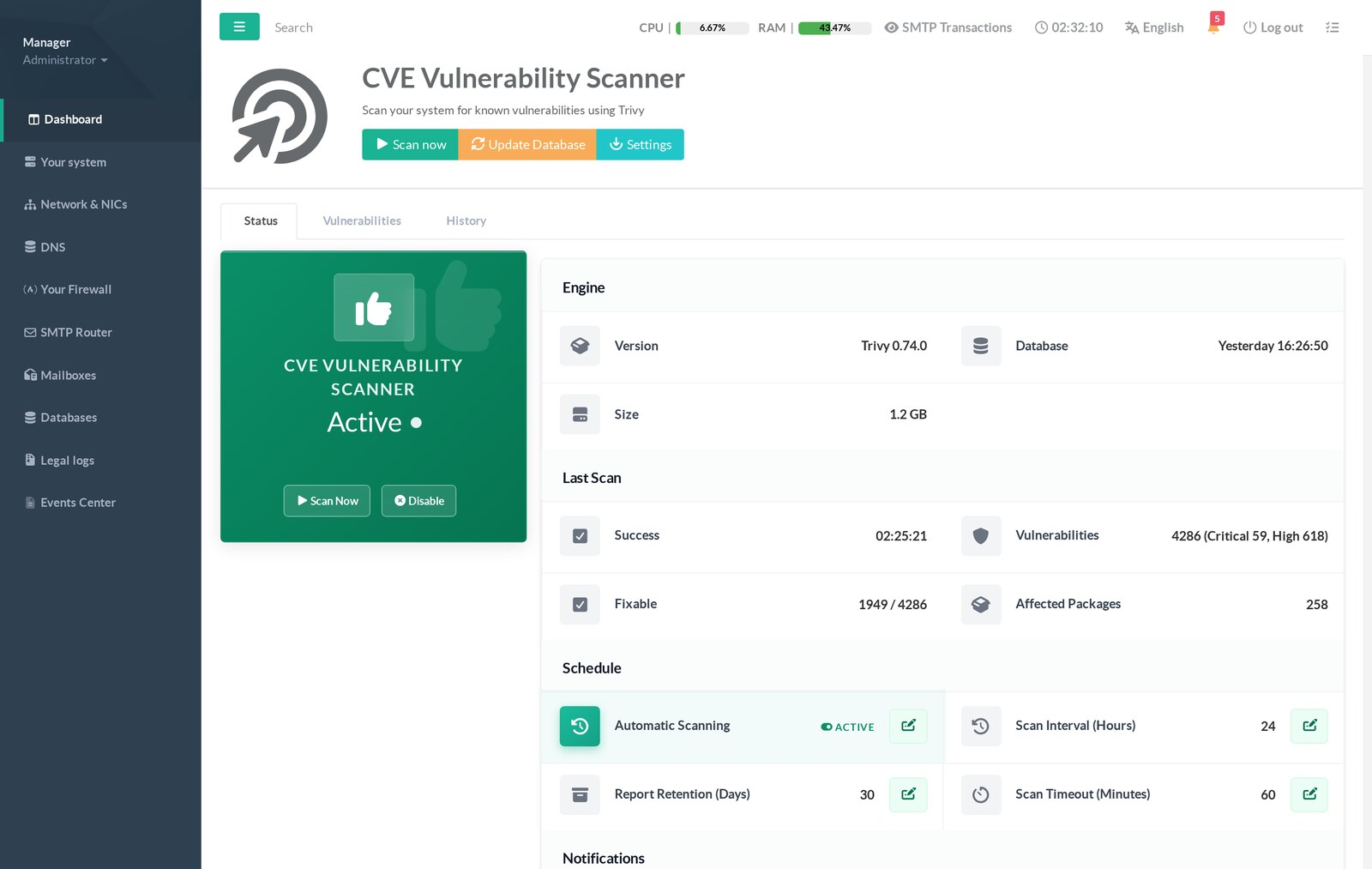
The Status tab is the summary:
Engine version, database date and size, outcome of the last scan, counts, and the schedule.
Two figures matter more than the total:
- Critical / High — what to look at first.
- Fixable — how many of those findings an upgrade would actually close.
When the database is missing, this card says why:
never downloaded, download in progress, or the error returned by the last attempt (mirror unreachable, not enough disk space, checksum mismatch).
Vulnerabilities
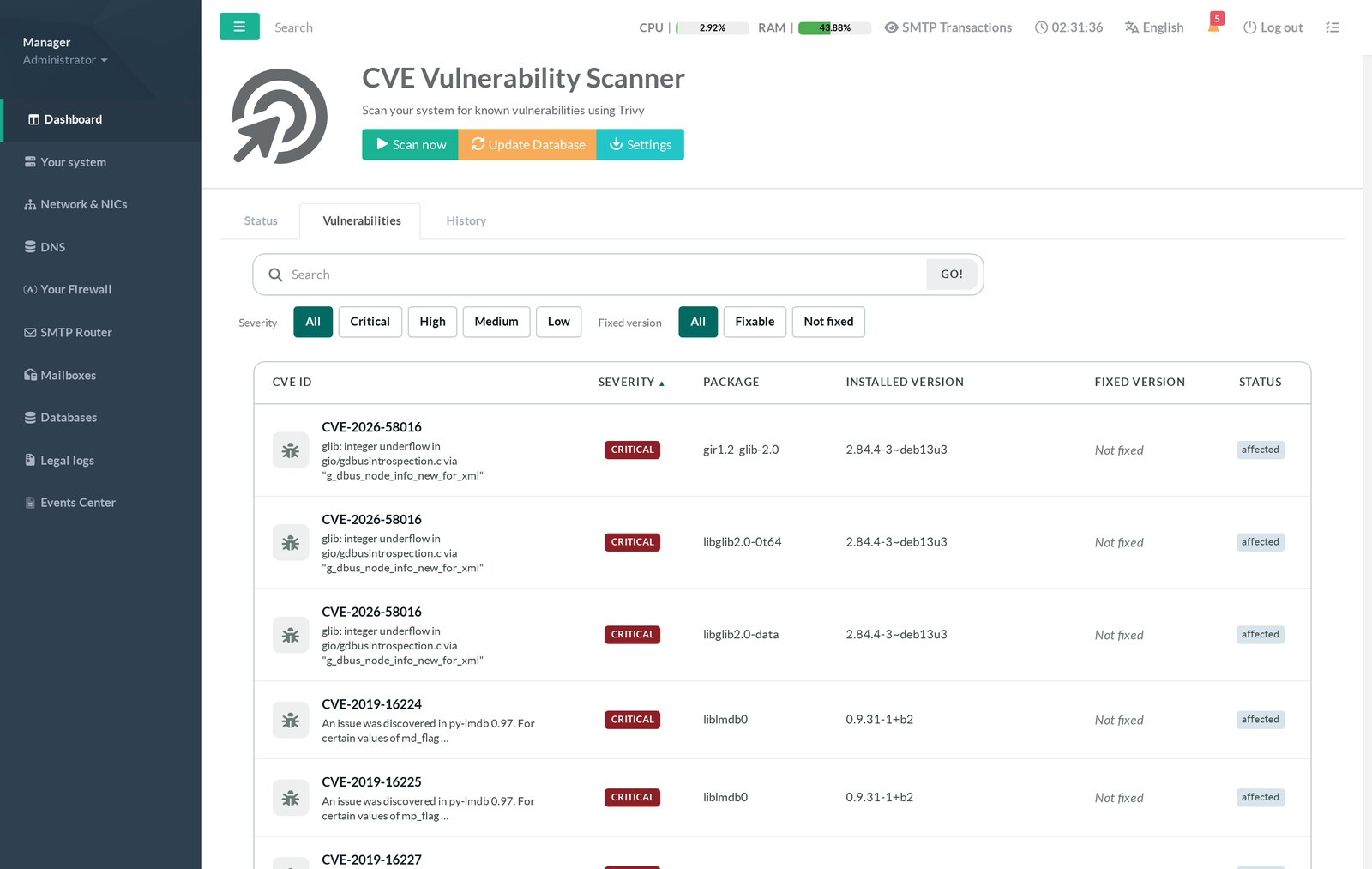
Search accepts a CVE number, a package name or any word of the title.
The two filter rows are independent: Severity (All / Critical / High / Medium / Low) and Fixed version (All / Fixable / Not fixed).
Every column header sorts, and the sort is applied by the daemon over the whole result set — not over the 50 rows currently displayed.
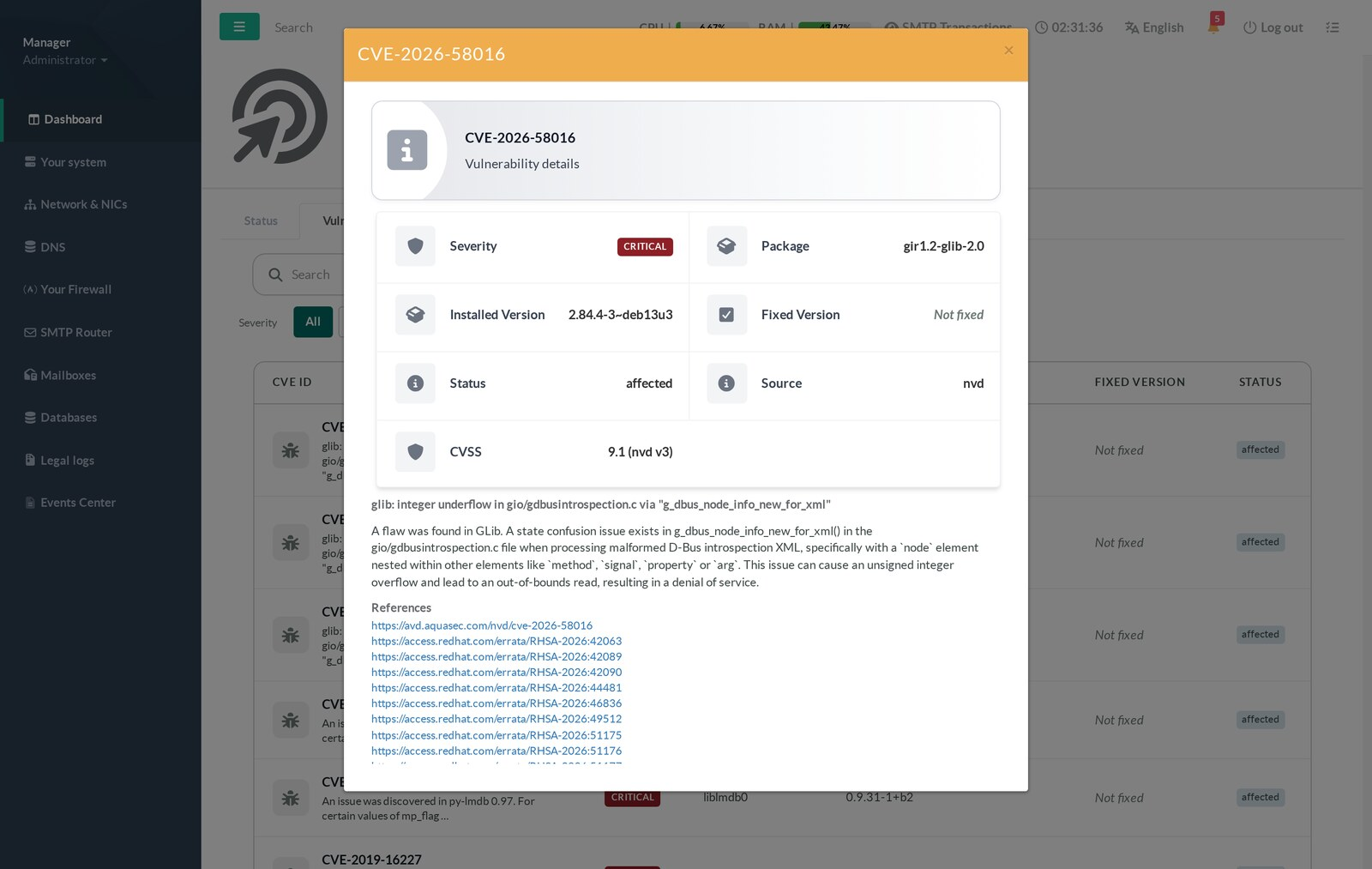
Click a CVE number for the details:
severity, package, installed and fixed versions, status, the source that decided the severity, the CVSS score of that same source, the full description and the upstream references.
The Status column carries the vendor's own verdict and is worth reading: affected, fixed, will_not_fix (the vendor has decided not to fix it), fix_deferred, end_of_life.
A will_not_fix entry will never disappear from your reports through an upgrade.
History and reports
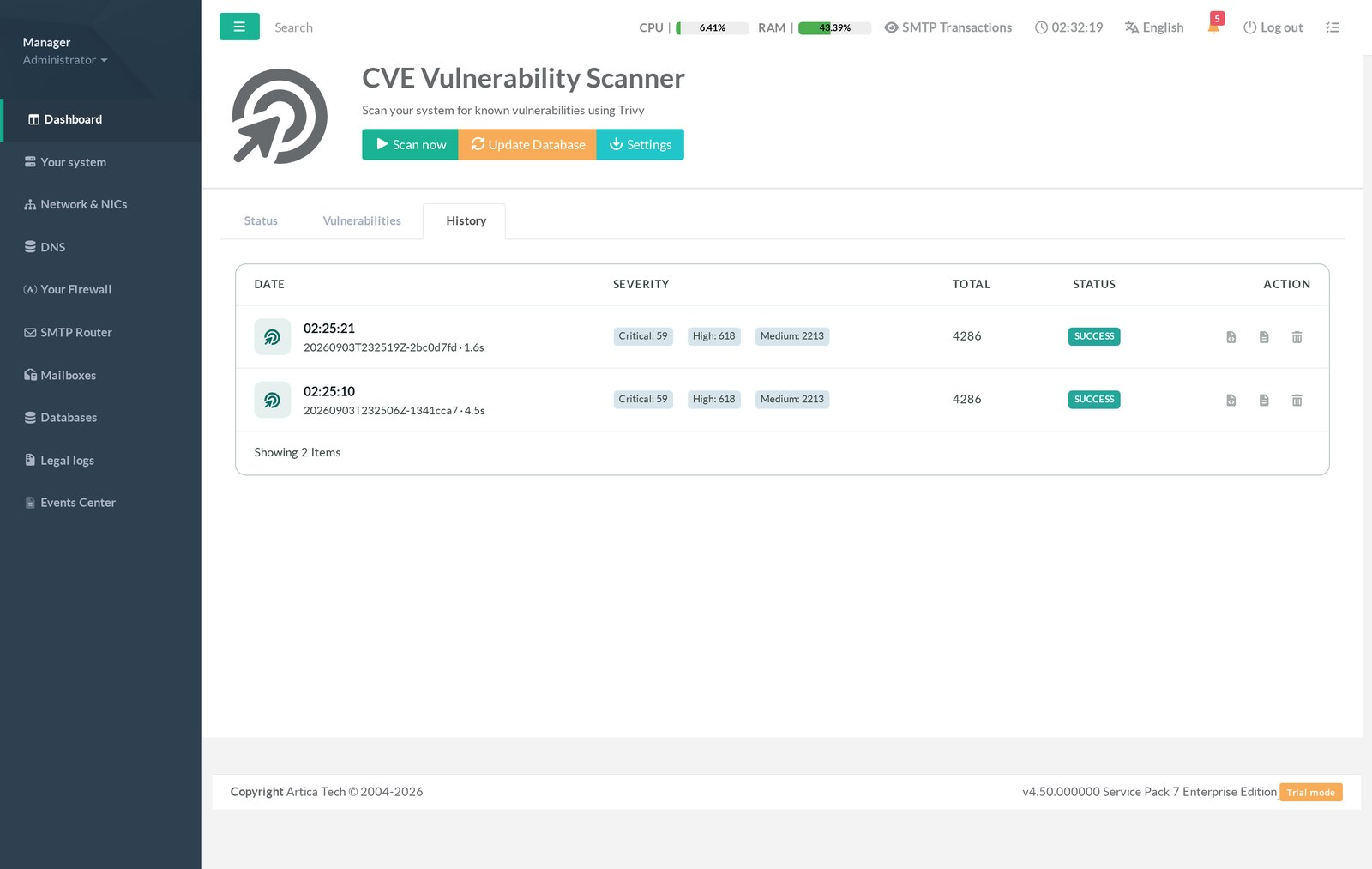
Each row offers the two exports: HTML — a self-contained page, most severe first, that can be mailed or archived as is — and JSON — the raw Trivy output for your own tooling.
The trash icon deletes one report; when you delete the current one, the console immediately re-points to the most recent remaining scan.
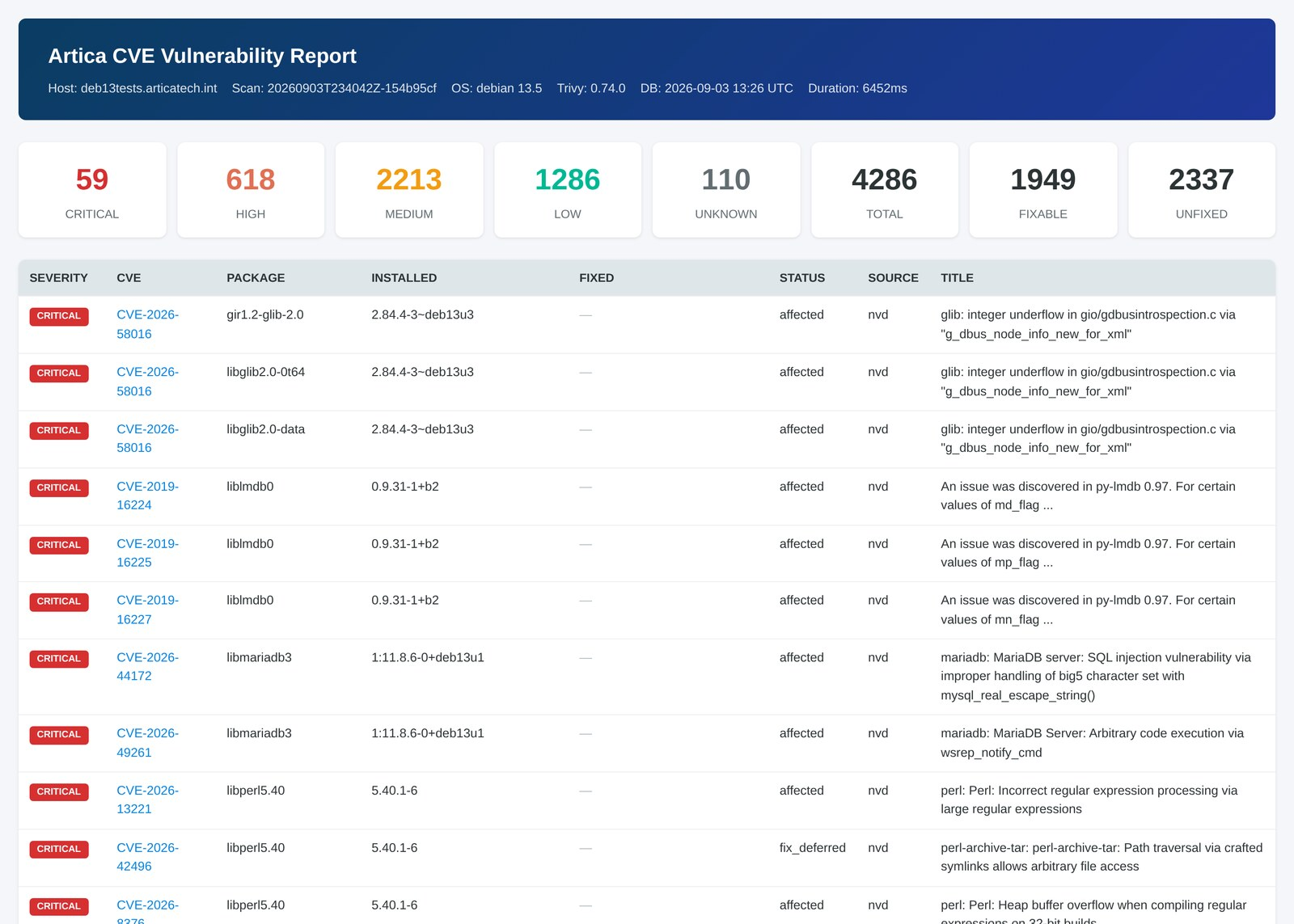
Reports older than the retention period (30 days by default) are removed automatically at the end of each scan.
¶ Notifications
When a scan finds vulnerabilities, the administrator is alerted through the standard Artica notification channel, with the report in the body of the message:
CVE vulnerability scan on deb13tests.articatech.int

  Scan id   : 20260903T233408Z-52d32909 (2.4s)
  System    : debian 13.5
  Trivy     : 0.74.0, database of 2026-09-03 13:26 UTC
  Findings  : 4286 total — 59 critical, 618 high, 2213 medium, 1286 low, 110 unknown
  Fixable   : 1949 of 4286 (258 package(s) affected)

SEVERITY  CVE                PACKAGE                INSTALLED            FIXED IN
CRITICAL  CVE-2026-58016     gir1.2-glib-2.0        2.84.4-3~deb13u3     -
CRITICAL  CVE-2019-16224     liblmdb0               0.9.31-1+b2          -
CRITICAL  CVE-2026-44172     libmariadb3            1:11.8.6-0+deb13u1   -
...Three limits keep that alert useful:
- A severity threshold (Notification Threshold, High by default).
A Debian system reports medium and low findings permanently;
alerting on those would send a mail after every single scan, forever.
Lower the threshold only if you intend to read the result. - A frequency limit.
One alert per 24 hours while the situation holds, immediately when the count grows, and the counter disarms when it reaches zero
The next appearance is reported without waiting out the window.
With a one-hour scan interval, an unbounded version would send 24 identical mails a day. - A size limit.
The body is capped at 40 lines and 60 KB, lists the most severe findings first, and always states how many it left out.
The alert is raised with severity critical when the report contains at least one CRITICAL finding, and warning otherwise.
Note the product-wide rule that applies to every Artica alert: outside production hours, and during the first three minutes after a reboot, an alert is recorded but not mailed immediately. It is still visible in Events Center.
¶ Settings
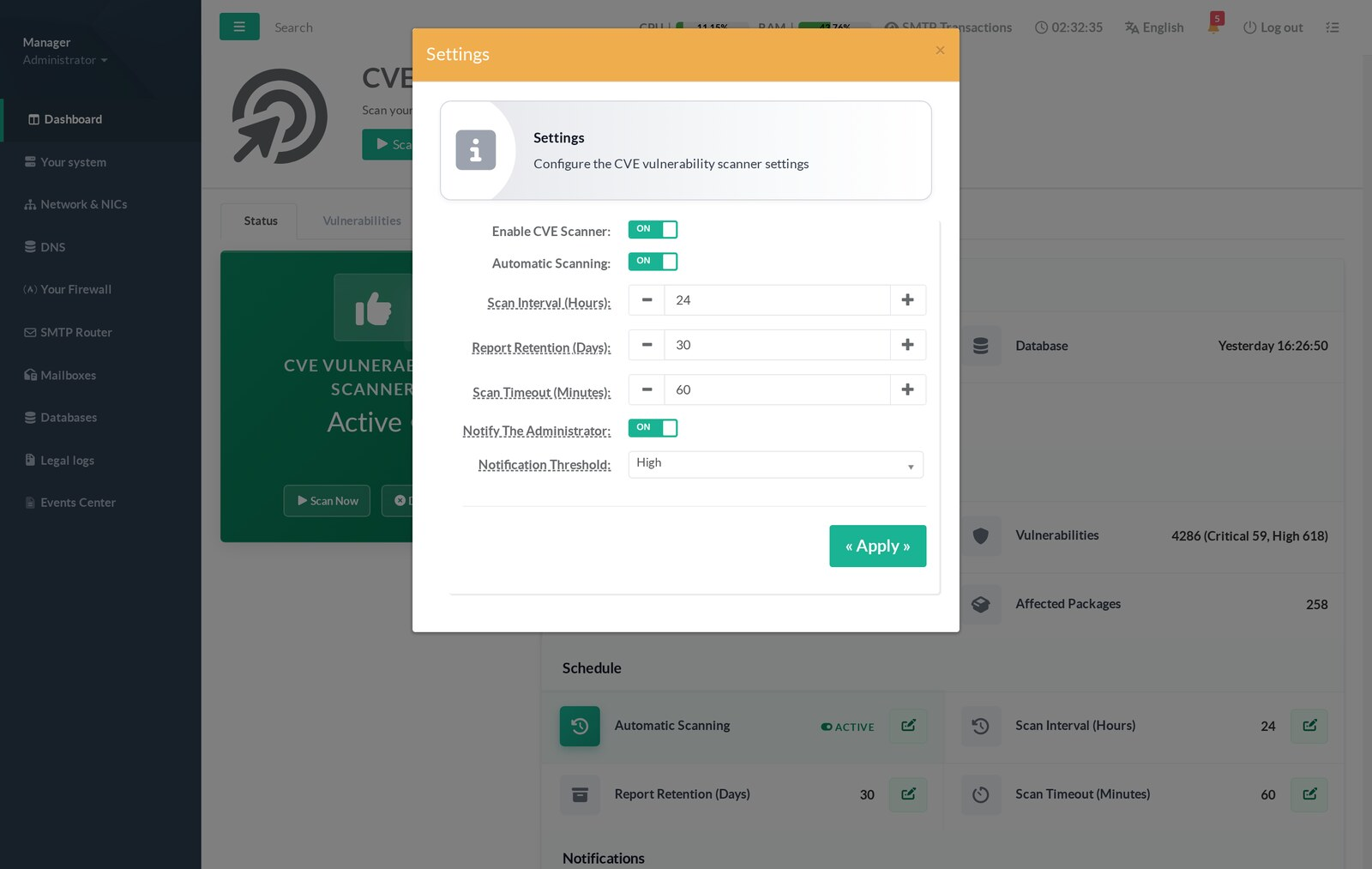
| Enable CVE Scanner | Arms the feature. Off by default. While off, no scan runs and the database is not downloaded or refreshed. |
| Automatic Scanning | Lets the appliance scan on its own schedule. Off means "manual scans only" — the Scan now button keeps working. |
| Scan Interval (Hours) | 1 to 168 (a week). Default 24. The interval is counted from the last attempt, successful or not: a permanently failing appliance retries once per interval, not every five minutes. |
| Report Retention (Days) | 1 to 365. Default 30. Older reports are purged after each scan. |
| Scan Timeout (Minutes) | 5 to 240. Default 60. A scan that exceeds it is stopped and recorded as failed. |
| Notify The Administrator | Sends the alert described above. |
| Notification Threshold | Critical, High (default), Medium, Low, or Any. Findings below the threshold are never counted for the alert. |
¶ Automation
Two independent periodic tasks run while the feature is enabled:
- The scan
Started when the configured interval has elapsed since the last attempt, and only if a database is present.
A scan already running is never doubled. - The database check
The mirror index is read once an hour and the file is downloaded only when its checksum differs.
A check is skipped while a scan is running, because the scanner holds the database open for the whole run.
The Update Database button bypasses the hourly limit and starts the check immediately.
¶ REST API
Everything the console does is available on the API, on the local UNIX socket:
SOCKET=/usr/share/artica-postfix/bin/run/articarest.sock
curl -s --unix-socket $SOCKET http://localhost/system/cve/status | jq
| GET /system/cve/status | Engine, database, current job, last scan, summary of the current report. |
| GET / PUT /system/cve/settings | Read / write the seven settings. PUT replaces the whole object — always send every field. |
| POST /system/cve/scan | Start a scan. Answers 409 when one is already running. |
| POST /system/cve/scan/cancel | Cancel the running scan. |
| GET /system/cve/jobs/{id} | State of a job, running or just finished. |
| GET /system/cve/report/summary | Counts of the current report. |
| GET /system/cve/report/vulnerabilities | The findings. Parameters: severity, status, package, cve, search, fixable (1 = fixable, 0 = not fixed), sort, order, limit (max 500), offset. |
| GET /system/cve/report/vulnerabilities/{cve} | One finding in full. |
| GET /system/cve/reports | The scan history. |
| GET /system/cve/reports/{scan_id}/html | /json | Download one report. |
| DELETE /system/cve/reports/{scan_id} | Delete one report. |
| GET /system/cve/database/status | Database state, including the outcome of the last download. |
| GET / POST /system/cve/database/update | Start a database check/download. Returns immediately; follow the progress file. |
All routes are subject to the same source-address restriction as the rest of the Artica API, and the module refuses every request if that restriction is not configured — an unconfigured access control is a misconfiguration, not a permission.
¶ Troubleshooting
| "Not installed" after installing the package | Check the binary is really there (ls -l /usr/local/sbin/trivy) and that it runs (/usr/local/sbin/trivy --version). The daemon accepts it in /usr/bin, /usr/local/sbin, /usr/local/bin or /usr/sbin, and it must be executable. |
| The database never arrives | The Status card names the cause. Not enough free space: free about 1.6 GB and retry. Download failed: check outbound access to clamav.artica.center. Truncated: the filesystem filled up during the transfer. |
| A scan fails immediately | binary_missing or database_missing in the last-scan line: one of the two prerequisites is absent. Both are shown in the Engine section. |
| A scan ends in scan_timeout | Raise Scan Timeout. A normal scan takes seconds; a timeout usually means the machine is under heavy I/O load rather than that the scan is slow. |
| Thousands of findings | Expected on any Debian system. Filter on Critical + Fixable — that is the actionable list. |
| No alert received | Check the threshold, then remember that an alert raised outside production hours is recorded rather than mailed. It is in Events Center either way. |
| The counts do not change after an upgrade | The console shows the last report, not a live state. Run a new scan after the upgrade. |
¶ Limits worth knowing
- The scanner reports installed packages, not running processes: a vulnerable library that no service loads is still listed, and a service still running an old, already-replaced binary is not.
- Only OS packages are covered. Software installed outside the package manager is invisible to it.
- Findings marked not fixed cannot be closed by upgrading — they need a different mitigation, or they wait for the vendor.
- The database is a snapshot: a CVE published after your last download is not in it. That is what the hourly mirror check is for.