The Mail Log Tracker records every SMTP operation of the appliance in real time:
each message accepted, each delivery attempt, each deferral, each bounce and each pre-queue refusal.
That stream is precise, but it lives in the console — somebody has to go and look at it.
The daily report turns one closed day of that stream into a single e-mail.
It is built from the tracker’s own tables, rendered as a self-contained HTML message with embedded charts, and it carries a CSV attachment holding the raw per-recipient operations of the day.
The message is handed to the appliance’s local Postfix relay, so it leaves the machine the same way any other mail does.
Two ideas govern the whole feature:
- A closed day, never a moving window.
The report covers the previous day from 00:00:00 to 23:59:59 in the appliance’s own time zone.
A day still in progress is refused, because half a day of figures invites the wrong conclusion. - The report describes, the console investigates.
Every figure in the e-mail is a link back to a place in the console where the same population can be filtered and read message by message.
The report tells you whether to go and look; it never replaces looking.
The report page defines what is sent and to whom.
It does not define when: the periodicity is a system task, described further down.
¶ Why you want it
- One e-mail replaces a daily console visit.
The figures that matter for a mail relay — accepted, delivered, deferred, bounced, refused, volume — arrive before anyone asks for them. - A bounce and a deferral are told apart.
Bounced mail went back to its sender and is lost; deferred mail is still queued and will be retried.
They demand different reactions, and the report gives each its own block with its own causes, destination domains and senders. - The attachment is evidence, not a summary.
The CSV holds one row per recipient outcome, with the queue ID, the relay, the SMTP status, the DSN and the diagnostic text.
It is what you attach to a ticket or hand to an auditor. - It renders with remote content blocked.
The charts are PNG images embedded in the message body (Content-ID), not links to a server.
There is no script, no web font and no remote URL, so the report looks the same in a locked-down Outlook as in a browser. - It speaks the same language as the console.
Refusal categories use exactly the vocabulary of the Rejected messages page, so a category read in the mail can be searched for in the console without translation. - It is multi-instance aware.
Every declared Postfix instance gets its own row, silent ones marked explicitly rather than omitted. - It says when it does not know.
If the daemon started inside the window, if the tracker was disabled, or if log lines were dropped under load, the report prints a warning naming the reason instead of presenting incomplete figures as complete. - Privacy is structural.
No subject, no message body, no header and no raw log line is ever read into the report or the CSV.
The columns are a hand-written list, not a copy of the table.
¶ Use cases
- The morning check
The most common one.
An administrator responsible for a relay opens one e-mail instead of a console, and knows in ten seconds whether the night was normal.
The hourly table makes an unusual burst visible without any query. - Catching a compromised account
A local mailbox whose credentials have leaked starts sending in volume, and the remote servers start refusing.
In the report this shows as a sharp rise in Bounced, with one sender at the top of the “Senders concerned” list of the bounced block.
That single line is usually the whole diagnosis. - Diagnosing an outbound routing problem
When deliveries pile up, the Deferred block concentrates on one cause (“Host unreachable”, “Connection timed out”) and on a handful of destination domains.
A deferral wave on a single domain is a peering or DNS problem;
The same wave on every domain is a local network problem. - Proving what was delivered
A customer or an auditor asks what happened to the mail of a given day.
The CSV attachment answers with the raw per-recipient outcomes
Queue ID, relay, status, DSN, diagnostic > without giving anyone access to the console. - Watching a multi-tenant or multi-instance appliance
The per-instance table separates the traffic of each Postfix instance, so a problem confined to one tenant does not hide inside a global total. - Verifying a migration
After moving a relay, comparing two consecutive daily reports is the cheapest way to confirm that the volume
The destinations and the refusal profile did not change.
¶ Where the settings live
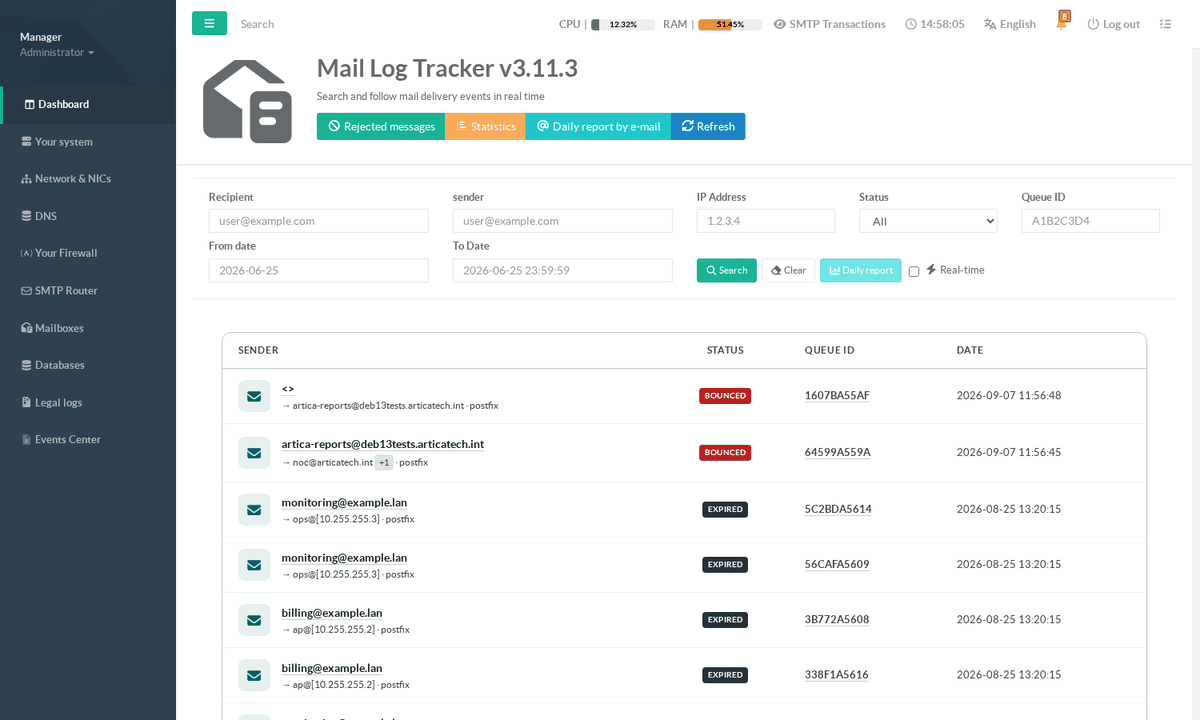
Everything the report needs is defined in one modal of the Mail Log Tracker page. Open SMTP Router > Mail Log Tracker and click Daily report by e-mail in the page header.
The modal is the single place where the report is defined.
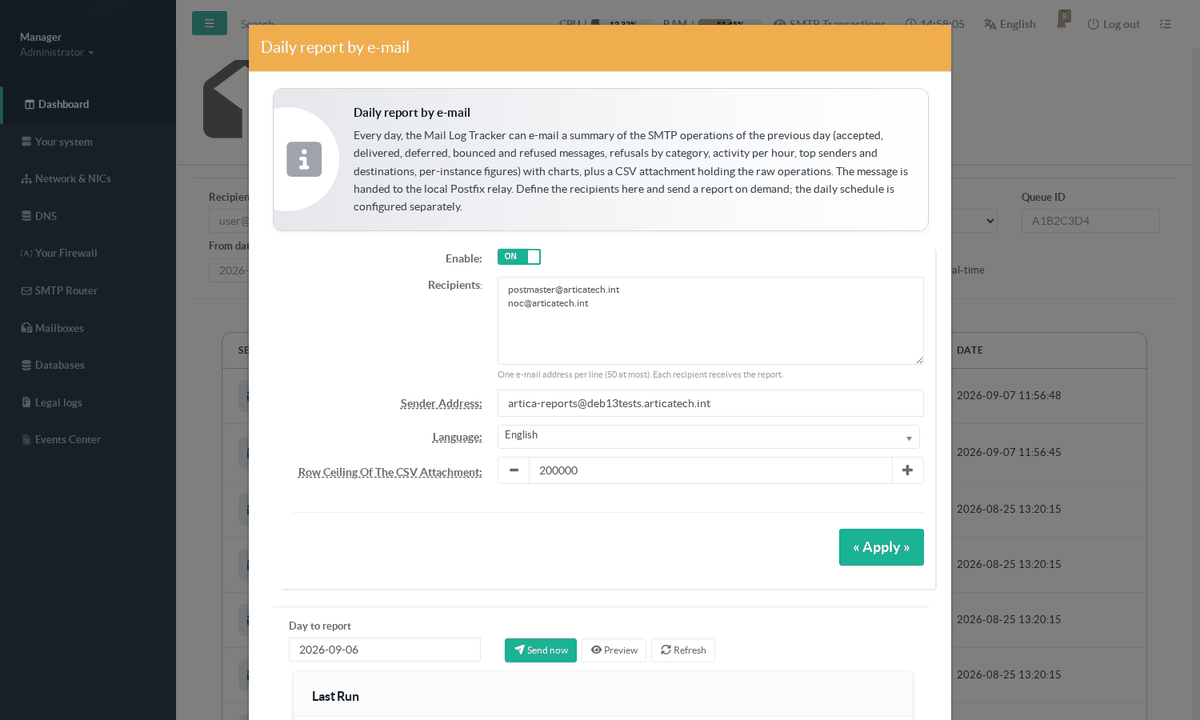
| Field | What it does |
|---|---|
| Enable | Arms the feature. While it is off, the scheduled task still runs but sends nothing and records the refusal in the run journal so a disabled report is never silently forgotten. |
| Recipients | One e-mail address per line, 50 at most. Every recipient receives the same message with the same attachment. Addresses are validated when you save and again when the message is submitted. |
| Sender Address | The envelope sender of the report. Leave it empty to use noreply@<hostname>. Use an address your own anti-spam policy accepts, and one whose bounces someone reads. |
| Language | The language of the report body. It is a setting of the report, not of the console: the console language is a browser preference of whoever is logged in, which says nothing about who reads the mail. Available: English, French, German, Spanish, Italian, Portuguese, Brazilian Portuguese, Polish. |
| Row ceiling of the CSV attachment | The maximum number of rows exported (default 200 000). It bounds the size of the attachment on a very busy day. When the ceiling is reached the CSV is truncated and the e-mail says so explicitly in its footer. |
Click « Apply » to save. Saving does not send anything.
¶ Testing before you schedule
Below the settings, the same modal lets you exercise the report on any finished day.
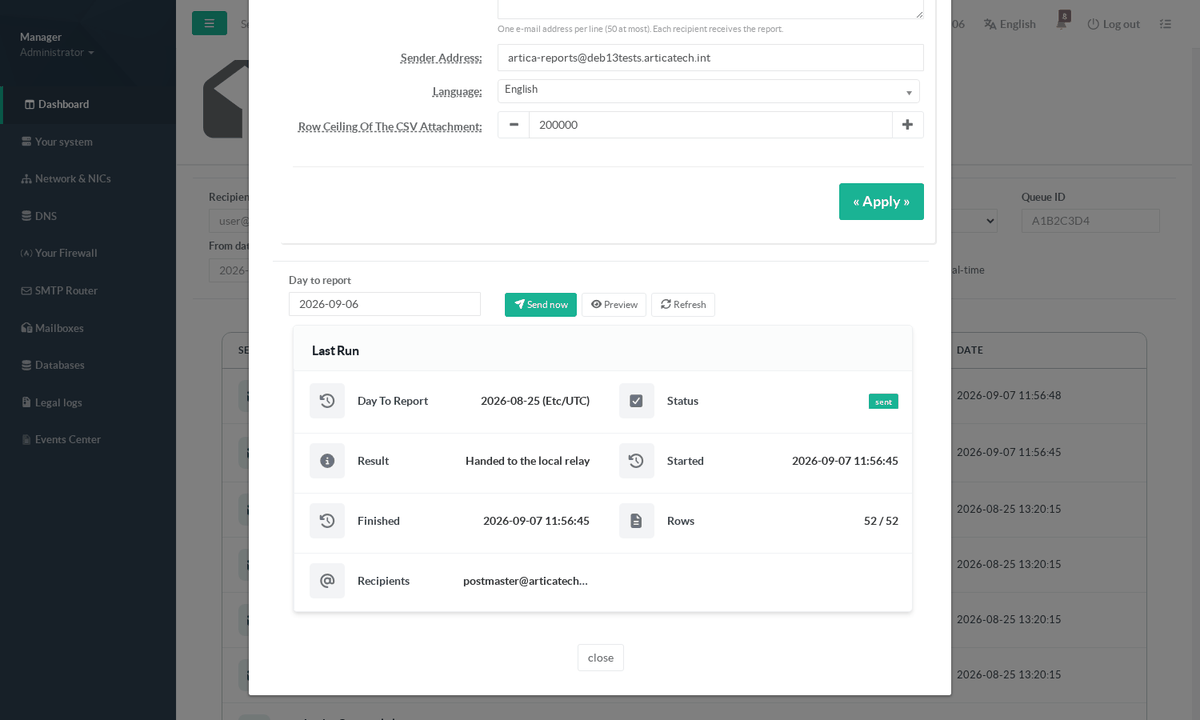
- Day to report
defaults to yesterday.
Any past day for which the tracker holds data can be used.
Today and future days are refused: only a finished day can be reported. - Preview
Renders the report in a new browser tab, without sending anything and without an attachment.
This is the fastest way to see what your recipients will receive. - Send now
Produces the report and hands it to the local relay immediately, exactly as the scheduled task would.
Use it once, after configuring, to confirm the whole chain works. - Last Run
The journal of the most recent run: the day covered, the status, the result, the start and end times, the number of rows exported against the number of rows in the window, and the recipients.
This panel is the answer to “did the report go out last night?”.
A run that could not proceed — feature disabled, no recipient, tracker disabled, a run already in progress — is written to the same journal with its reason. There is no silent failure.
¶ What the e-mail contains
The subject is [Artica] <hostname> - SMTP daily report <YYYY-MM-DD>. The body opens with the day, the exact window and the time zone, followed by the key figures and the hourly activity.
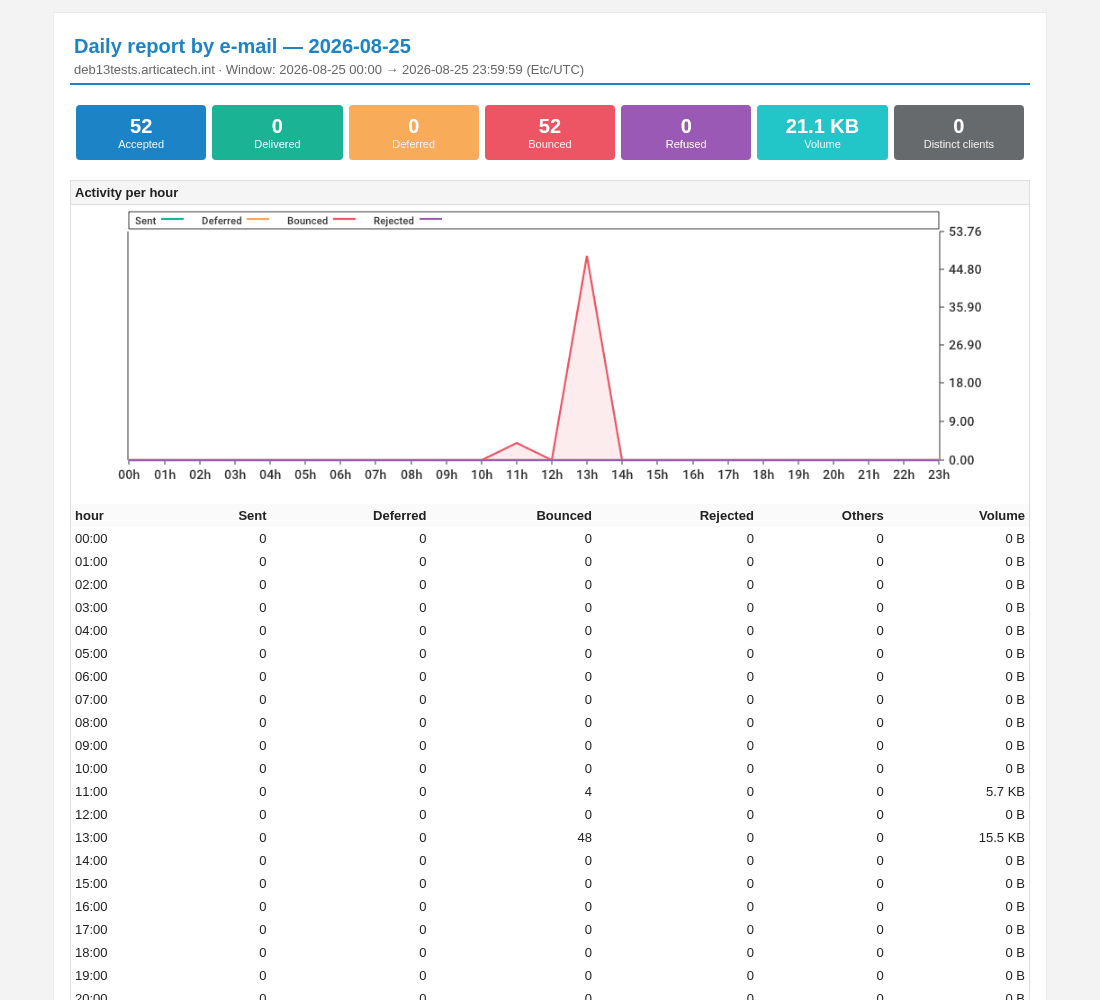
- Accepted — messages the appliance took responsibility for.
- Delivered / Deferred / Bounced — their outcome at the end of the day.
- Refused — sessions rejected before queueing (RBL, greylisting, unknown recipient…). These never became messages.
- Volume and Distinct clients — bytes accepted, and how many different client addresses connected. Locally injected mail has no client address, so an appliance that only relays its own applications legitimately shows zero here.
The hourly table always matches the local day: it shows 23 or 25 rows on a daylight-saving change instead of a fixed 24.
¶ Bounced and deferred messages
This is the section to act on.
It splits the two failure classes that the summary table below it deliberately merges.
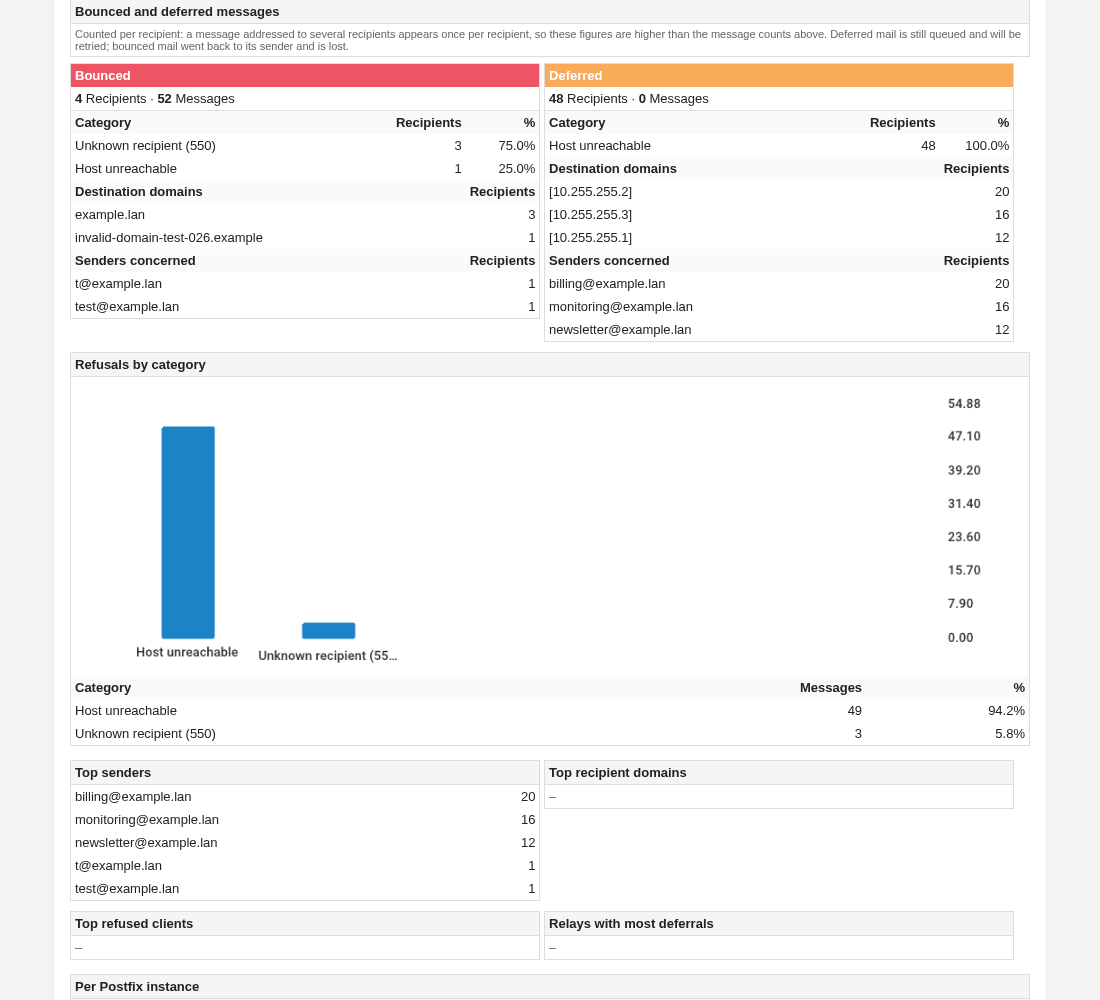
Each block gives, for its class: the causes with their share, the destination domains, and the senders concerned.
Read the two counters carefully — they do not measure the same thing.
The cause of a failure is recorded per recipient, while the key figures at the top of the report count messages.
A message addressed to three recipients that failed for two of them is one bounced message and two bounced recipients. Both numbers are printed side by side so the difference is visible rather than puzzling.
Two consequences are normal and worth knowing:
- A class can show recipients but zero messages.
A message deferred at 10:00 and delivered at 14:00 contributed a deferral during the day, yet its final state is “delivered”.
That is the deferral you want to see: it happened, and it was resolved. - A class can show messages but zero recipients.
Mail that simply ran out of queue lifetime is counted as bounced at the message level but leaves no per-recipient delivery record to break down.
The block says so explicitly instead of claiming nothing happened.
Below it, Refusals by category is the one-glance summary of everything the appliance refused
Pre-queue rejections, remote bounces and remote deferrals together — with a chart and the same category names used by the console’s Rejected messages page.
The tops then name the busiest senders, the destinations that received the most mail, the client addresses most often refused, and the relays behind the most deferrals.
A dash means the list is genuinely empty for that day.
The report closes with a per Postfix instance table and a footer naming the attachment, the number of rows it holds, and the daemon version that produced it.
¶ The CSV attachment
The attachment is the raw material behind the summary:
one row per recipient outcome and one row per pre-queue refusal, with a frozen 19-column header so a script written today keeps working.
It carries the timestamp, the instance, the queue ID, the client address and name, the sender, the recipient, the relay, the SMTP status, the DSN, the diagnostic text, the size and the delay.
It carries no subject and no message content — that is a property of how the export is written, not a filter that could be switched off.
Above 2 MiB the file is gzipped automatically. If the row ceiling was reached, the file is truncated and the e-mail footer states it in plain words rather than leaving you with a silently short export.
¶ Scheduling the report — system task 87
The daily-report modal decides what is sent and to whom.
It deliberately does not decide when:
the periodicity is an ordinary Artica system task, so it is scheduled, enabled, disabled and audited exactly like every other recurring job on the appliance.
Go to Your system > Tasksand create a new schedule of type [87] Daily report by e-mail.
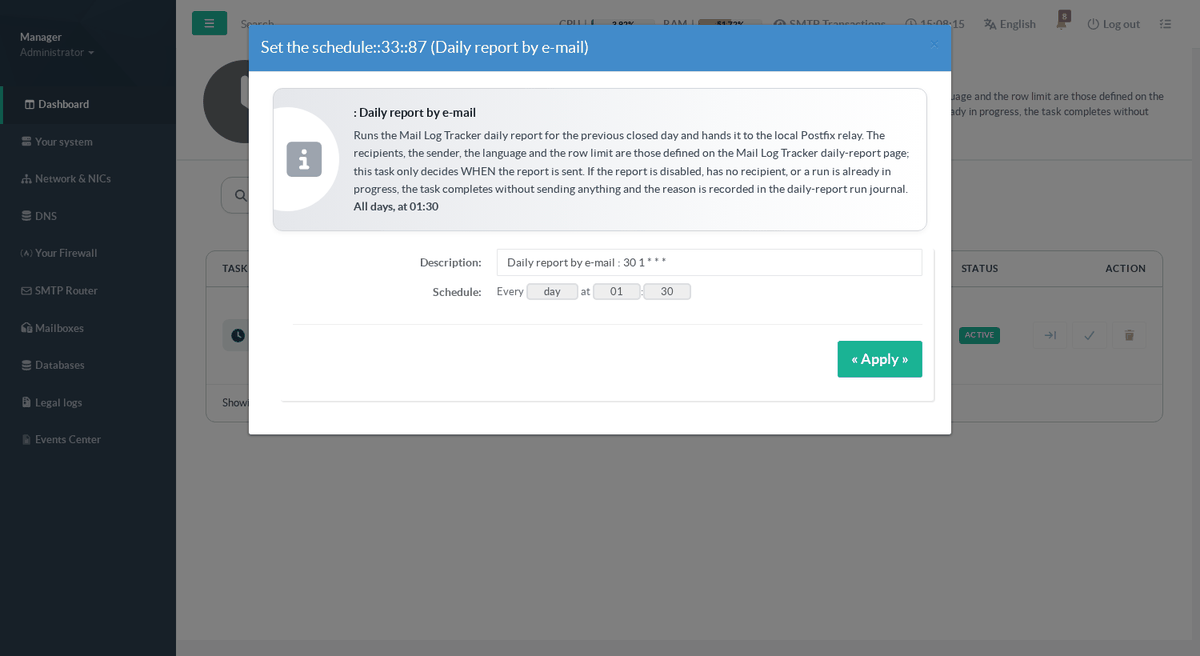
Set the schedule to every day, at an hour comfortably after midnight — 01:30 is a good default.
The report always covers the previous day, so it must run once that day is closed; running it at 00:05 works too, but leaves no margin if the appliance is busy at midnight.
It asks the daemon to produce the report over its local socket and falls back to the command line if the daemon is not answering.
It carries no recipient, sender, language or row limit of its own: those come from the daily-report modal, so there is exactly one place to change them.
Do not forget « Apply all schedules »
A newly created schedule is stored but not yet installed in cron.
Its status badge reads INACTIVE until you click Apply all schedules on the tasks page, which writes the cron entry (/etc/cron.d/syssch-<ID>) and turns the badge to ACTIVE.
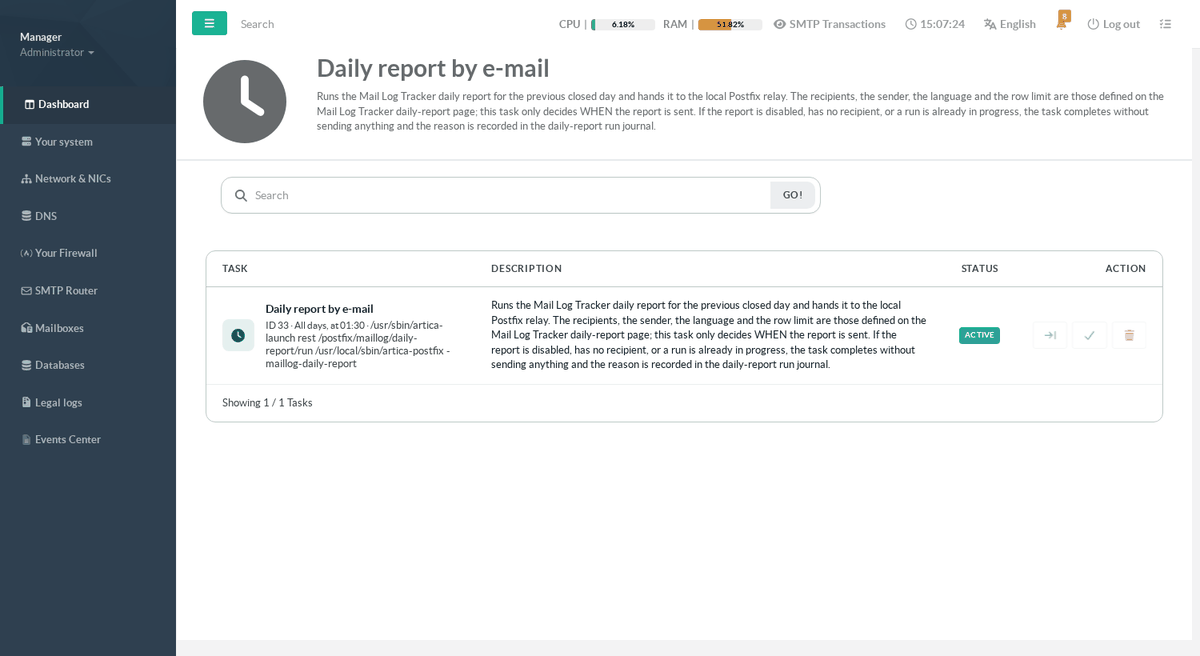
This is the single most common reason for “the report was scheduled but never arrived”.
The badge is the authority: it reflects the cron file on disk, not the checkbox in the database.
Two behaviours are worth knowing:
- The task completes normally when there is nothing to send
Report disabled, no recipient, tracker disabled, or a run already in progress.
It does not fail; it records the reason in the run journal, which the Last Run panel displays. - Disabling the task stops the sending without touching the settings, and disabling the report in the modal stops it without touching the schedule.
Either switch works on its own.
¶ From the command line
The same report can be produced from a shell, which is useful for a one-off, for a test after a migration, or from an external scheduler:
artica-postfix -maillog-daily-reportartica-postfix -maillog-daily-report -day 2026-08-25artica-postfix -maillog-daily-report -day 2026-08-25 -to alice@example.com,bob@example.comartica-postfix -maillog-daily-report -day 2026-08-25 -preview /tmp/report.html
-dayselects a finished local day; without it, yesterday.-tooverrides the recipients for that run only — the addresses are never stored.-previewwrites the HTML body to a file instead of sending it.
Exit status: 0 handed to the relay, 1 failed, 2 a run was already in progress, 3 declined (disabled, or no recipient). A declined run stays distinguishable from an empty one, so a wrapper script can react correctly.
¶ Troubleshooting
| Symptom | What to check |
|---|---|
| The report never arrives | Open the modal and read Last Run. If it shows nothing, the schedule never fired: check that the task badge reads ACTIVE on the tasks page, not INACTIVE. |
| Last Run says the run was declined | The report is disabled, or has no recipient. Both are shown in the same modal, a few lines above. |
| Last Run says “sent” but no mail arrived | “Handed to the local relay” means Postfix accepted the message; from there it is an ordinary delivery. Search the queue and the tracker for the sender address configured in the modal. |
| A day is refused | Only a finished day can be reported. Today and future dates are rejected on purpose. |
| The report warns that figures may be incomplete | The warning names its reason: the daemon started inside the window, log lines were dropped under load, or the tracker was disabled for part of the day. The figures are still the best available — they are simply not certified complete. |
| “Distinct clients” is zero | Normal when the mail is injected locally by applications rather than received over the network: such messages carry no client address. |
| The attachment is marked partial | The row ceiling was reached. Raise it in the modal, or report a narrower day. |
The run journal is kept for 90 days and pruned automatically, so the history of what was sent stays available for as long as it is useful without growing without bound.