A collector is the agent's counterpart behind the proxy: it reads what is installed on an application server and reports it, and takes no commands at all. This page is about the agent.
An agent is the decision engine.
The console is where policy is written; the agent is what applies it, next to nginx, on every request. One agent serves one or more sites, pulls its configuration from the console, and reports back what it did.
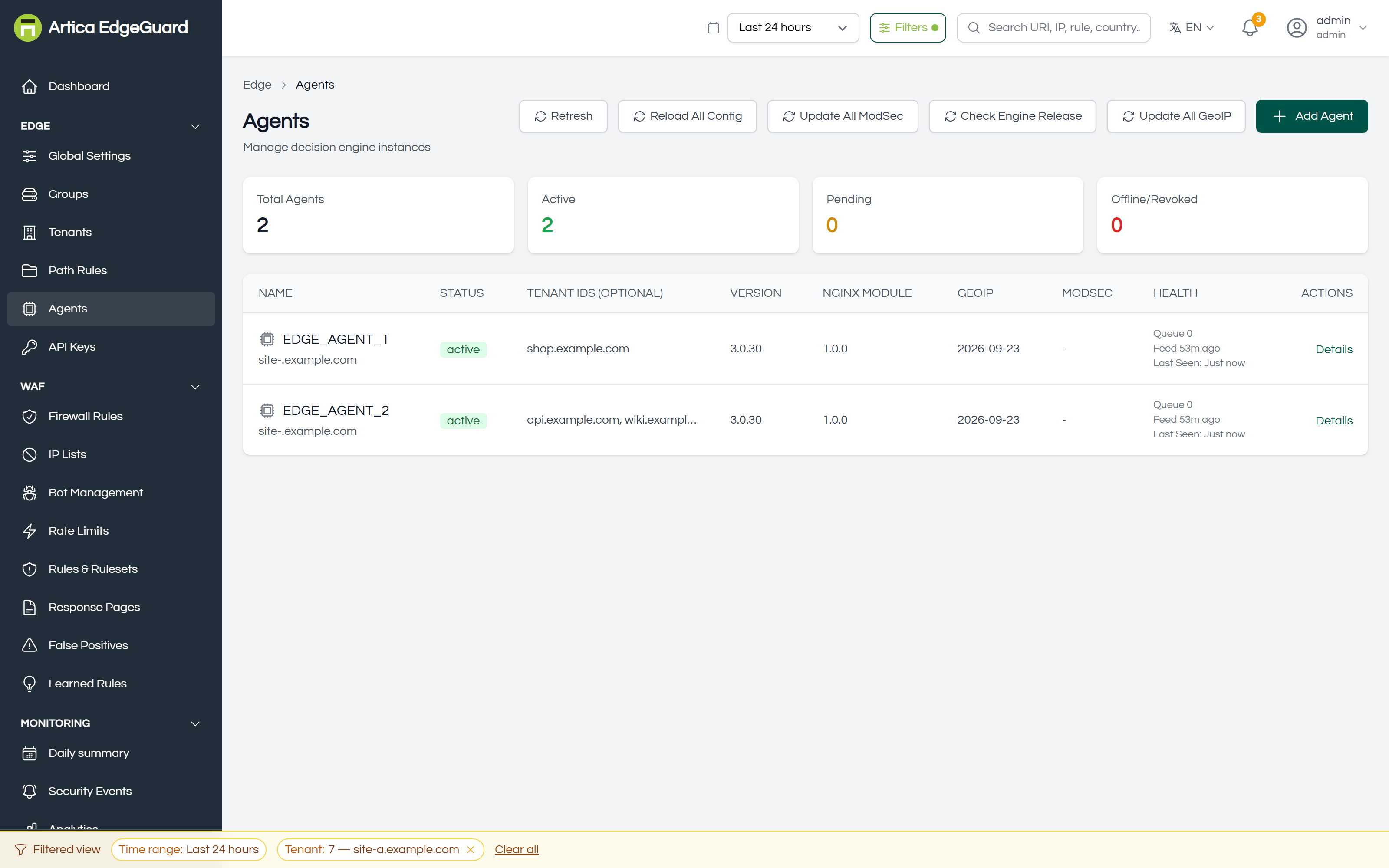
¶ What the list tells you
| Column | Meaning |
|---|---|
| NAME | the agent's name, with its hostname underneath |
| STATUS | active, pending, offline or revoked |
| TENANT IDS | which sites it protects |
| VERSION | the engine version it is running |
| NGINX MODULE | the version of the module inside nginx, or not consulting — see below |
| GEOIP | the date of its GeoIP database |
| MODSEC | the CRS version, when ModSecurity is in use |
| HEALTH | queue depth, when the rule feed last updated, when it was last seen |
The four counters above the table — total, active, pending, offline/revoked — are the quickest answer to "is the fleet healthy?".
An agent that stops reporting is marked offline automatically. Nothing else happens to it: the last configuration it pulled is still in force at the edge, because an engine that cannot reach the console must keep protecting the site rather than stop.
¶ Is nginx actually consulting the agent?
STATUS answers whether the agent is talking to the console. It does not answer whether nginx is talking to the agent, and those are different questions with the same green badge.
An agent can be running perfectly, pulling its configuration and reporting its health, while nginx never asks it anything — the module not loaded, security_check not switched on for the server block, or the socket owned by a user nginx does not run as. The site is then served without being examined, and the console shows an active agent with no events, which looks exactly like a site nobody attacks.
The NGINX MODULE column is what separates them, because the only way that value can be known is from a request the module itself sent:
| What you see | What it means |
|---|---|
a version, e.g. 1.0.0 |
nginx is consulting this agent, and that is the module's version |
| not consulting | no request has ever reached this agent from nginx |
| a version plus no recent request | it was being consulted, and nothing has arrived for over six hours |
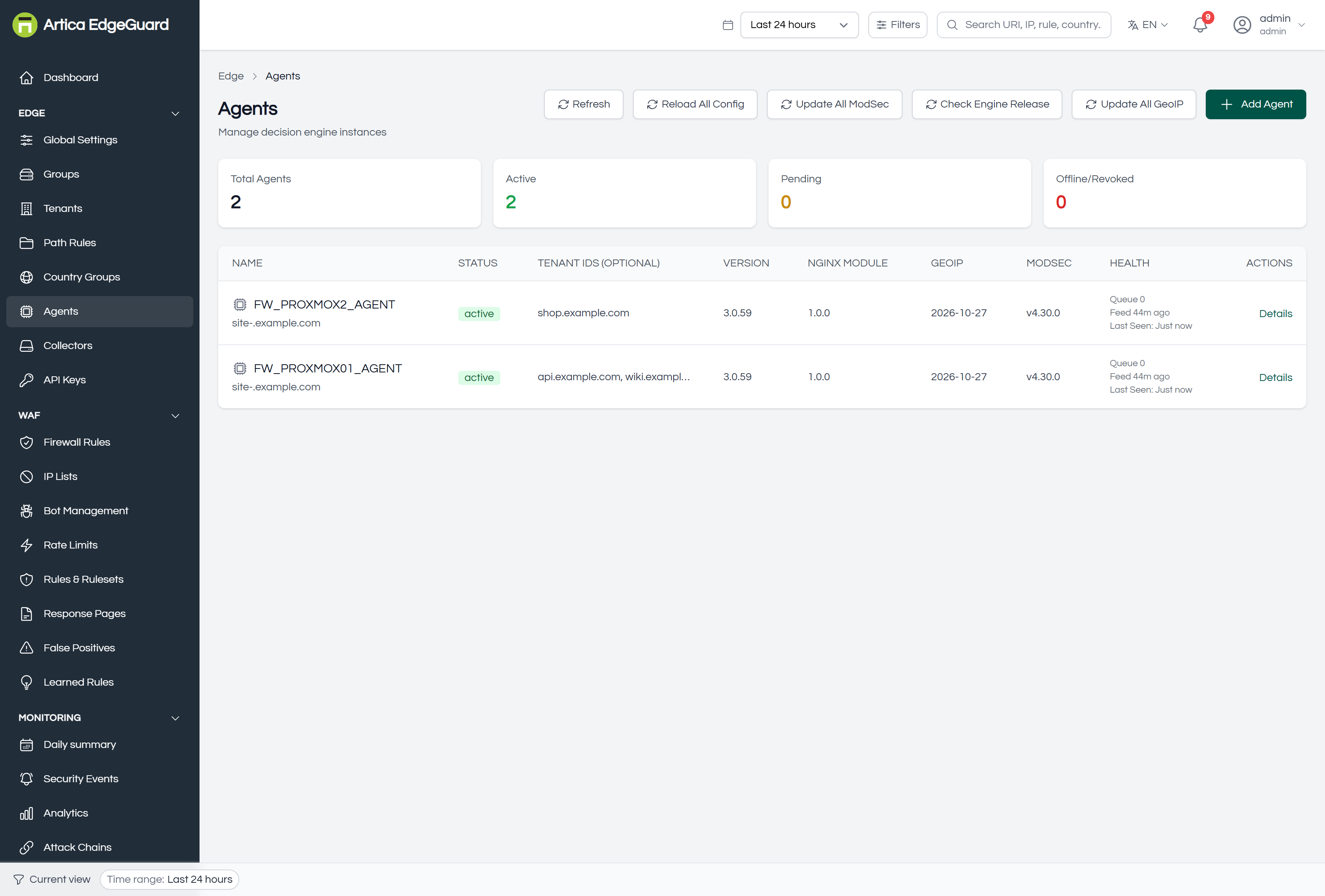
"No recent request" is a question, not a verdict. A site with no visitors and a site nginx has stopped consulting send exactly the same thing — nothing — so the figures cannot tell them apart. Make one request to the site: if the agent still reports nothing, nginx is serving that traffic without examining it.
The first two also raise a notification, so they reach you without anyone watching the table. The third is deliberately a warning rather than an alert, for the reason above.
¶ If it says "not consulting"
Three things cause it, in the order worth checking:
- The module is not loaded.
nginx -Vshould list the security module, andnginx -Tshould show theload_moduleline. security_checkis not on for the server blocks that matter. It is off unless switched on.- The socket is owned by someone nginx cannot read. This is the common one on anything that is not Debian or Ubuntu: nginx runs as
nginxon RHEL, Rocky, Alma, Fedora and SUSE, and ashttpon Arch and Alpine. The engine detects the right user by itself from version 3.0.59; on an older engine, or an unusual setup, setsocket_ownerin its configuration to the user nginx runs as.
Running EdgeGuard beside an nginx you manage yourself? See Your own nginx for what to paste into it.
The engine reports the third one itself — if it could not hand the socket over, it says so on its next heartbeat rather than leaving the reason in a log file at boot.
¶ How an agent and the console talk
Two conversations, both started by the agent — the console never connects inwards, which is what lets an agent sit behind NAT or in a customer's data centre:
- Configuration pull, about every 30 seconds. The agent asks for everything: settings, rules, IP lists, bot rules, rate limits, response templates, exclusions, accepted learned rules. It stores them in a local SQLite cache and serves decisions from that, so a console outage does not stop protection.
- Heartbeat, on the same rhythm. The agent reports its versions, health and counters — firewall-rule hits, bot-rule hits, ruleset hits, exclusion hits, endpoint shapes, learned-rule evidence — and central folds them into the pages you read.
Everything you change in the console therefore reaches the edge within about half a minute, and nothing needs restarting.
¶ Registering an agent
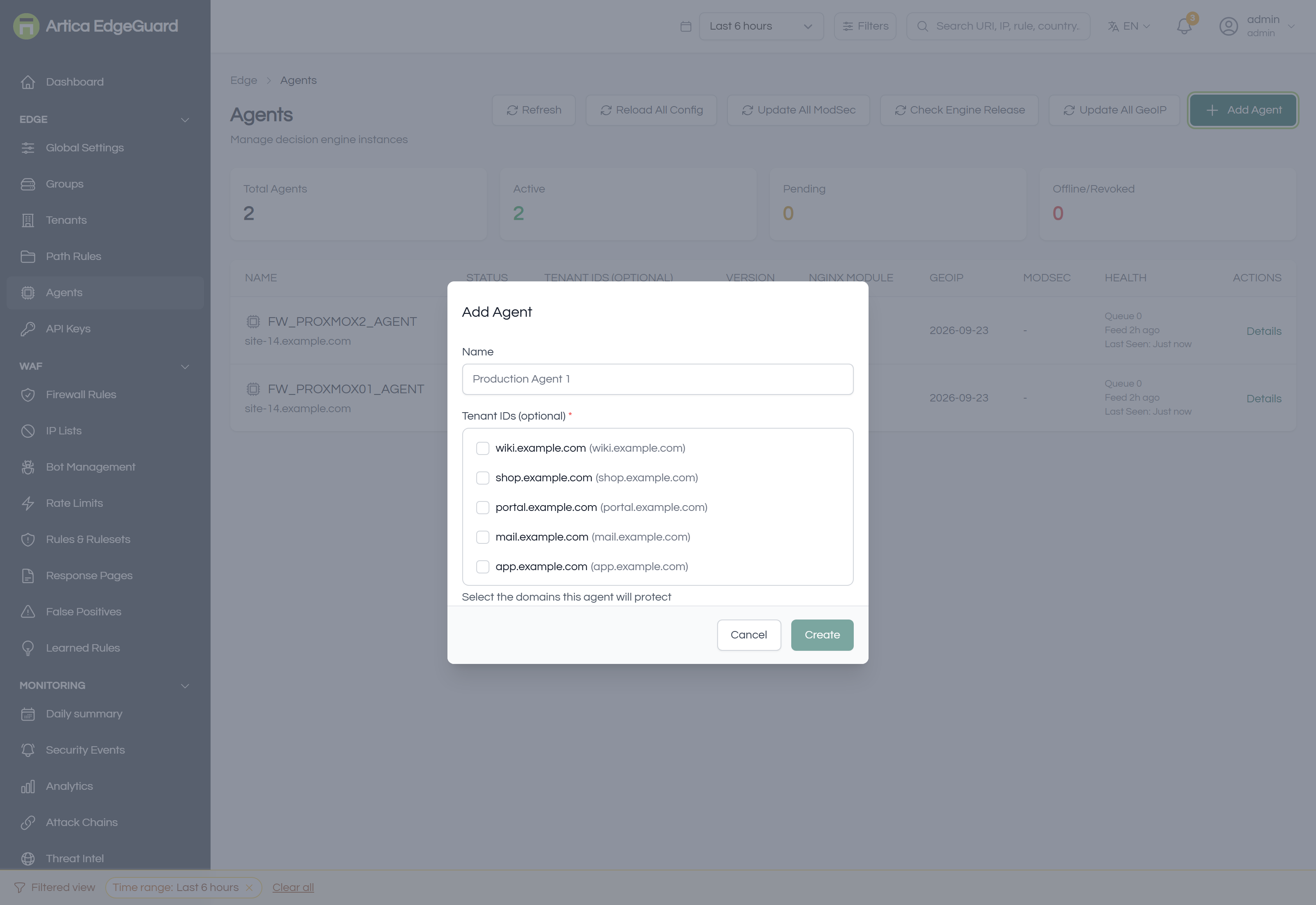
- Click Add Agent.
- Name it — e.g.
Production Agent 1. Use something that will still make sense when there are six. - Tick the domains this agent will protect.
- Create, and copy the key it shows into the agent's configuration file.
- The agent appears as pending until it reports in, then active.
¶ The details panel
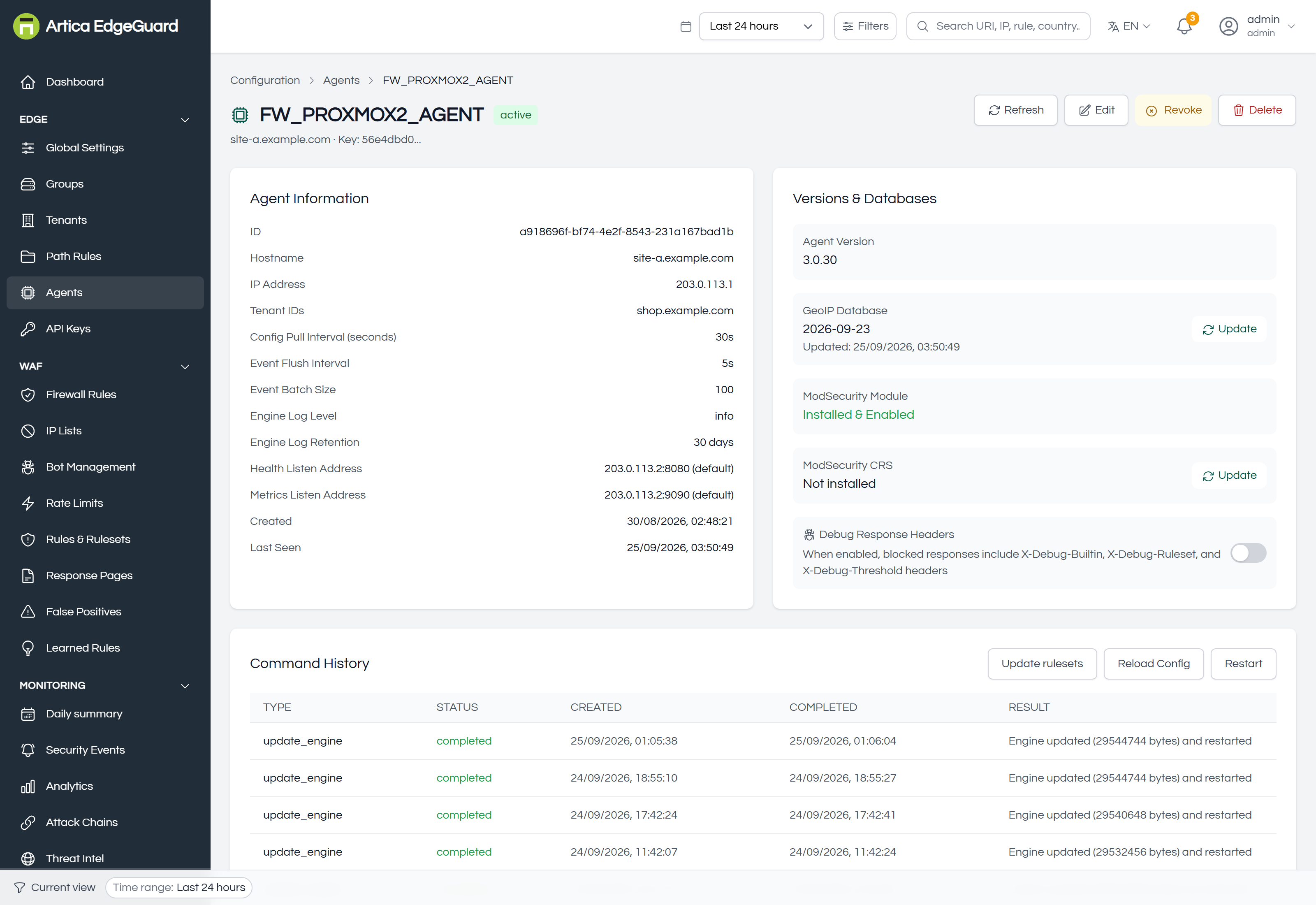
Details on a row opens everything known about one agent, in three parts:
- Agent Information — identity, address, hostname, the sites it serves, status and last heartbeat.
- Versions & Databases — engine, nginx module, GeoIP date, CRS version. This is where you see that one agent is behind the others, which is the most common cause of "why does that site behave differently?".
- Command History — what has been asked of this agent and what came back. A failed update is visible here rather than silent.
- Installed software — what this node's own package manager reports, read from
dpkg. Filter by package, source package or version. - Known vulnerabilities — what Debian's security tracker says about those versions.
¶ Known vulnerabilities on a node
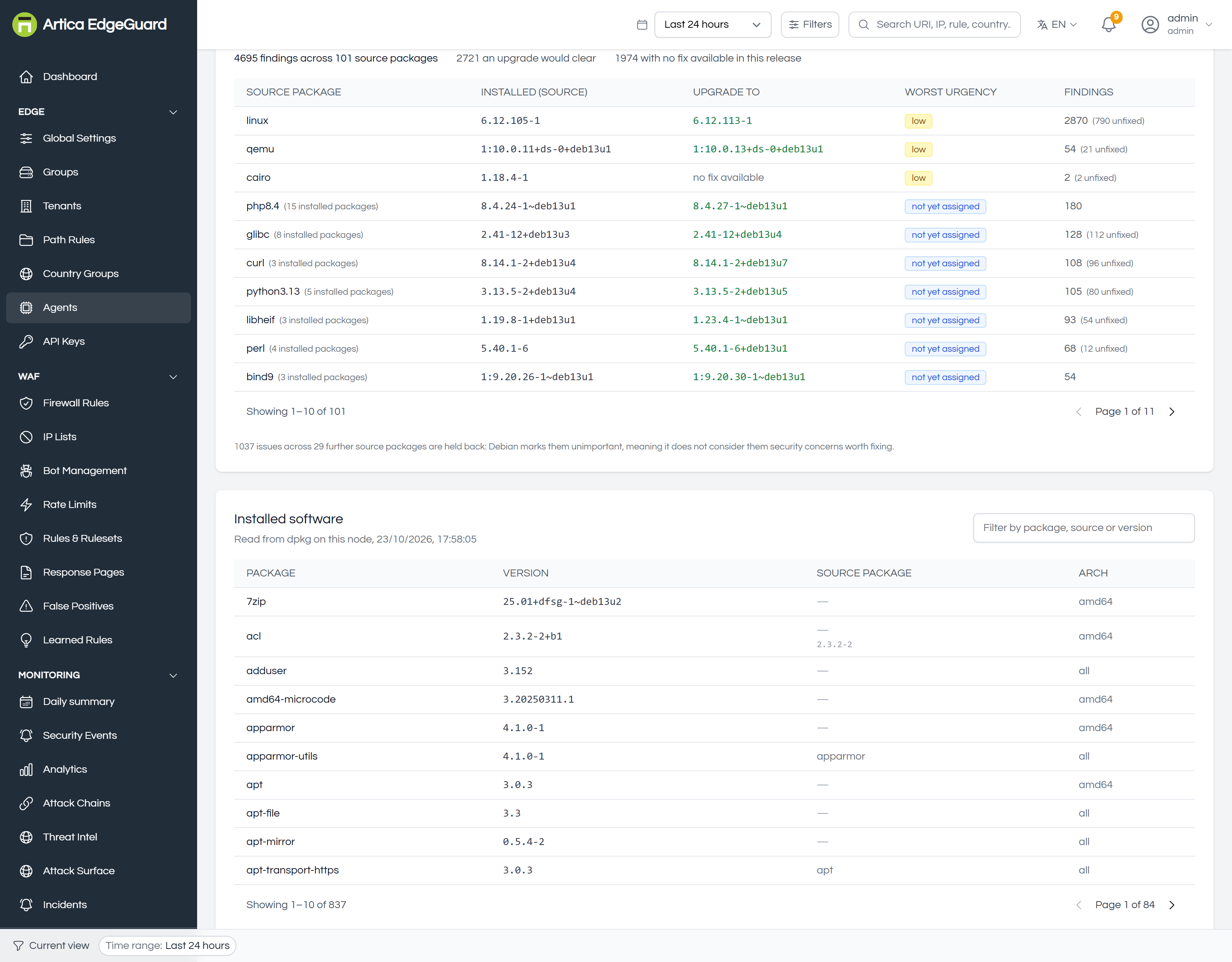
The agent reports its installed packages with its heartbeat, and the console correlates them against the Debian Security Tracker once a day. The result is grouped by source package, which is not cosmetic: a real pass over an ordinary Debian machine produces around 4,500 findings, most of them from the kernel. Grouped by source it is about a hundred rows, and each row is an action, because apt upgrades a source package and not a CVE.
Three numbers at the top divide a large list into the parts that mean different things:
| an upgrade would clear | the actionable list — one apt upgrade resolves these |
| no fix available in this release | Debian has published no fix. This is where a WAF rule is the only mitigation there is |
| held back as unimportant | Debian's own triage says these are not security concerns worth fixing. Shown with the checkbox above the table |
The Installed (source) column deserves a note. Security data names the version a fix landed in by source version, and a binary package built from that source frequently carries a different number. Comparing the binary's version against a source fix version is how a node reports hundreds of findings for issues patched years ago; the column shows what was actually compared.
An empty list is not a clean node. A node that was never correlated, or whose package database could not be read, says so where the findings would be. Treat the two as different facts, because only one of them lets anyone say "nothing vulnerable here".
¶ The commands
Available for one agent from its panel, or for the whole fleet from the buttons above the list:
| Command | What it does |
|---|---|
| Reload Config | fetch the configuration now instead of waiting for the next pull |
| Update | upgrade the engine to the published version |
| Update rulesets | fetch the current rule feed now |
| Update GeoIP | refresh the geolocation database |
| Check Engine Release | ask whether a newer engine has been published |
| Restart | restart the engine process |
| Edit | change the name and the sites it serves |
| Revoke | the agent stops being trusted |
| Delete | remove it from the console |
Revoke is not a pause. A revoked agent is told so on its next heartbeat, stops serving decisions and wipes its local cache — sites, settings, rules, lists, everything it had pulled. It is the right action for a machine that has left your control, and the wrong one for an agent you intend to bring back in an hour.
¶ Keeping a fleet consistent
- Versions. Compare the VERSION column across the list; an agent left behind will be missing fixes the others have. Use Check Engine Release, then Update All or one agent at a time.
- GeoIP dates. A stale database means country conditions and datacentre challenges judge on old data.
- Rule feed. The HEALTH column says when the feed last updated. An agent whose feed is a month old is running last month's detection.
- Queue depth. A queue that is not draining means events are not reaching the console — usually a network path, occasionally a console that is down.
¶ Verifying an agent
1. Is it talking? The list shows active and a recent Last Seen. If not, check that the agent can reach the console's address and that its key has not been revoked.
2. Is it enforcing what you think? Change something small — an IP list entry for a test address — wait 30 seconds, and make a request. The decision at the edge is the proof; the console alone only proves what was written down.
3. What is it running? The agent's own status endpoint answers locally:
curl -s http://127.0.0.1:8083/status | head -40
It reports the engine version, uptime, storage backend, the rule feed date and the slowest recent decisions — which is the first place to look when one site feels slower than the others.
¶ When an agent looks wrong
| Symptom | Where to look |
|---|---|
| Offline, but the site is protected | the agent is serving from its cache; check the network path to the console |
| Offline and the site is unprotected | check nginx and the engine process on that host |
| One site behaves differently | compare VERSION and GEOIP with the other agents |
| Configuration changes never arrive | Command History for failed pulls; the key may have been revoked |
| Events stop but traffic continues | queue depth in HEALTH; the event path is separate from the config path |