Advanced caching (also called Expert mode) gives each website its own dedicated on-disk cache inside the reverse-proxy, driven by your own rules.
Instead of a single global on/off switch, you decide how long content stays cached, which parts of the site must never be cached (administration areas, APIs, shopping carts), and which files should be cached harder by the visitor browser (images, style sheets, scripts).
Pages served from the cache are returned by the reverse-proxy itself: your backend server is never contacted, so the response is faster and the backend load drops.
¶ Benefits
- Less load on your backend.
Every cache hit is a request your application server never sees. A site serving thousands of identical pages per minute can end up sending only a handful of requests to the backend.
- Faster pages for your visitors.
A cached response is read from the local disk cache and returned immediately, without the network round-trip to the backend, the application runtime, or the database query behind it.
- Your site stays up when the backend fails.
With Serve stale content on backend error enabled, the reverse-proxy keeps answering with the last known good copy while the backend is down, timing out, or returning 5xx errors. Visitors see a working site instead of an error page.
- Per-site isolation.
Each website gets its own cache zone, its own directory and its own size limit. One busy site cannot evict the cached content of another.
- Surgical control.
Rules are evaluated per URL, so you can cache the public part of a site aggressively while guaranteeing that the administration area, the API or the checkout process is never cached.
- Safe by default.
OnlyGETandHEADrequests are eligible. Requests carrying anAuthorizationheader always bypass the cache, and a response that sets a cookie is never stored. The cache respects what your backend asks for unless you explicitly override it.
- Browser-side caching too.
Over-cache rules set theCache-Controlheader sent to the visitor, so static assets are kept by the browser and are not requested again at all.
¶ Use cases
| Situation | Recommended configuration |
|---|---|
| CMS / blog / institutional website (WordPress, Drupal, Joomla) | Time to live of 10 minutes to 1 hour. Exclude the administration area (/wp-admin, /administrator, /user) and the login page. Over-cache .jpg, .png, .css, .js for 12 to 24 hours. |
| E-commerce | Exclude everything personalised: /cart, /checkout, /account, /api. Over-cache product photographs and the front-end bundle. Keep the general time to live short so price and stock changes appear quickly. |
| Single-page application with a REST backend | Exclude /api (path mode) so data calls always reach the backend, and over-cache the static bundle (.js, .css, fonts, images) for 24 hours. |
| Documentation, marketing or landing pages | Content changes rarely: a time to live of several hours is safe and removes almost all backend traffic. |
| Slow, fragile or overloaded backend | Enable the cache with Serve stale content on backend error. Even a short time to live absorbs traffic spikes, and the stale copy keeps the site reachable during backend outages. |
| Site distributing large files | Exclude the heavy extensions (.iso, .zip, .tar.gz) in extension mode so a few huge downloads do not evict all your cached pages. |
| Site behind an unreliable network link | A longer time to live plus stale-on-error dramatically reduces how often the link is used. |
¶ Opening the Advanced caching panel
Open Web services, select the website you want to tune, select Optimization and click on Caching — Expert mode panel.
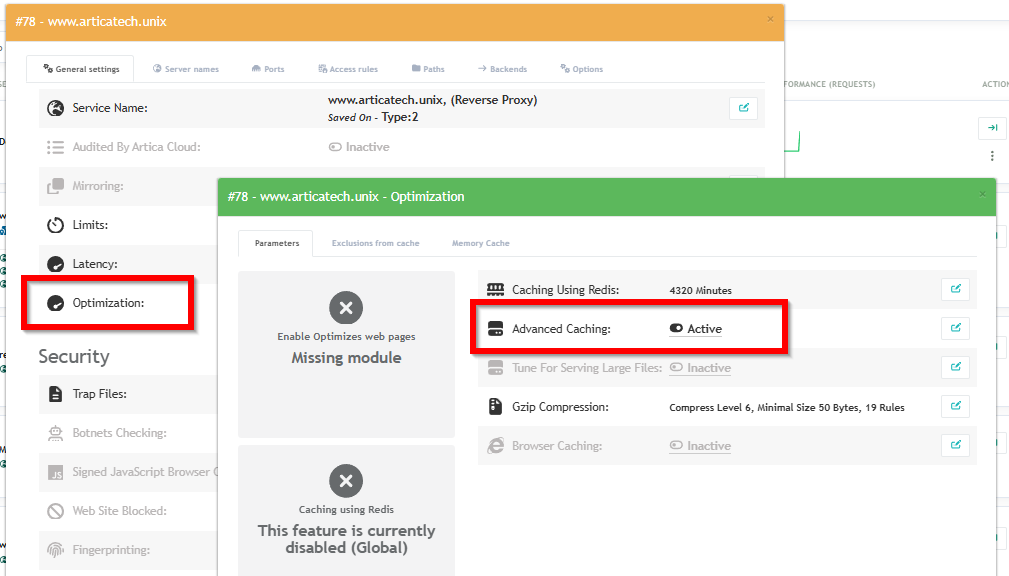
The panel is organised in three tabs: the general settings, the exclusions, and the over-cache rules.
¶ 1. General parameters

This tab controls the cache zone itself.
| Setting | Default | Description |
|---|---|---|
| Enable the feature | Disabled | Turns advanced caching on for this website. While it is disabled the rules of the two other tabs are stored but have no effect. |
| Time to live | 1 hour | How long a cached response stays valid before the reverse-proxy asks the backend for a fresh copy. Choose a value and its unit (seconds, minutes, hours, days). Error responses (404) are cached for 1 minute only, so a temporary mistake never sticks for hours. |
| Maximum cache size | 1 GB | Disk budget for this website. When the limit is reached the least recently used entries are removed automatically. |
| Inactive time before purge | 2 hours | An entry that is not requested during this period is deleted, even if its time to live has not expired. This keeps the cache filled with content people actually ask for. |
| Serve stale content on backend error | Enabled | If the backend is unreachable, times out, or answers 500/502/503/504, the last cached copy is served instead of an error page. This is the setting that keeps your site online during a backend outage. |
| Caches directory / Working directory | — | Read-only. Where this website stores its cache on disk. |
Click the edit icon on the Time to live row to set the value and its unit:

¶ 2. Exclusions — content that must never be cached

Use this tab for everything that is personalised, authenticated or sensitive.
- Click New item to add a rule:

| Field | Description |
|---|---|
| Mode |
|
| Pattern | The value to match, according to the selected mode. |
| Comment | Free text, shown under the pattern in the table. Use it to explain why the rule exists. |
| Enabled | A disabled rule is kept but ignored. Handy to test the impact of a rule without deleting it. |
In the table, click the Enabled label to switch a rule on or off, click the pattern to edit it, and use the red icon to delete it.
¶ 3. Over-cache — caching harder

Over-cache rules target files that almost never change — images, style sheets, scripts, fonts.
The browser then stops requesting them altogether, which removes traffic both from the reverse-proxy and from your backend.
The form is the same as for exclusions, with one extra field: the time to live in minutes applied to the matching files.

What over-cache does exactly. A matching request gets its
Cache-Controlheader rewritten topublic, max-age=<your TTL>before the response is sent to the visitor, so the browser keeps the file for that duration.On the server side the response is still stored according to the general Time to live of the site and to the cache headers returned by your backend: a response that the backend marks as
no-store,private, or that sets a cookie, is not stored by the reverse-proxy. Over-cache never overrides that decision.
¶ What is never cached
Independently of your rules, the reverse-proxy refuses to serve or store a cached response in the following cases. These guards exist to protect personalised content:
- The request is not a
GETor aHEAD(a form submission, an upload, a deletion, …). - The request carries an
Authorizationheader. A shared cache must never reuse a response that was built for one authenticated user, and the cache key does not include the identity of the visitor. - The response sets a cookie, or the backend marks it as
no-storeorprivate. - The URL matches one of your exclusion rules.
- The request carries
?purge=1(see below).
Important. Cached content is shared between all visitors of the website. Session cookies and the
Authorizationheader are handled automatically, but an application that personalises a page using another mechanism — a custom header, a query parameter, the client IP address — must have those URLs added to the Exclusions tab. When in doubt, exclude first and measure afterwards.
¶ Testing and troubleshooting
- Bypass the cache for one request.
Add?purge=1to the URL: the request is forced to the backend and its answer is not stored. Useful to compare a cached page with a fresh one.
- Check that a page is cached.
Request the same URL twice and compare the response time; a cache hit is answered by the reverse-proxy and is typically an order of magnitude faster.
- Check the browser TTL of an over-cached file.
Look at theCache-Controlheader of the response: it must showpublic, max-age=followed by your rule TTL expressed in seconds (a 60-minute rule givesmax-age=3600).
- A page is cached and should not be.
Add an exclusion rule in Path mode. Remember that a rule applies to the beginning of the URL, so/accountcovers the whole personalised area.
- Nothing seems cached.
Verify that the feature is enabled in the first tab, that the URL does not match an exclusion rule, and that your backend does not returnCache-Control: no-storeor a cookie on every response.
- Reclaim disk space.
Lower the maximum cache size or the inactive time; entries are removed automatically.
¶ Good to know
- Every change made in this panel rebuilds the configuration of the website and reloads the reverse-proxy.
The operation is transparent for the visitors: established connections are not interrupted.
- Disabling the feature removes the cache directory of the website and its generated files.
- The rules belong to the website: duplicating a site does not copy them, and they are included in the configuration backups.
- Cache entries are stored per
scheme,host, URL and query string:http://andhttps://, and two different domains of the same site, never share an entry.