« Back to The eCAP connector antivirus
The integrated antivirus scans the files your users download through the proxy.
Now and then it blocks a file that is safe.
The antivirus exclusions list tells the proxy which traffic to deliver without a scan.
It is in Your Proxy > Antivirus Proxy, tab Antivirus exclusions.
¶ Benefits
- A false positive is fixed in a few minutes.
Users do not wait for the signature vendor to correct its database. - You exclude one domain, one server or one computer.
Everything else is still scanned. - Large downloads from your own update servers or business applications reach users without the scanning delay.
- Each exclusion has a description and a date.
Additions, changes and deletions go to the administrator audit trail. - Applying the list reloads the proxy configuration.
Downloads in progress keep running.
¶ How it works
The antivirus runs inside the proxy, through the eCAP adapter.
Before the proxy hands a response to the adapter, it checks a short list of rules.
If one matches, the response goes to the user unscanned.
The proxy skips the antivirus for:
- Windows Update traffic.
- Sites in the proxy global whitelist.
- The entries of the antivirus exclusions list.
- The content types skipped in the antivirus parameters, such as images, videos and text.
- Two built-in domains used for system and signature updates:
debian.organdclamav.artica.center.
The global whitelist also bypasses the other proxy controls.
When you only want to stop the antivirus scan, use the antivirus exclusions list.
¶ Example: a false positive from an unofficial signature
Users report that they cannot download the October newsletter of a supplier.
The PDF file is on files.contoso.com.
The proxy answers with the antivirus block page.
¶ 1. Check the detection
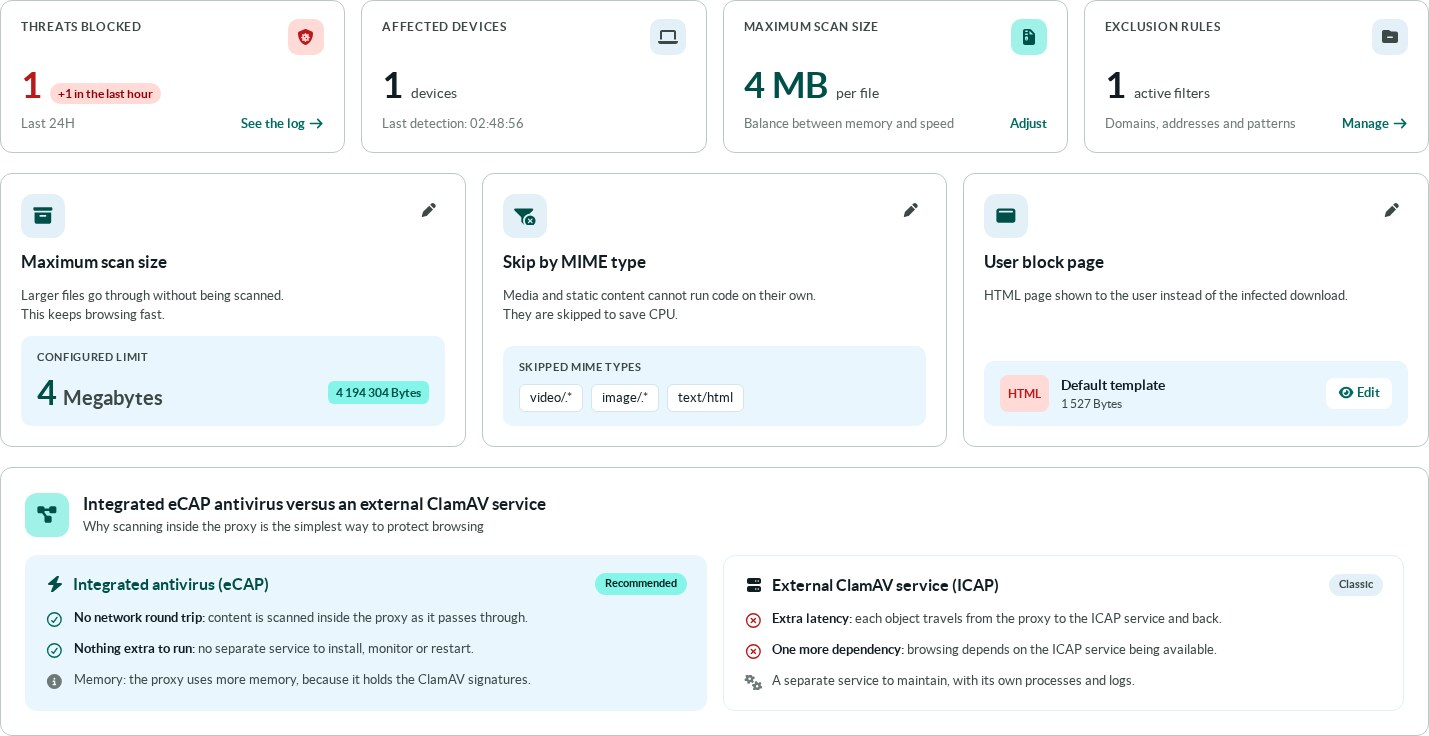
The Parameters tab counts the threats blocked in the last 24 hours and the devices concerned.
Click See the log, or open the Events tab.
The Events tab lists each detection with the signature name, the date, the URL and the client address.
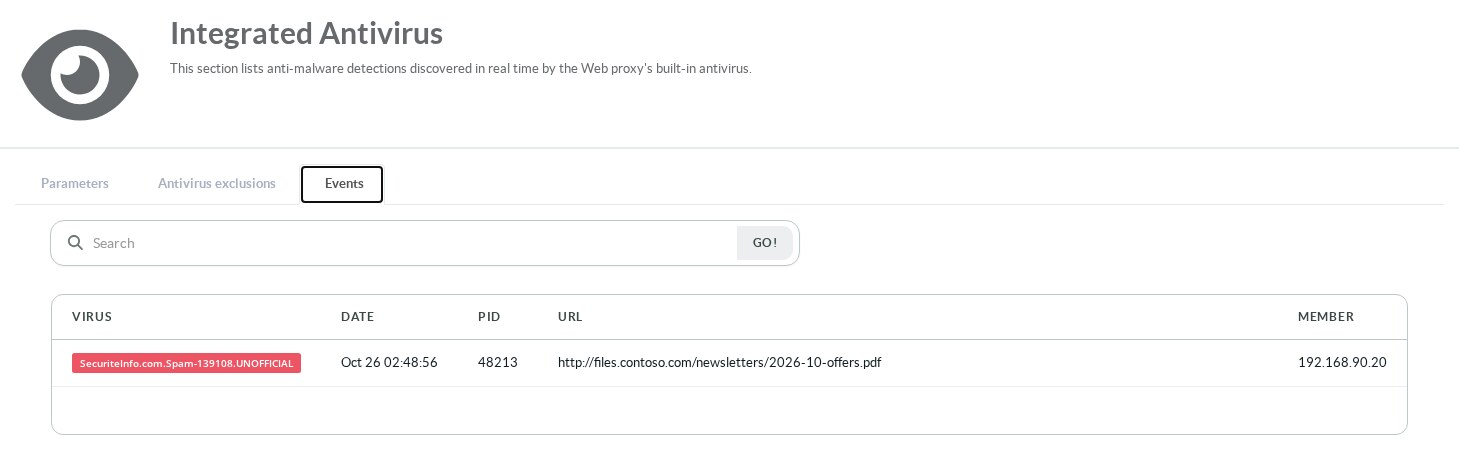
ClamAV adds the .UNOFFICIAL suffix to every signature that does not come from the official ClamAV databases.
This one comes from the SecuriteInfo third-party database.
Third-party databases often catch more spam and phishing.
They also raise more false positives.
Confirm that the file is safe before you exclude anything.
Ask the supplier, or check the file with another engine.
¶ 2. Open the exclusions list
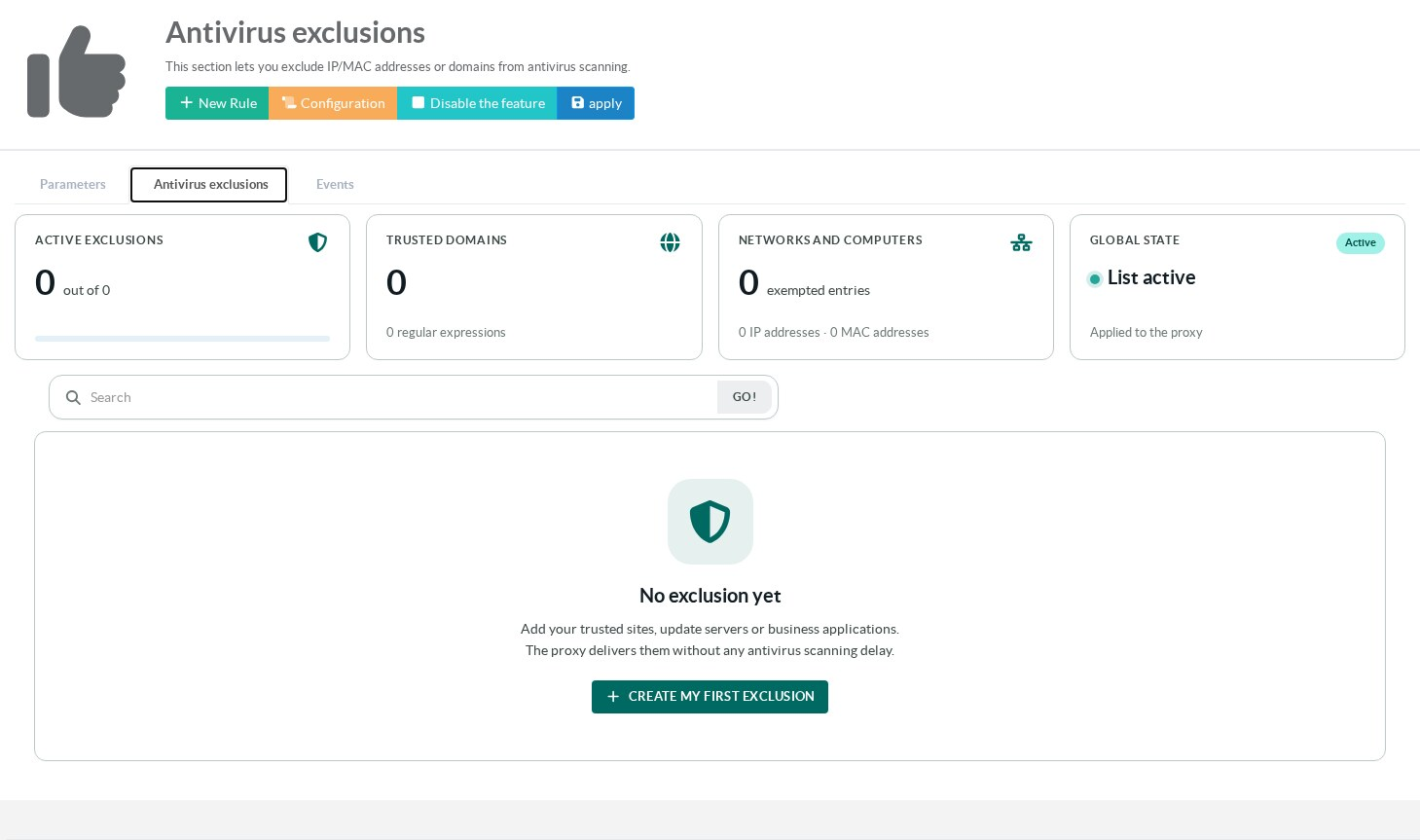
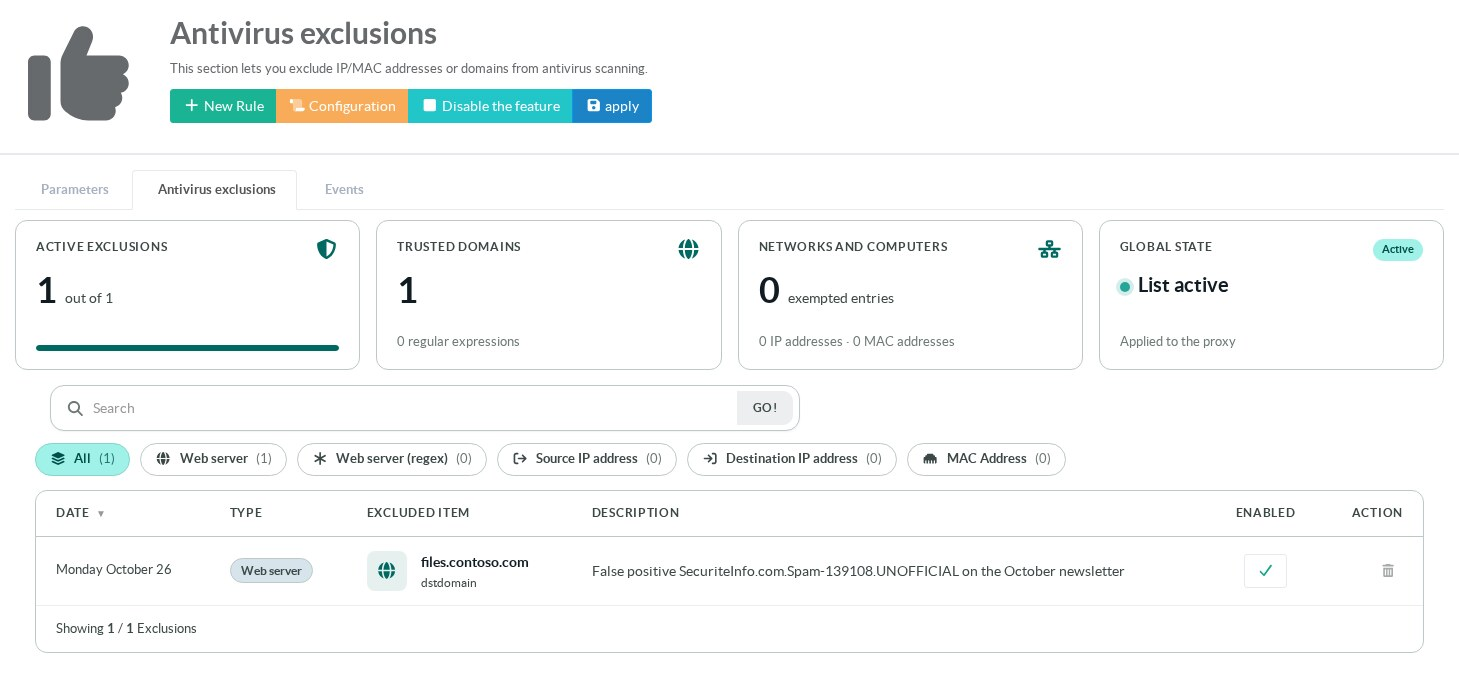
Open the Antivirus exclusions tab.
The cards at the top count the active exclusions, the trusted domains and the excluded networks and computers.
The Global state card shows whether the list is applied.
¶ 3. Add the exclusion
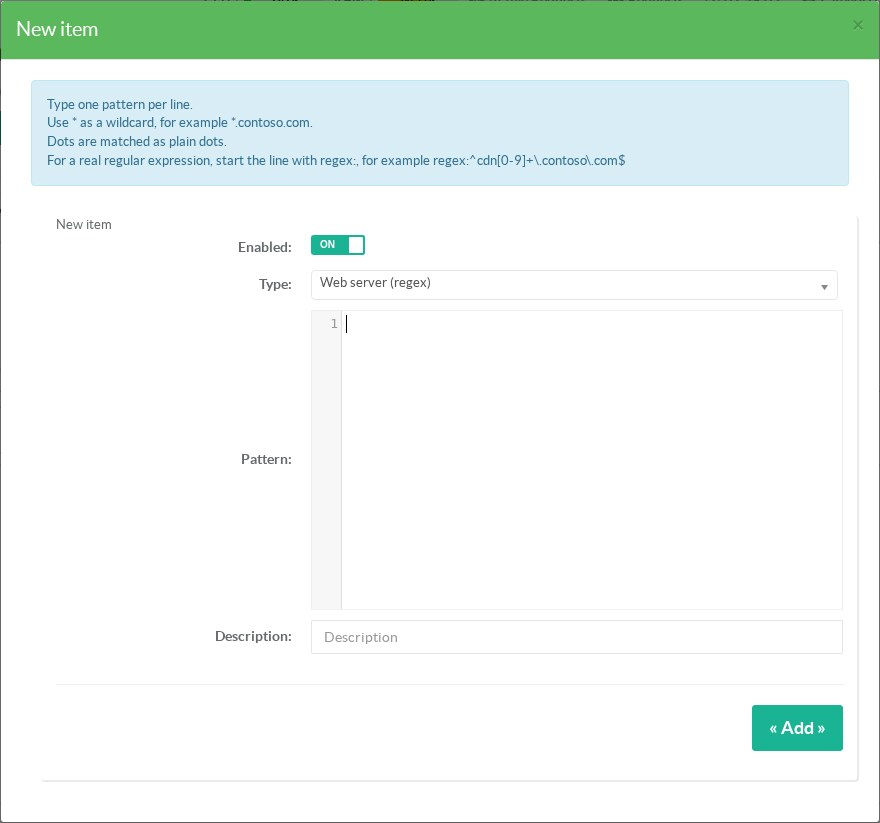
Click New Rule.
In Type, choose Web server.
The help above the form changes with the type and says what to enter.
Enter files.contoso.com in Pattern.
Exclude the host that serves the file, not the whole company domain.
Put the reason and the signature name in Description.
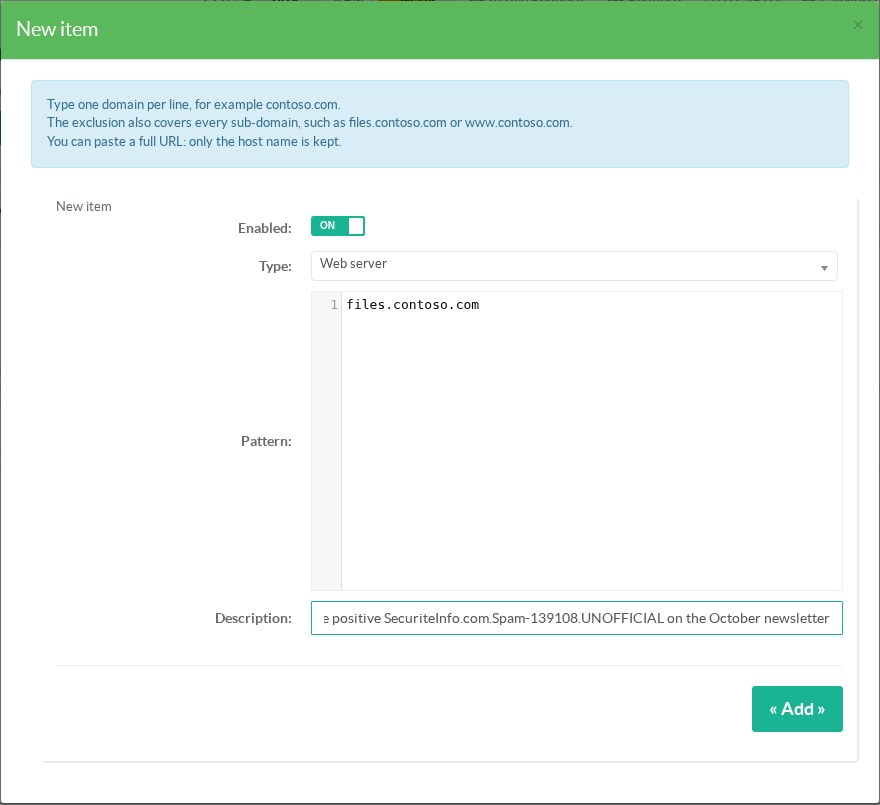
Sub-domains are covered too.
Click Add.
The exclusion appears in the list, enabled.
¶ 4. Apply
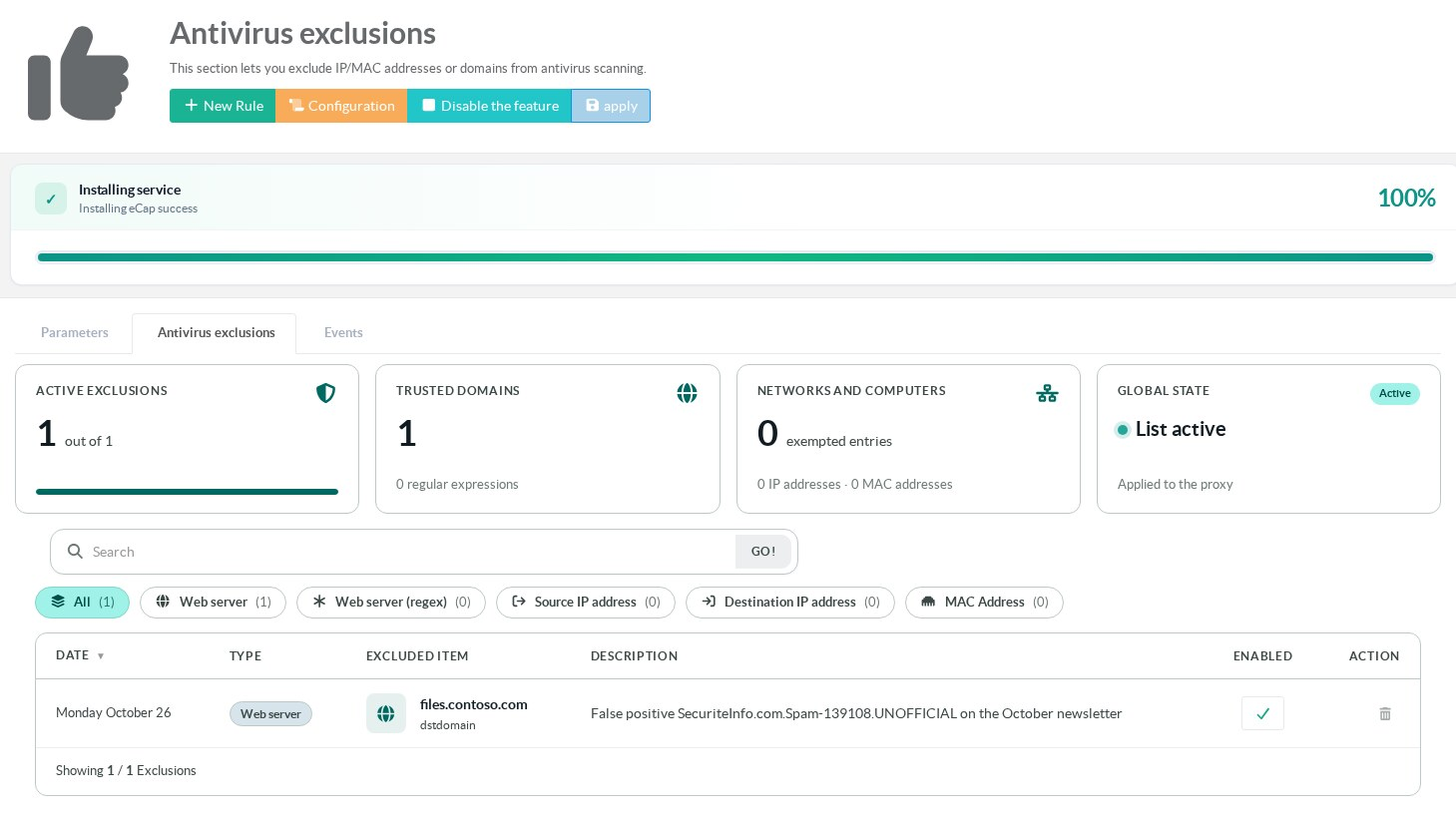
Click apply.
The proxy writes the exclusion files and reloads its configuration.
The exclusion is active when the progress bar reaches 100 %.
Ask the user to download the newsletter again.
No new line appears in the Events tab.
A change in the Parameters tab works differently.
The antivirus reads the scan size, the skipped types and the block page only when it starts.
Applying one of these settings therefore restarts the proxy service.
Older builds restart the proxy service when you click apply.
Downloads in progress are then interrupted.
Apply during a quiet period.
On those builds, Disable the feature does not suspend the antivirus exclusions either.
¶ Exclusion types
| Type | What to enter | Example | Notes |
|---|---|---|---|
| Web server | One domain per line. | contoso.com |
Every sub-domain is covered, www included.A full URL is accepted: only the host name is kept. |
| Web server (regex) | One pattern per line. | *.contoso.com |
* is a wildcard.Dots are matched as plain dots. For a real regular expression, start the line with regex:, for example regex:^cdn[0-9]+\.contoso\.com$. |
| Source IP address | One client address per line. | 192.168.1.0/24 |
A single IP, a network or a range such as 192.168.1.20-192.168.1.40.Nothing these computers download is scanned. |
| Destination IP address | One server address per line. | 203.0.113.10 |
For a server reached by its IP address, or a whole hosting network. An IP address entered with a domain type is handled as a destination address. |
| MAC Address | One MAC address per line. | 00:50:56:a1:b2:c3 |
The proxy only sees the MAC address of computers on its own network segment. Behind a router, use the source IP address. |
You can paste several lines at once.
Each line becomes a separate exclusion with the same type and description.
The form skips a line that is not a valid IP address, network or MAC address for the chosen type.
¶ Manage the list
- The check in the Enabled column turns an exclusion on or off.
A disabled entry stays in the list for later use. - The trash icon deletes an exclusion.
- The buttons above the table filter by type.
The search field looks in patterns and descriptions. - Configuration shows the files generated for the proxy at the last apply.
- Disable the feature suspends the proxy whitelists.
All antivirus exclusions are then ignored and everything is scanned, except the two built-in update domains.
The same switch also governs the proxy global whitelist.
Every change needs a click on apply.
¶ Good practice
- Exclude the smallest item that solves the problem: a host rather than a domain, a domain rather than a client network.
- Do not exclude a client network to work around one false positive.
- Put the signature name and the date in the description.
- Remove the exclusion once the vendor has fixed its signature.
- Report the false positive to the vendor of the signature.
For a SecuriteInfo signature, that is SecuriteInfo, not ClamAV.
¶ Troubleshooting
| Symptom | What to check |
|---|---|
| The file is still blocked after you added the exclusion. | Click apply and wait for 100 %. Check that the entry is enabled and that the Global state card says List active. |
| The domain looks right but does not match. | The file may come from another host, such as a CDN. Read the exact URL in the Events tab and exclude that host. |
| A MAC address exclusion has no effect. | The computer is behind a router. Use its IP address. |
| A Web server (regex) pattern matches nothing. | Dots, parentheses and question marks are taken literally. Start the line with regex: to write a real regular expression. |